

.svg)
.svg)
.svg)
.svg)
.svg)
.svg)
.svg)
.svg)
.svg)
.svg)
.svg)
.svg)
.svg)
.svg)
.svg)
.svg)
.svg)

.svg)
.svg)
.svg)

.svg)

.svg)
.svg)
.svg)
.svg)
.svg)


.svg)
.svg)
.svg)
.svg)
.svg)
.svg)
.svg)






%20(1).png)
Table of contents
Table of contents
.svg)
Many nonprofits have dealt with mismatched fonts, last-minute graphics, or inconsistent designs. With the right tools, though, your emails, fundraising pages, and social posts can look as strong as the impact you’re working toward.
That’s where Canva comes in. Canva Pro gives eligible nonprofits everything they need to design on brand, tell their story clearly, and show up with confidence across every campaign.
In this guide, we’ll help you go from a blank canvas to a bold, recognizable brand. You’ll learn how to unlock your free Canva Pro account, build a brand kit, and use Canva’s best features to create designs that inspire action, spark generosity, and bring your mission to life.
Key takeaways
- Branding builds donor trust 🙌 Professional, consistent branding helps establish credibility and increases donor engagement.
- Eligible nonprofits get Canva Pro for free 🎨 Canva Pro offers advanced design tools and is completely free for eligible nonprofits.
- Build a brand kit 💼 With Canva Pro, nonprofits can store and apply brand fonts, colors, and other design elements across all materials.
- Save time with customizable templates ⏰ Canva’s extensive template library helps you create high-quality designs quickly, with no design experience required.
- Create standout marketing materials 👀 From social media graphics to annual reports, Canva has all the tools you need to get your visuals noticed.
- Connect Canva with your fundraising platform 🧈 Integrate Canva with a platform like Givebutter to customize your giving page, emails, and campaign updates.
What nonprofits get with Canva
Canva is an easy-to-use design tool that helps nonprofits create professional-looking marketing materials. You can access advanced features like:
- Brand kits 🎨 Save templates, color palettes, and fonts to keep your branding consistent and your design process efficient.
- Marketing materials 📣 Create flyers, brochures, posters, and more in just a few clicks.
- Supporter gifts 🎁 Show some love with branded t-shirts, mugs, stickers, and totes.
- Social media graphics 📸 Make social media a breeze with design tools and templates for Instagram, Facebook, X, and more.
🤔 Did you know? Most nonprofits believe a strong brand identity plays a vital role in securing donors. In fact, 93% say brand identity has a positive impact on engagement.
Is Canva free for nonprofits?
Canva Pro is available at no cost for eligible organizations. Anyone can use Canva’s free plan, which includes basic templates, photos, and design tools. Canva Pro typically costs $15 per month and unlocks access to premium features, including advanced editing tools, more templates, and team collaboration.
Canva nonprofit eligibility
The following organizations are eligible for a free Canva Pro account:
- Registered nonprofits or 501(c)(3) organizations in the U.S. ✅
- Non-governmental organizations ✅
💡 Pro tip: Canva bases eligibility on your mission and the documentation you provide, not just your tax status. Review Canva's nonprofit eligibility guidelines before applying.
How to apply for Canva for nonprofits
Start by visiting the Canva for nonprofits page and selecting Apply. You’ll need to provide your organization’s name, website, and proof of 501(c)(3) status for U.S.-based organizations.
After submitting your application and supporting documentation, you’ll receive an email from Canva directly verifying your application success or requesting more information. Usually, this process takes about 7–10 days.
How to use Canva for nonprofits (10 expert tips)
Once you understand what’s possible with Canva, it’s easy to create professional marketing materials and spread the word about your mission.
Use the Canva tips below to get the most from your Pro account.
1. Build your brand kit 🎨
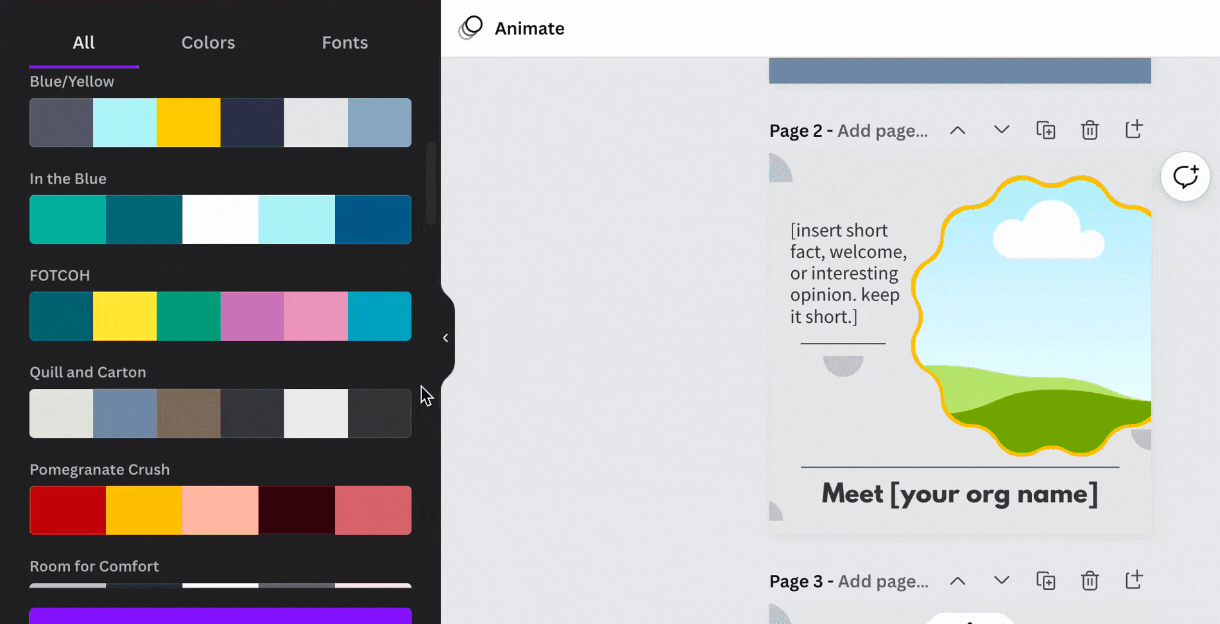
Keep your content on-brand and consistent across all channels with Canva’s brand kit.
Get started with these essentials:
- Choose your colors 🗺️ Create a custom palette using your organization’s brand colors. You can even pull colors directly from an image.
- Set your fonts 🖊️ Select fonts from Canva's library or upload your own.
- Add your albums 🖼️ Connect Dropbox or Google Drive to access your photos in one place.
- Pick your brand elements ⭐ Choose from a wide range of graphics, images, and visual elements to make your branding stand out.
2. Customize unlimited premium templates ⚡
If you want professional-looking marketing assets without a significant time investment or graphic design skills, Canva’s template library has you covered.
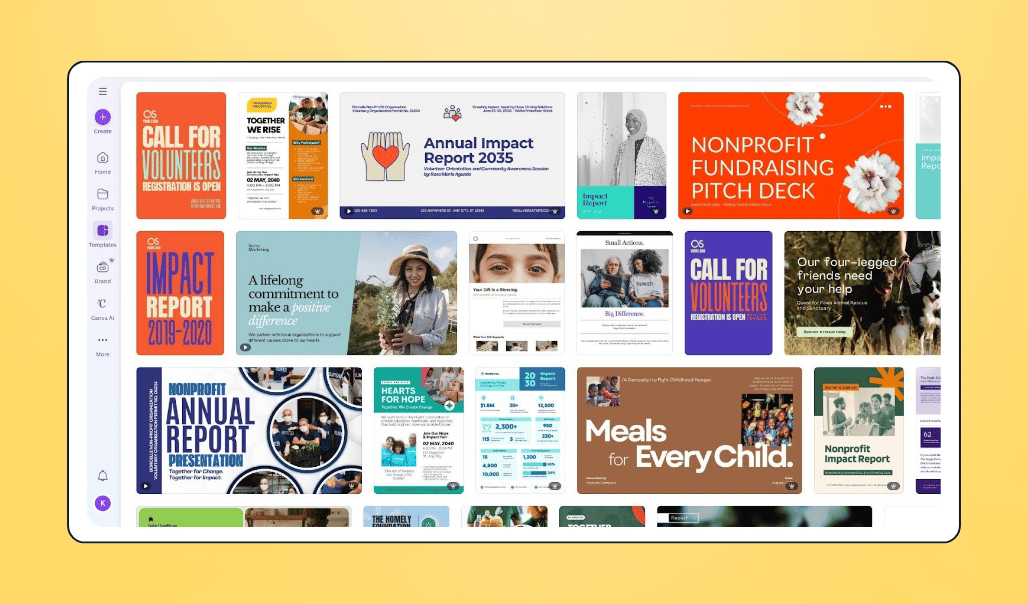
With Canva’s templates, you can:
- Save time ⏰ Instead of starting from scratch, choose from Canva’s vast assortment of ready-made templates.
- Create on-brand content 🎨 Customize content with your saved fonts, brand colors, logos, and images for consistent visuals.
- Put your best foot forward ✨ Create polished, visually appealing marketing materials without any design experience.
💡 Pro tip: Make each template your own by adding your brand elements like colors, graphics, and fonts. Keep these elements consistent across templates to reinforce your visual identity.
3. Integrate with your fundraising platform 🧈
Once your brand kit is in place, connect Canva directly to your fundraising platform. This ensures your marketing materials, donor communications, and campaign visuals have a consistent look, and you won’t need to toggle between tools.
💡 Pro tip: Like Canva, Givebutter is easy to set up and offers a range of highly rated features. Plus, with the Givebutter Guarantee, every nonprofit that enables donor tips can use Givebutter’s core donor management, marketing, and fundraising tools for free.

Create eye-catching campaigns with Givebutter & Canva
4. Create beautiful campaign pages 📌
With Canva Pro’s Givebutter integration, you can design engaging, brand-aligned giving pages that convert visitors into recurring supporters. Ideal for newer organizations or nonprofit teams without the resources to create their own website.
Use Canva and Givebutter together to add visual elements like:
- Images
- GIFs
- Videos
- Custom website or landing page layouts
🤔 Did you know? According to marketers, video is one of the most effective fundraising tools. In fact, 72% of donors say they’re very likely to give after watching a video.
5. Launch a social media campaign that gets you noticed 👯
If you want to leverage social media to hit your fundraising goal, take advantage of Canva Pro’s thousands of Facebook, Instagram, Twitter, and YouTube templates. Just follow these steps:
- Customize templates 👩🎨 Choose templates that fit your campaign type, then tailor them to match your branding and message.
- Export 🚀 With Canva Pro, you can export designs as JPEGs, PNGs, MP4s, GIFs, and more.
- Share with your supporters 👐 Publish across channels like Facebook, LinkedIn, Instagram, and more to spread the word and build momentum for your campaign.
💡 Pro tip: Canva’s background removal tool helps you create eye-catching, shareable social media graphics and photo collages that highlight your mission and stand out in supporters' feeds.

6. Share updates with your supporters 📣
Beyond social media, Canva is a powerful tool for strengthening donor communications. Clear, well-designed updates are key to donor stewardship and help supporters stay connected to your mission over time.
Here are three ways Canva Pro can elevate your donor communications:
- Newsletter graphics 💌 Create eye-catching visuals and export them as PNGs, JPEGs, or GIFs to include in your nonprofit newsletter.
- Impact reports 📊 Use Canva’s report templates to create a customized impact report that shows supporters how their gifts are making a difference.
- Direct mail 📬 From greeting cards to letterheads and more, you can design customized direct mail and get it printed through Canva Pro.
💡 Pro tip: With the Givebutter Canva integration, you can create eye-catching campaign updates and publish them directly to your supporter feed. From there, you can share the same message as an email with just one click.

7. Promote an on-brand fundraising event 💃
Canva makes it easier than ever to promote fundraising events that showcase your brand. Thoughtful design elevates your event and keeps your mission front and center.
With Canva Pro, you can:
- Design flyers 💌 Advertise your event with on-brand flyers featuring event details, photos, and graphics.
- Add QR codes 🤖 Include QR codes on your promotional materials to link to your event registration, ticket sales, or additional event information.
- Create branded merchandise 🧢 Customize hats, t-shirts, bookmarks, totes, mugs, and more to sell or share at your event.
💡 Pro tip: If you need a design in multiple sizes, Canva Pro’s Magic Resize tool helps you quickly duplicate your document or graphic into other formats in just a few clicks.
8. Get creative with donor appreciation 👐
Canva makes it easy to design t-shirts, mugs, bookmarks, tote bags, photo books, and more. You can use these items as meaningful donor appreciation gifts or sell branded merch as a fundraiser.
💡 Pro tip: With Canva Print, you can get customized merchandise printed and shipped directly to you at affordable prices. For example, a t-shirt through Canva is typically around $20.
9. Craft engaging emails ✉️
Boost donations and ticket sales by pairing Canva-designed emails with Givebutter’s built-in email marketing software. Putting a little extra effort into crafting thoughtful emails can really pay off. In fact, 33% of donors say email is the tool that inspires them to give the most.
💡 Pro tip: With Givebutter Plus, you can add drag-and-drop elements like donation buttons directly into your fundraising emails. You’ll also get access to a library of eye-catching email templates.
10. Let loose with GIFs 🤪
GIFs are a great way to catch your supporters’ attention on social media, in your newsletter, or when celebrating a special occasion.
Here are a few ways Canva Pro makes incorporating GIFs into your marketing strategy easier than ever:
- Customize GIFs 🎨 Upload existing GIFs to Canva and personalize them with your brand colors, text, and graphics.
- Animate images 🌠 Use Canva’s design elements (or upload your own) and export as a GIF to create moving pictures.
- Create GIFs from scratch 🖌️ Design multiple frames using Canva pages, then export your project as a GIF to create an eye-catching animation you can share across channels.
💡 Pro tip: Keep GIFs relevant and aligned with your brand voice so they enhance your message without distracting from it.
Turn designs into donations with Canva & Givebutter
Canva Pro gives eligible nonprofits access to powerful design tools for free, including brand kits, premium templates, and easy collaboration. When your designs are ready to go live, Givebutter helps you put them to work.
By connecting Canva with Givebutter, you can turn your visual content into action. Add your designs directly to fundraising pages, emails, and campaign updates to create compelling marketing materials that inspire supporters to give.
Create your free Givebutter account and launch your next campaign with Canva-powered visuals today. 💛
FAQs about Canva for nonprofits
How to get Canva free for nonprofits?
Canva Pro is free for qualifying nonprofits. To apply for a Canva nonprofit account, you’ll need to share basic information about your organization, including tax information and your website.
For nonprofit organizations that don’t qualify, Canva Pro typically costs around $15 per month.
How many Canva seats do nonprofits get?
Canva for nonprofits includes access for up to 50 users per organization. This allows multiple team members to collaborate and create designs using your brand kit.
How long does nonprofit Canva account approval take?
Approval usually takes 7–10 days. Canva will email you to confirm whether your application was approved. If you haven’t provided enough documentation, you may be rejected or asked for additional information, which can delay the process.
Are churches and community groups eligible for Canva for nonprofits?
Churches and community groups may be eligible if they are registered 501(c)(3)s and demonstrate a clear public benefit mission. Commercial or political organizations are not eligible.
What if my Canva application is denied?
In many cases, applications are denied due to incomplete forms rather than ineligibility. You can follow up with Canva or its third-party verifier, Goodstack, and submit additional documentation such as IRS statements, website information, or organization bylaws.

Share this article


Subscribe
150K+ changemakers already subscribed








.svg)
.svg)


%201.webp)