

.svg)
.svg)
.svg)
.svg)
.svg)
.svg)
.svg)
.svg)
.svg)


.svg)
.svg)
.svg)
.svg)
.svg)
.svg)
.svg)
.svg)

.svg)
.svg)
.svg)

.svg)

.svg)
.svg)
.svg)
.svg)
.svg)


.svg)
.svg)
.svg)
.svg)
.svg)
.svg)
.svg)





.svg)






Your donor list shows names and gift totals, but not always how your giving base is distributed or where to focus stewardship. A donor pyramid groups supporters by giving level, so you can see where revenue is concentrated and plan cultivation around it.
This guide explains how to build a donor pyramid, use it to guide your fundraising, and get started with a free, customizable template.
Key takeaways
- Use the donor pyramid for donor cultivation 👐 It’s a strategic tool to upgrade donors and keep them giving to your nonprofit.
- Base your tiers on your own data 📊 Start with an export of your giving data and build your pyramid around natural clusters.
- Start with four or five tiers 🥞 If you’re a small to mid-size nonprofit, divide your pyramid into four or five tiers. You can always add more later.
- Map your donors 🗺️ Assign each donor to a pyramid tier based on their giving history.
- Flag candidates for upgrade 🌟 Donors who are nearing the top of one tier are prime candidates for the next level.
- Build an engagement plan for each tier 💛 Plan the communication strategies and channels you’ll use to cultivate donors at each stage of the pyramid.
- Make it easier with the right tools 🧈 Givebutter’s detailed contact profiles keep donor data in one place, while Givebutter’s AI tools help you find patterns and connections across that data.
What is a donor pyramid?
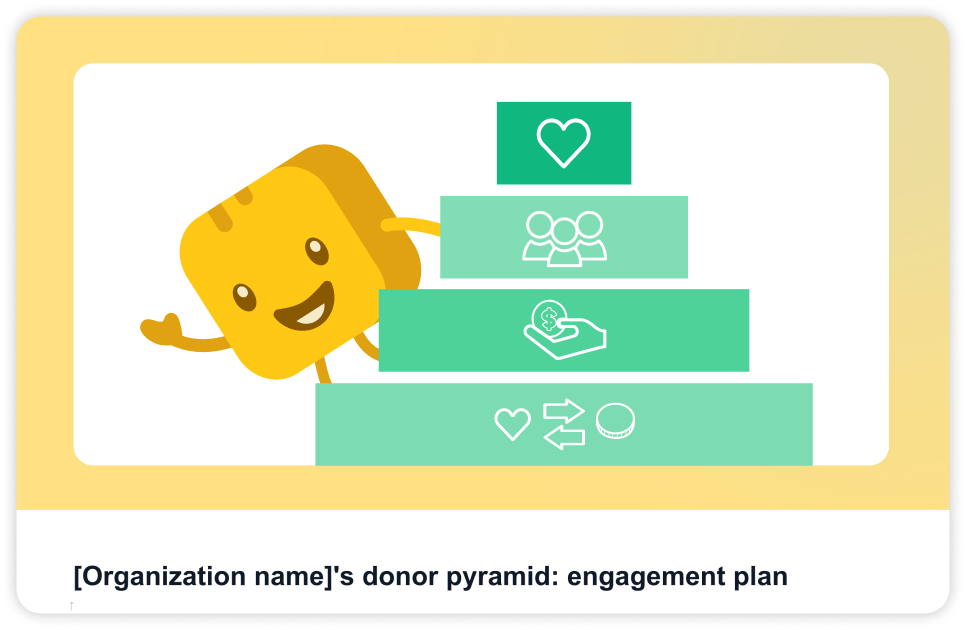
A donor pyramid (also called a fundraising donor pyramid or pyramid of giving) is a tool nonprofits use to break down their donor base by giving level. This helps them tailor communications and fundraising asks to match giving capacity.
The top level of your donor pyramid represents your major donors. The bottom level of the pyramid is the largest and contains your lower-level givers. Beyond visualizing your donor database, the donor pyramid tells you where to channel your energy and resources, and how many donors you need to upgrade to reach a certain fundraising goal.

Why nonprofits use donor pyramids
Donor pyramids are a blueprint for relationship building that can make your fundraising more efficient and targeted.
Here are some of the key reasons nonprofits use donor pyramids:
- Tailored outreach 👐 Make specific asks based on your donors’ giving history and capacity.
- Targeted stewardship 💛 Focus your donor stewardship efforts on those most likely to upgrade.
- Higher fundraising efficiency 💰 Funnel nonprofit resources into areas most likely to make an impact.
- Set fundraising goals 🎯 Pair your pyramid with an annual fund gift range chart to map out realistic giving goals based on your candidates for donor upgrade.
- Plan capital campaigns 💸 During the quiet phase of a capital campaign, nonprofits aim to secure most of their fundraising goal from their top donors. The donor pyramid helps identify these donors.
The levels of a donor pyramid
The number of pyramid tiers varies by organization size, with larger organizations usually featuring more tiers. Base your pyramid on your nonprofit’s data and see where groups and clusters emerge naturally.
Consider starting with these tiers:
How to build a donor pyramid for your nonprofit
Follow these four steps to turn your data into an actionable cultivation strategy.
Step 1: Pull your donor data 💻
Build your donor pyramid based on your own data—not general nonprofit benchmarks or averages. Start with a data export of your giving history filtered by donation amount. This makes it easier to view giving patterns and group your donors.
Givebutter ties every gift and ticket purchase to a contact profile, so your giving history is already in one place. With Givebutter Plus, ready-made reports pull that history into one view.
💡 Pro tip: Consolidate your donor history and build a more complete donor pyramid with Givebutter. It’s the all-in-one fundraising, CRM, and fundraising events management platform that tracks every donation as you go.
Step 2: Define your giving tiers 🤔
Review your data by average gift size, looking for donation clusters and break points. They don’t have to be round numbers. Identify repeated donation amounts and similar giving frequencies to guide your tiers.
If you’re a small or medium-sized nonprofit, start with just four to five tiers. This makes the next steps easier to manage, and you can add in more tiers as your nonprofit grows.
💡 Pro tip: Use Givebutter’s AI connectors to ask your LLM to identify potential giving tiers you might have missed.
🎬 See it in action: A nonprofit pulls its data and views multiple $20, $60, $200, and $1K donations. Using these common donation amounts as anchors, they set their four giving pyramid tiers at $1–$40, $41–$150, $151–$500, and $501+.
Step 3: Map donors to tiers and spot upgrade candidates 🗺️
Once you’ve defined your donor pyramid tiers, assign donors to a tier based on their giving history. Flag supporters near the top of their tier as upgrade candidates.
💡 Pro tip: Givebutter Magic makes it easy to spot giving patterns you might have missed, so you won’t have to spend hours analyzing to build a donor pyramid that works for your nonprofit. Givebutter’s contact profiles also help you better understand your donors.
🎬 See it in action: The same nonprofit notices multiple $150 donations. Each $150 donation is flagged as an upgrade candidate for the next tier: $151–$500.
Step 4: Build your engagement plan by tier 💛
Map out an engagement plan for every tier in your donor pyramid. This is when your donor pyramid goes from a visualization tool to an actionable fundraising strategy.
This approach helps you make asks that match donors’ giving capacity, use the communication channels that resonate most, and focus resources on those most likely to upgrade.
Here’s how your engagement strategy might look:
💡 Pro tip: Use your pyramid to determine how many donors you need from each tier to reach a specific fundraising goal. Imagine you’re running a capital campaign and your goal is $100K—if the top tier should cover 50% ($50K) and the average top-tier gift is $5K, you’ll need about 10 donations.
Download your free donor pyramid template
We’ve made it easy to build your own donor pyramid with a free, customizable template (no donor pyramid generator needed) that includes a prebuilt tier structure and an engagement plan for each tier.
Customize the pyramid with your own data to visualize your donor database. Then, transform your pyramid into an actionable fundraising strategy by adding in your communication channels and next steps for each tier.
Build your donor pyramid with Givebutter
With the donor pyramid, nonprofits can turn reactive fundraising into strategic donor cultivation. Perfectly organized data isn’t required. What matters is making the data you do have work harder for your nonprofit.
With Givebutter Magic and detailed donor profiles, you can easily identify patterns in your donor base to set the foundation of your donor pyramid. Then, you can execute your engagement strategy with email campaigns, event planning tools, fundraising reports, and more.

Organize donor data with Givebutter’s CRM
Sign up for your free Givebutter account today and start building your donor pyramid.
FAQs about the donor pyramid
How do I use a donor pyramid for a capital campaign?
The pyramid shows you where to channel your energy and resources, along with the average donation amount you should aim for from each major donor to hit your goal. For a capital campaign, use it to identify your top-level donors and determine your fundraising goal for that tier.
What’s the difference between a donor pyramid & a gift range chart?
The donor pyramid is a strategic tool for cultivating donors and fundraising more efficiently. Like a donor pyramid, a gift range chart breaks down your support base into giving tiers, but its main purpose is to help you determine how many donors you need from each giving tier to help you hit a particular fundraising goal.
Share this article







.svg)
.svg)


