










Cybersecurity probably isn’t the first thing that comes to mind when you think about running a nonprofit. But nonprofits handle the kind of information cybercriminals love to target, including donor details, payment data, employee records, and login credentials.
Fortunately, protecting that information doesn’t require an enterprise-sized security budget. Below, you’ll find the cyber threats nonprofits face, the practical steps you can take to reduce your risk, and what to do if a breach happens.
Key takeaways
- Nonprofits are attractive targets for cybercriminals because they hold valuable donor and financial data, often have limited security resources, and may provide access to larger partner networks.
- Measures like enabling multi-factor authentication, limiting admin access, training staff on phishing, using password managers, and keeping software updated can significantly reduce the risk of cyberattacks.
- Choosing secure fundraising and CRM platforms with built-in fraud monitoring can help protect donor data and flag suspicious activity.
- If a cyberattack or data breach happens, nonprofits should contain the incident, notify their team or board, assess what was affected, seek legal counsel, contact their cyber insurance provider, and communicate clearly with donors.
Why nonprofits are a target for cybercriminals
Cybercriminals are targeting nonprofits at an unusually high rate. Okta’s Nonprofits at Work 2026 report found that the ratio of detected threats to authentication attempts at nonprofits reached 78%.
In other words, nearly four out of five attempted authentications were fraudulent, making nonprofits the most-attacked sector in its dataset.
So, what makes nonprofits such attractive targets?
- They hold valuable personal data. Nonprofits collect donor names, email addresses, home addresses, payment information, and sometimes sensitive information about beneficiaries. Criminals can use stolen data for identity theft and financial fraud or sell it to other bad actors.
- They often have fewer cybersecurity resources. When budgets are tight, funding often goes to programs and services rather than IT security. Smaller nonprofits may also rely on lean teams or volunteers who have little formal cybersecurity training, making threats such as phishing scams easier to pull off.
- Money is constantly moving through their systems. Donations, grants, vendor payments, and fundraising campaigns give attackers opportunities to impersonate staff, redirect payments, steal account credentials, or trick employees into transferring money.
- They can provide a path to bigger targets. A nonprofit may share platforms, accounts, or other digital connections with corporate partners, vendors, and funders. Attackers can sometimes compromise the less-protected organization first and use that access to pursue a larger target.
- Their technology may be outdated. Older software, abandoned accounts, weak passwords, and systems that aren’t regularly patched can all create openings that attackers know how to exploit.
None of this means a nonprofit needs a large security team to stay safe. But it does make basic cybersecurity protections increasingly important.
Common cyber threats nonprofits face
Cyberattacks don’t always look like someone “hacking into” a system. Many start with a convincing email, a compromised vendor account, or a fake donation page that looks legitimate at first glance.
Here are some of the most common threats nonprofits should know how to spot.
Phishing & business email compromise (BEC) 🎣
Phishing attacks use fake emails, texts, or login pages to trick people into sharing passwords, payment details, or other sensitive information. Business email compromise goes a step further: the attacker impersonates someone the recipient already trusts, such as an executive director, board member, vendor, or finance employee.
For example, a staff member might receive an email that appears to be from the executive director, asking them to urgently pay an invoice or change a vendor’s bank details. The message may use the person’s real name, job title, and writing style, making it harder to recognize as a scam.
Here’s an example of a phishing email impersonating PayPal. Scams like this often pair a familiar logo with an urgent warning and a link to a fake login page.
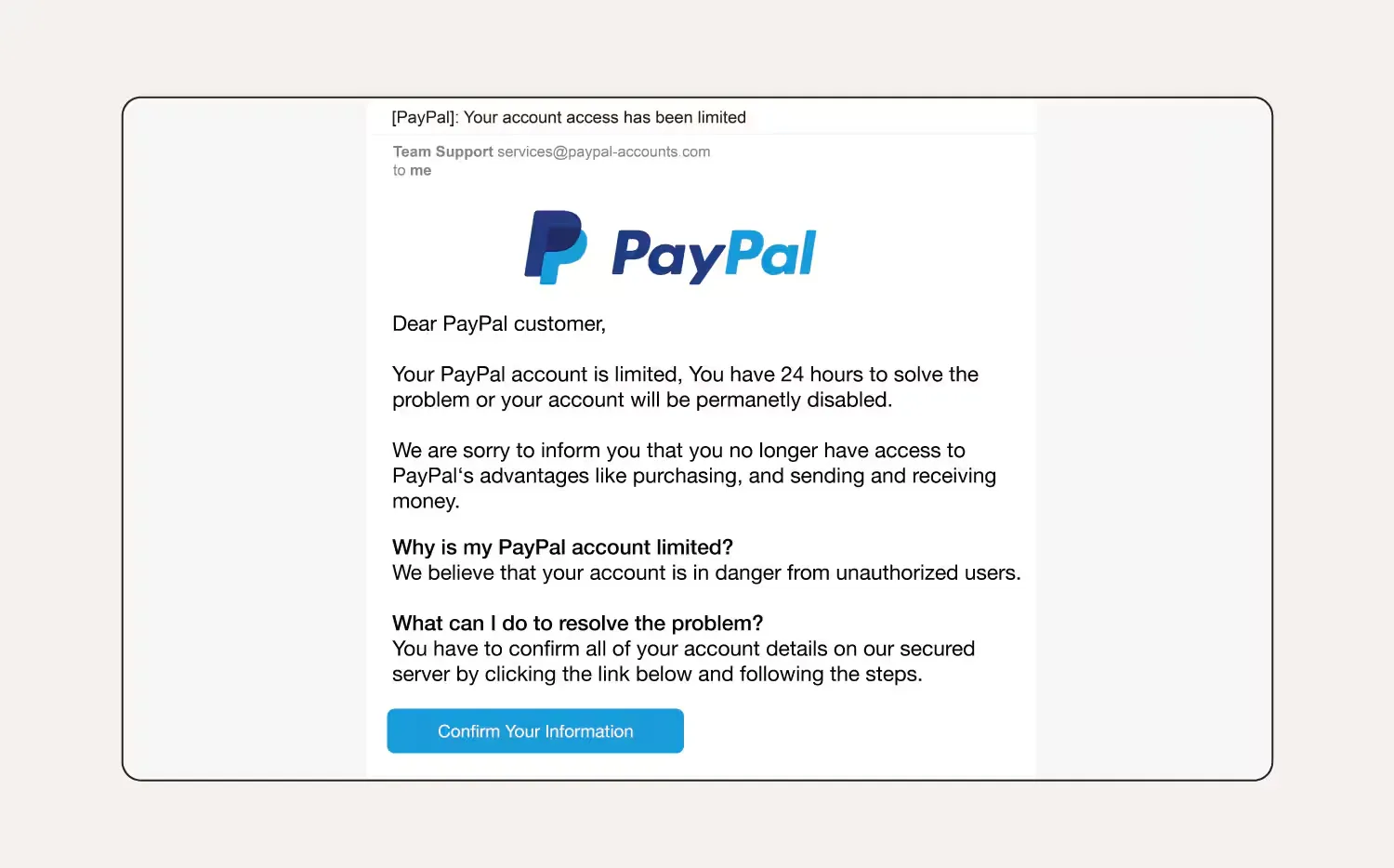
Image source: Norton Security
Ransomware 💻
Ransomware is malicious software that locks or encrypts an organization’s files and systems so staff can no longer access them. Attackers then typically demand payment in exchange for restoring access.
A nonprofit hit by ransomware might suddenly lose access to donor records, shared drives, financial files, or internal systems. That can halt fundraising and day-to-day operations, especially if the organization lacks reliable backups.
Donor data breaches 🔐
A donor data breach happens when unauthorized people gain access to information such as donor names, email addresses, mailing addresses, account credentials, or payment-related data.
The breach may happen inside the nonprofit’s own systems, but it can also originate with a third-party vendor that stores or processes donor information. For example, an attacker could compromise a donor CRM and download a database containing thousands of donor records.
Fake or spoofed fundraising pages 🤡
Scammers can copy a nonprofit’s name, logo, photos, and messaging to create fake fundraising pages that appear to belong to the organization.
These pages may surface after a natural disaster, emergency, or other high-profile fundraising moment when donors are motivated to give quickly. Instead of reaching the nonprofit, however, donations go directly to the scammer.
Scammers can set up spoofed pages on almost any crowdfunding platform, like the fake GoFundMe campaign below.\
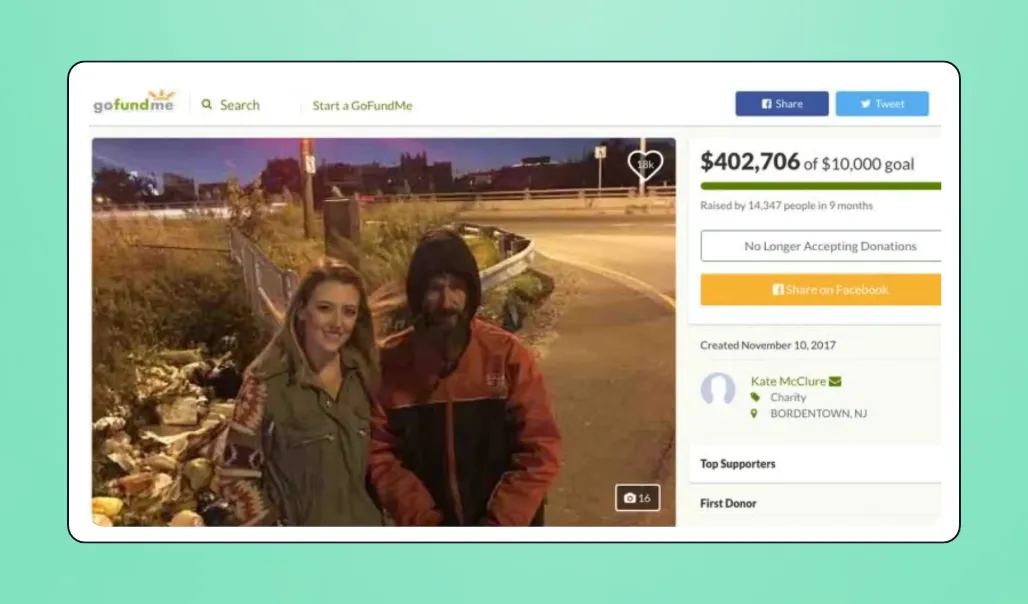
Image source: WHYY
Spoofed pages can do more than steal donations. They can also damage trust if supporters believe the nonprofit was responsible for the fraudulent campaign.

8 low-cost ways nonprofits can improve their cybersecurity
Good cybersecurity is largely about reducing avoidable risk. No nonprofit can prevent every possible attack, but the right safeguards can make attacks much harder to pull off and limit the damage when something does go wrong.
Here are eight ways to improve your cybersecurity:
1. Use multi-factor authentication everywhere 🆔
Multi-factor authentication (MFA) requires someone to prove their identity in more than one way before they can log in. For example, instead of entering only a password, a staff member might also need to approve the login through an authenticator app or enter a one-time code.
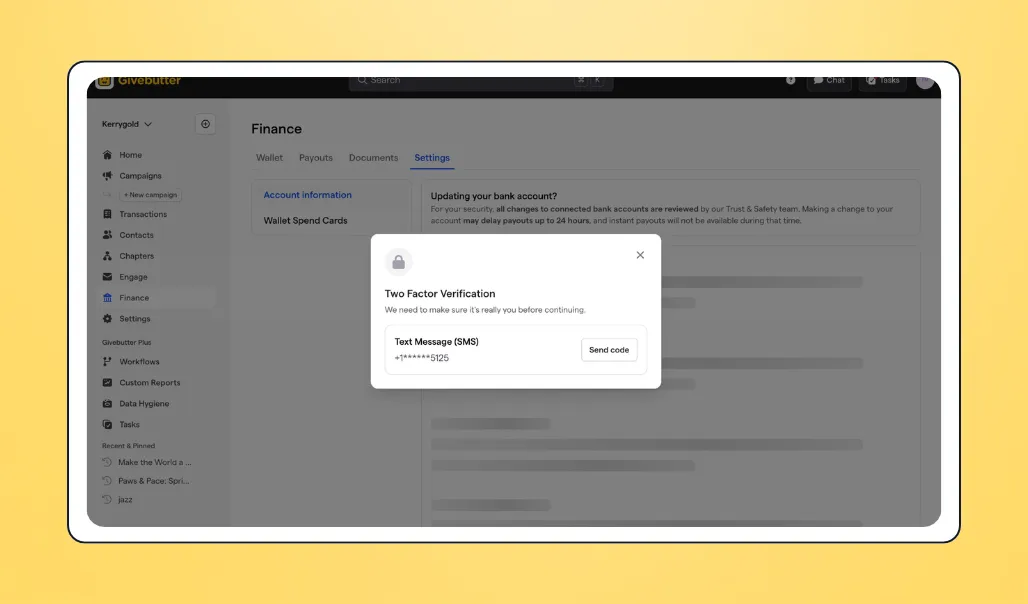
This ensures a stolen password alone isn’t enough to access the account. An attacker would still need to get past the second form of verification.
Turn on MFA for any system that contains sensitive or operationally important information, especially:
- Email and Google Workspace or Microsoft 365 accounts
- Fundraising platforms and CRMs
- Banking and accounting software
- Payroll and HR systems
- Cloud storage
- Social media accounts
Authenticator apps like Google Authenticator and Microsoft Authenticator can generate or approve login codes. Where available, consider using security keys or passkeys, which offer stronger protection against phishing.
2. Limit & audit who has admin or financial access 💳
Not everyone who uses a system needs permission to change account settings, export donor information, add users, or manage payouts.
For example, a volunteer helping manage a fundraising event might need access to attendee information and campaign updates, but they shouldn’t be able to change the organization’s bank account or download its entire donor database.
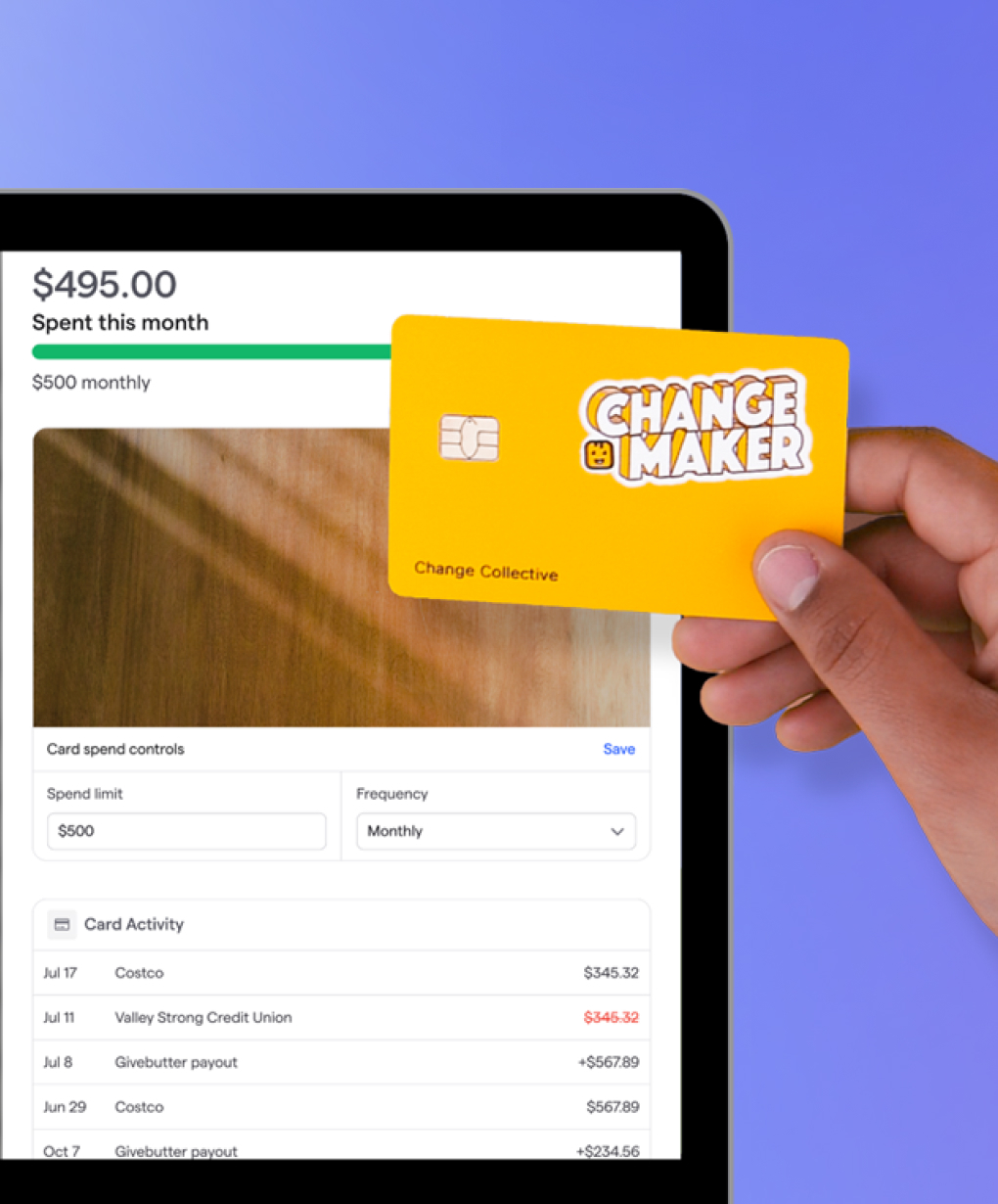
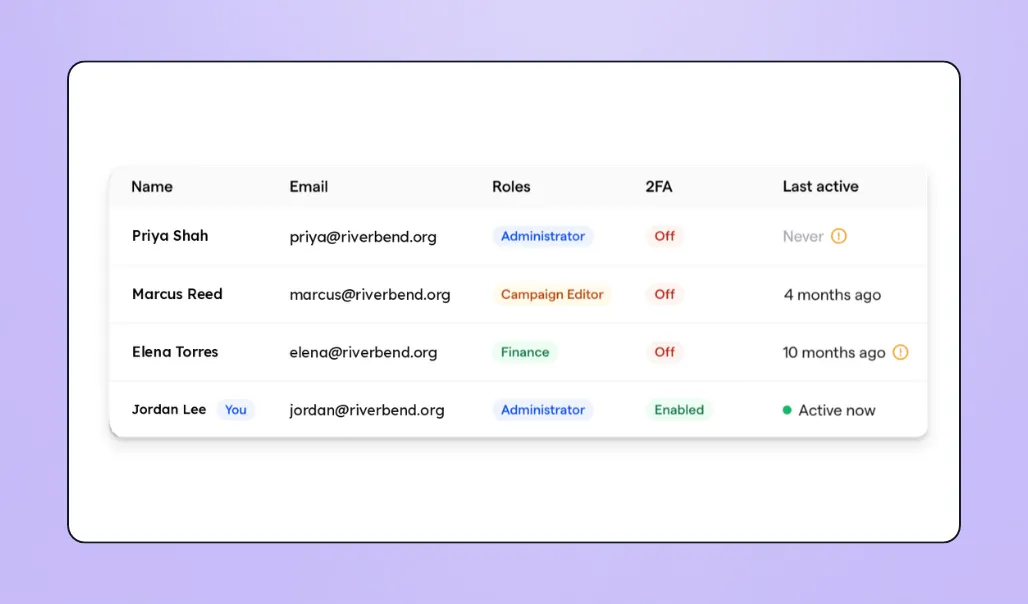
Apply the Principle of Least Privilege: give each person only the access they need to do their job. Review permissions across fundraising tools, CRMs, bank accounts, accounting software, payroll systems, email, cloud storage, and other platforms that contain sensitive information. With Givebutter, we’ve made it easy to audit who has access to what and make changes to permissions. You can see at a glance who has access, when they were last active, their role, and if 2FA is enabled.
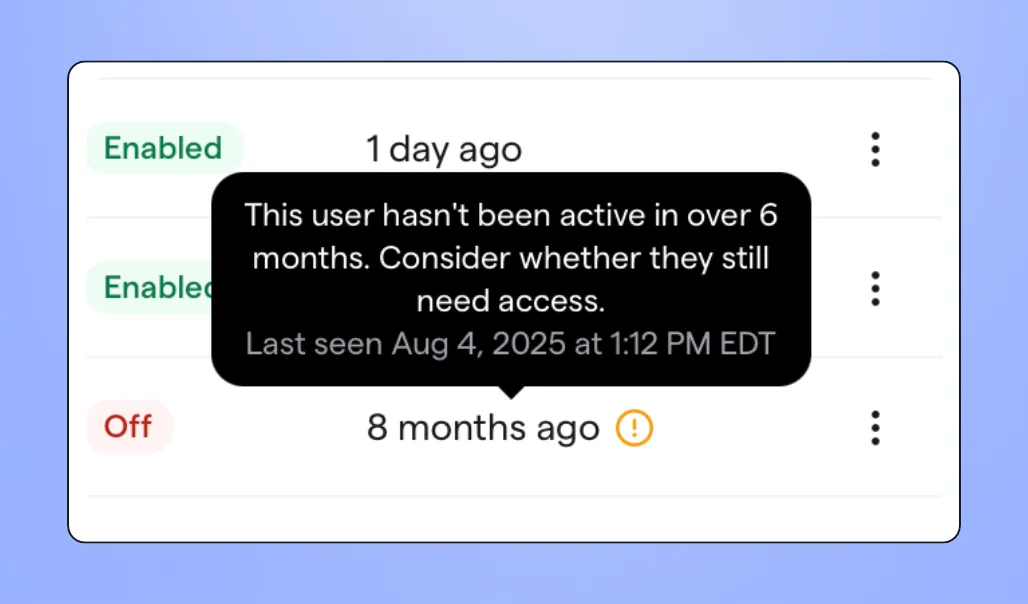
Also, make access reviews routine (quarterly is a reasonable starting point) and remove accounts as soon as employees, contractors, or volunteers leave. Pay particular attention to old admin accounts that may have been forgotten.
3. Train staff & volunteers to recognize phishing 👀
A phishing email can bypass expensive security software if someone is convinced to click a malicious link, share a password, or send money.
So, train staff and volunteers to look for warning signs such as unexpected requests to change payment information, slightly misspelled email addresses, unfamiliar login pages, unusual attachments, and messages that create a false sense of urgency.
More importantly, don’t make phishing training a one-time onboarding exercise. Send short refreshers throughout the year and periodically walk through realistic examples of nonprofit phishing scams.
Staff should also know exactly how to report a suspicious message and feel comfortable verifying an unusual request through another channel before acting.
4. Vet third-party vendors before giving them access to donor data 📊
A nonprofit’s data security depends partly on the companies that store, process, or have access to its donor information.
Before connecting a new CRM, fundraising platform, email tool, or other vendor, find out how the company protects donor records, account credentials, payment-related information, and any other sensitive data it will handle.
Ask:
- Does the platform encrypt sensitive data?
- Does it support MFA and different user permission levels?
- How does it handle and protect payment information?
- Does it follow relevant standards such as PCI DSS for card payments?
- Has it undergone independent security assessments, such as SOC 2?
- What happens to the nonprofit’s data if the account is closed?
- How will the company notify customers if a data breach occurs?
📢 Note: If the platform will handle particularly sensitive information, ask for relevant privacy and security documentation before signing a contract. Don’t rely only on marketing claims.
5. Keep software & devices updated 📱
Software updates often fix security flaws that attackers already know how to exploit. Delaying them can leave an otherwise preventable opening.
Prioritize updates for the technology staff to use every day, including:
- Laptops, desktops, phones, and tablets
- Windows, macOS, iOS, and Android
- Web browsers
- Email and productivity software
- Accounting and payroll applications
- Website platforms, themes, and plugins
- Antivirus and endpoint security software
- Routers and other network equipment
Turn on automatic updates wherever possible. For shared or organization-owned devices, assign someone to ensure updates are being installed.
6. Use a password manager organization-wide 🔑
Reusing passwords creates a domino effect. If one website is breached, attackers can try the same login details on the nonprofit’s email, CRM, fundraising platform, and other accounts.
A password manager helps prevent this by generating and securely storing a different, strong password for each account.
With many password managers, each staff member creates one strong master password that unlocks their encrypted password vault. They remember that master password, while the password manager remembers the unique passwords for the individual accounts they use. Some business plans also support options like single sign-on or passkeys.
💡 Pro tip: Password managers like 1Password, Bitwarden, and Dashlane offer plans for organizations and teams. These plans can also provide shared vaults, allowing authorized staff to securely access credentials for shared organizational accounts while administrators control access.
7. Have a basic incident response plan before you need one 🚨
When something suspicious happens, figuring out who should do what wastes valuable time. A short incident response plan gives staff a playbook to follow.
It doesn’t need to be complicated. The plan might say that if an employee discovers their email account has been compromised, they should immediately contact a designated staff lead, reset the password, end active sessions, secure connected accounts, document what happened, and determine whether donor or financial information was accessed.
The organization may also need to contact its bank, technology provider, insurer, legal counsel, or affected individuals, depending on the incident.
Include names and contact information for the people responsible for making those calls. Review the plan at least once a year (and whenever key staff members or systems change), so it isn’t sitting forgotten in a shared drive when a nonprofit cyberattack occurs.
8. Choose fundraising & CRM tools with fraud monitoring built in ⚒️
Fraud protection should be one of the criteria nonprofits consider when evaluating fundraising and CRM software.
Look for safeguards such as transaction and account monitoring, secure payment processing, account verification, payout protections, and systems for detecting unusual activity.
These built-in safeguards don’t replace good security habits inside the nonprofit, but they can help catch suspicious activity before it becomes a bigger problem.
How Givebutter helps protect your organization & donors
Givebutter is an all-in-one fundraising platform and donor CRM with built-in fraud monitoring and security measures designed to help reduce risk for nonprofits and their supporters. These safeguards cover both activity on the Givebutter platform and the payment process itself.
They include:
- Protection against donor data breaches 🔐: Givebutter never stores donors’ card numbers or bank account details on our servers. Our payment processing partner, Stripe, handles that information instead and is certified as a PCI Level 1 Service Provider, the highest and most stringent level of PCI certification in the payments industry. That means the most sensitive financial data isn’t sitting in your fundraising platform to begin with.
- Protection against fake or spoofed fundraising pages 🤡: Eligible nonprofits can complete Givebutter’s verification process to confirm their identity and tax-exempt status. Verified organizations get a badge on their fundraising pages, so donors can tell your real campaign apart from an impersonator. Behind the scenes, our Trust & Safety team reviews accounts, verifies individuals and organizations, and investigates red flags.
- Protection against redirected payments 🎣: Business email compromise and account takeovers often aim to send money somewhere it shouldn’t go. Givebutter reviews payouts for signs of fraud before releasing funds, and our team may request more information when something needs verification. That adds an extra check before money leaves the platform.
- Protection against fraudulent transactions 💳: Stripe Radar assesses transactions for fraud and blocks high-risk payments and card-testing attempts.
- Visibility into who has access 🆔: The Users tab shows each team member’s role, when they were last active, and whether they have two-step authentication enabled. Users who have been inactive for more than six months are flagged for review. This makes the access audits and MFA checks from strategies #1 and #2 much faster.

See Givebutter in action
What to do if your nonprofit experiences a cyberattack or data breach
A cyberattack can create a lot of pressure very quickly. You may be trying to understand what happened, keep systems running, answer questions from your team, and figure out whether donors need to be notified.
Having a clear order of operations can help you respond without making rushed decisions.
Here’s what to do:
Contain the incident 🚧
Start by stopping any further unauthorized access. Depending on what happened, you may need to disable a compromised account, disconnect an affected device, reset passwords, or temporarily restrict access to certain systems.
If you have an IT provider or security specialist, bring them in as early as possible. Also, avoid deleting files or other evidence that may be useful when investigating what happened.
Notify your team & board 💬
Notify the people who need to be involved in the response, including relevant staff, leadership, and board members. Decide who will coordinate next steps, communicate with outside experts, and approve any public or donor communications.
Find out what was affected 🔎
Determine which systems or accounts were compromised, when the incident began, and what information may have been accessed, stolen, or exposed. Pay particular attention to donor contact details, financial information, employee records, passwords, and other sensitive data.
Get legal guidance on notification requirements 🧑⚖️
Data breach notification laws vary by state, including what constitutes a reportable breach, who must be notified, and how quickly. Consult legal counsel to understand which requirements apply to your situation rather than making that decision internally.
Contact your cyber insurance provider 🧑💻
If you have cyber insurance, contact your provider promptly. The policy may cover expenses such as forensic investigations, legal support, data recovery, and breach notifications.
Be transparent with affected donors 🤝
If donor information was involved, explain what happened, what information was affected, what you’re doing in response, and any steps donors should take.
Avoid speculating, minimizing the incident, or giving vague reassurances. Donors are more likely to maintain trust when you give them useful, straightforward information about the situation.
Strengthen your nonprofit’s security with Givebutter
Cyberattacks on nonprofits are happening at an unusually high rate, but improving your security doesn’t have to require a massive IT budget. A few well-chosen safeguards can make a meaningful difference.
Since donor information and payments are common targets, start by choosing fundraising and CRM tools with built-in fraud monitoring. Givebutter is a great example.
Our dedicated Trust & Safety team reviews accounts, verifies the identity of individuals and nonprofits, and flags signs of suspicious or fraudulent activity.
Our payment partner, Stripe, is PCI-compliant and uses Stripe Radar to help detect and block fraudulent transactions. We also never store donors’ card numbers or bank information on Givebutter servers.
If you’d like to fundraise with more confidence, sign up for Givebutter for free today.
FAQs
Do small nonprofits really get targeted by hackers?
Yes. Small nonprofits can be attractive targets because they often hold valuable donor, employee, and financial information while operating with limited cybersecurity resources.
Attackers may also assume smaller organizations have weaker defenses. Size alone doesn’t make a nonprofit safe, which is why basic protections like MFA, phishing training, and strong access controls matter.
What’s the difference between phishing & business email compromise?
Phishing usually involves fake emails, texts, or login pages designed to trick someone into sharing credentials or clicking a malicious link. Business email compromise, or BEC, is more targeted.
The attacker impersonates a trusted person, such as your executive director, board member, or vendor, to persuade someone to send money, change payment details, or share sensitive information.
Does Givebutter protect donor payment data?
Yes. Givebutter does not store donors’ card numbers or bank information on our servers. Stripe, our payment processing partner, handles that data instead.
Stripe is a PCI Level 1 Service Provider and uses fraud detection tools like Stripe Radar to assess transactions and help reduce the risk of fraudulent payments.
Do nonprofits need cyber insurance?
Not every nonprofit is required to carry cyber insurance, but it’s worth considering, especially if you store donor, employee, or financial data. A policy may help cover costs tied to forensic investigations, legal support, breach notifications, data recovery, and other incident-related expenses.
Review your risks, budget, and existing coverage before deciding what makes sense for your nonprofit.
Share this article