.svg)
.svg)
.svg)
.svg)
.svg)
.svg)
.svg)
.svg)
.svg)


.svg)
.svg)
.svg)
.svg)
.svg)
.svg)
.svg)
.svg)

.svg)
.svg)
.svg)

.svg)

.svg)
.svg)
.svg)
.svg)
.svg)


.svg)
.svg)
.svg)
.svg)
.svg)
.svg)
.svg)




.svg)



%20(1).png)

Neon CRM is a CRM offered as part of the broader Neon One suite, where nonprofits can start with a core CRM and add other tools as needed.
But for many teams, that flexibility comes with friction. Deciding which modules you need and increasing your budget to unlock core fundraising features can quickly take time and money away from your mission.
That’s why nonprofits like yours look for a better way to engage donors and raise funds.
In this guide, we break down the 5 best Neon CRM alternatives, including what each platform does well, who it’s best for, and how it compares. They are:
- Givebutter: A free, all-in-one fundraising alternative to Neon CRM
- Donorbox: A fundraising-first alternative with flexible payment options
- CharityEngine: A fundraising-focused Neon CRM alternative built for clean data
- Bloomerang: A CRM-first donor management with paid fundraising add-ons
- Bonterra: A tech ecosystem for large nonprofits

Why nonprofits like yours look for Neon CRM alternatives
Neon CRM is a well-known nonprofit CRM, but it’s not always the best fit. Users’ most common complaints based on real third-party reviews include:
Limited & rigid reporting 📊
Users frequently point out that Neon CRM’s reporting tools don’t offer enough flexibility. Instead of pulling all relevant data points into a single custom report, teams often have to run multiple reports and manually combine them.
Here’s what one reviewer said when asked, What do you dislike about Neon CRM?:
I think the reporting right now is hard for us. We are used to having something that is a bit more customizable, and trying to run reports in a custom way that we track donations, event registrations, and memberships as part of our donation levels would be ideal, and right now we are having a hard time doing that. — Lauren H. S., Assistant Vice President for Development [G2]
A steeper learning curve than expected 🧠
Certain features and workflows can feel complex or unintuitive, especially for smaller teams without dedicated CRM admins. Users in public reviews note that clearer guidance and in-platform education would help them fully unlock the platform’s potential.
Here’s one such review, where a user lists the cons of the Neon CRM platform:
Certain features or workflows can feel a bit complex, and we’re still learning how to best utilize them. We’d appreciate more clarity or guidance in those areas to help us maximize the platform’s potential. — Sarah, Manager in US Nonprofit Organization Management [Capterra]
Clunky event management 🎟️
Neon CRM’s event module is a common pain point amongst third-party reviews. Guest lists often mix registrants and attendees, requiring manual cleanup to get accurate reports. Event image uploads also require precise formatting, or visuals may display incorrectly.
One reviewer wrote the following when asked, What do you dislike about Neon CRM?:
The event module feels somewhat clunky, especially when generating a guest report, as both registrants and attendees appear together. This means you have to manually sort through and delete entries to create an accurate guest list. Additionally, when uploading an image for an event, you need to be familiar with sizing JPEGs correctly; otherwise, only part of the image will display. — Stacey L., Vice President of Philanthropy [G2]
Search & data retrieval limitations 🔍
The search functionality is limited to certain fields (like addresses), making it difficult to locate records tied to grants, notes, or custom data that aren’t part of core contact info.
On G2, one user responded to the question, What do you dislike about Neon CRM?, with:
The search feature is limited; you can only search for addresses and not keywords. So if there's a grant I'm tracking, I can't search the name of the grant because it's not in the profile account contact info. — Lesley K. [G2]
The #1 Neon CRM alternative: Why nonprofits choose Givebutter
Givebutter is a free, all-in-one nonprofit fundraising and CRM platform that brings together fundraising, payments, engagement, and donor management into a single, modern platform. It can hold its own against any dedicated donor management system while adding invaluable fundraising features.
You can track relationships, manage giving history, segment your audience, and surface actionable insights, all in the same place you run campaigns, host events, and process donations.
The platform is easy for teams of any size to use and delightful for supporters to donate through.
Because everything is connected by default, donor data updates automatically as you go. There’s no manual syncing and no reconciling records across tools, so you can focus less on managing systems and more on advancing your mission.
Givebutter vs. Neon CRM: A side-by-side comparison ⚖️

Why Givebutter is the best Neon CRM alternative ✅
The biggest differences between Neon CRM and Givebutter come down to price and function.
Neon CRM is part of a wider Neon One platform. You choose what features you want and which ones you don’t. As your feature stack changes, so does your invoice. That’s not the case with Givebutter.
Givebutter believes nonprofits deserve to have access to features that help them manage donor data, launch campaigns, host events, and engage supporters quickly, without worrying about inflating platform costs. That’s why the platform is all-in-one, and all of its core features are free to use.
Kenneth McQuiller made the switch to Givebutter from Neon CRM and found it made their fundraising operations smoother and more successful:
Givebutter has everything you need with a donor CRM, but is also affordable (free!) and has the customization you need to be successful. The silent auction software helped change our auction this year and made it a billion times better. — Kenneth M., Assistant Director, The Meeting Place Learning Center [G2]
Neon CRM also has a paid migration and setup process, but with Givebutter, you migrate for free and can be fully operational in days, not weeks or months. It really is that easy to switch.
Givebutter’s standout features 💰
Unlike Neon CRM, which charges a monthly fee starting at $99 and adds setup or implementation costs depending on your plan, Givebutter is completely free to use.
Givebutter offers unlimited:
- Donation forms and widgets
- Fundraising pages
- Events and auctions
- Donor management & CRM
- Email marketing
- Analytics
- Secure payment processing
- Mobile app
- Integrations
- 24/7 support
How is Givebutter free? Thanks to optional donor tips.
Turning tips on means zero platform fees for your nonprofit. Donors get the choice to cover processing costs, and if they don't, the Givebutter Guarantee has you covered—so every dollar raised goes straight to your mission.
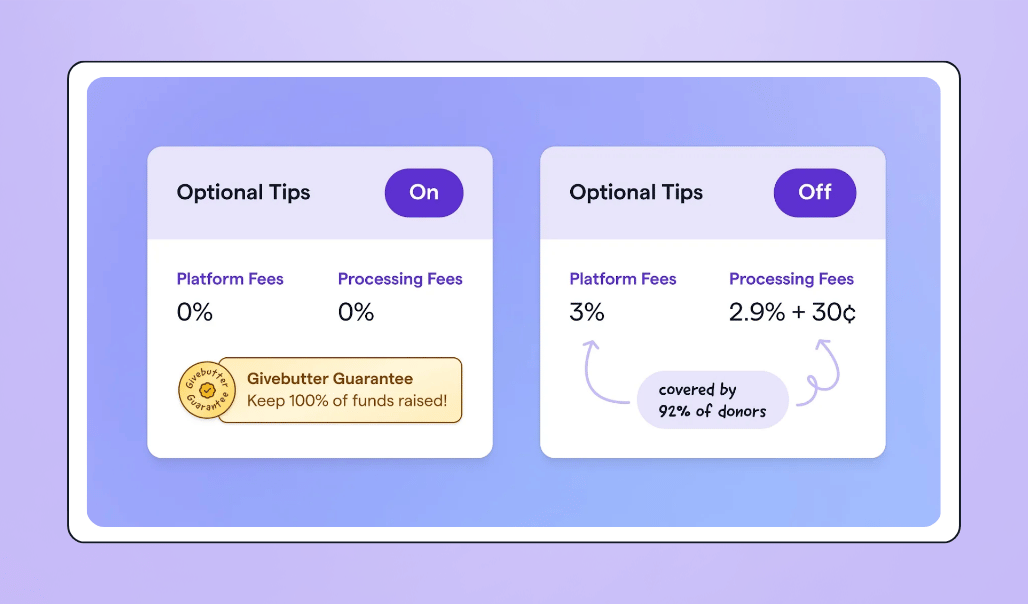
If you'd rather disable tips, a flat 3% platform fee applies alongside standard processing fees (2.9% + 30¢ for cards, 1.9% + 30¢ for ACH), with full flexibility over who covers them.
Need advanced tools? Givebutter Plus is available from $29/month, adding text messaging, an advanced email editor, discounted direct mail, and native QuickBooks integration—with zero pressure to upgrade.

See Givebutter in action with a personalized demo
Who is Givebutter built for? 🏗️
Givebutter is made for nonprofits, startups, schools, sports teams, and faith-based groups who need an easy, all-in-one platform.
The platform is especially well-suited for teams that don’t have a dedicated tech admin or the time to manage complex systems. Whether you’re running your first online fundraiser or coordinating campaigns, events, and communications year-round, Givebutter is designed to be intuitive for staff, volunteers, and supporters alike.
God’s Secret Service Agents Foundation (GSSA) uses Givebutter to power “secret acts of kindness” and fund missions that support communities in places like Kenya, Jamaica, and Mexico.
With an all-volunteer board, their team used Givebutter to rally supporters around a campaign to help build a community center in rural Kenya. They raised 128% of their goal, engaged 80+ supporters, and earned a $5K donation through Givebutter Gives Back.
If your organization wants a CRM with fundraising tools that are approachable for your team and frictionless for supporters, Givebutter is built for you.
4 other Neon CRM alternatives to consider
While Givebutter is a strong alternative to Neon CRM, it’s not the only one. Here are four others worth your consideration.
1. Donorbox: A fundraising-first alternative with flexible payment options 💰
Donorbox is a fundraising-first platform best known for its flexible, fast-loading donation forms and wide range of payment options. Nonprofits that prioritize online giving over deep CRM functionality often find it a good alternative to Neon CRM.
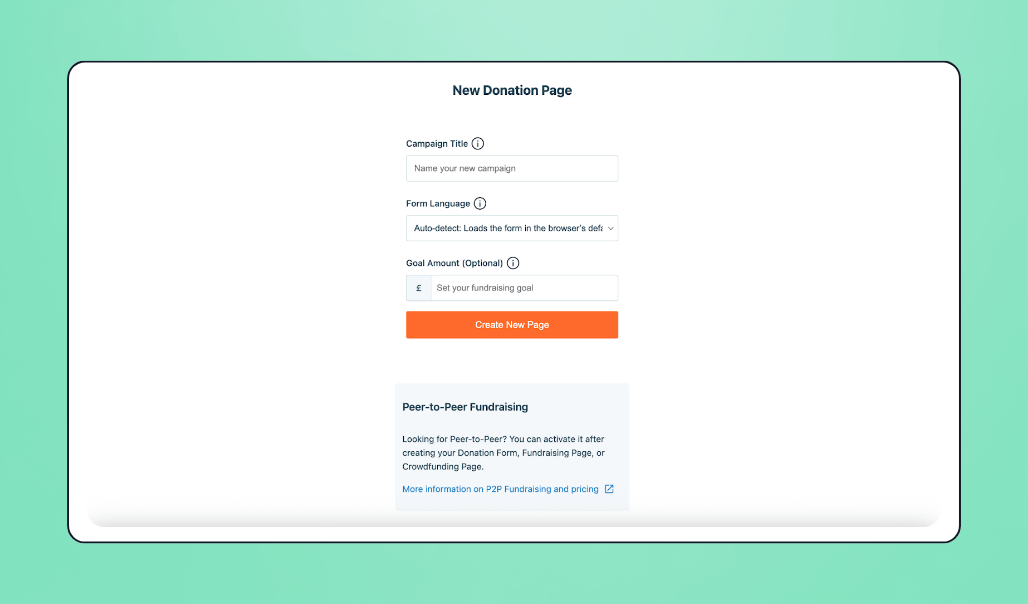
✅ What makes Donorbox a good Neon CRM alternative: Donorbox is a strong alternative to Neon CRM because it supports multiple currencies and a wide range of payment methods (including credit cards, ACH, PayPal, Apple Pay, and Google Pay), making it especially appealing for nonprofits with global or mobile-first audiences.
🔥 Donorbox’s standout features:
- OmniGive donation forms
- Recurring donations
- Multi-currency support
- Multiple payment methods (credit card, ACH, PayPal, Apple Pay, Google Pay)
- Crowdfunding campaigns
- Peer-to-peer fundraising
- Donor portal
💰 Cost: Organizations can choose from three pricing plans, including a free plan. However, all their plans have built-in payment processing fees (unlike Givebutter), and their CRM has a separate monthly cost based on the number of contacts you have.
2. CharityEngine: A fundraising-focused Neon CRM alternative with clean data 📊
CharityEngine is a fundraising-focused platform designed for nonprofits that want control over data quality, reporting, and fundraising performance. The platform is especially known for optimizing recurring giving and monthly gift collection.
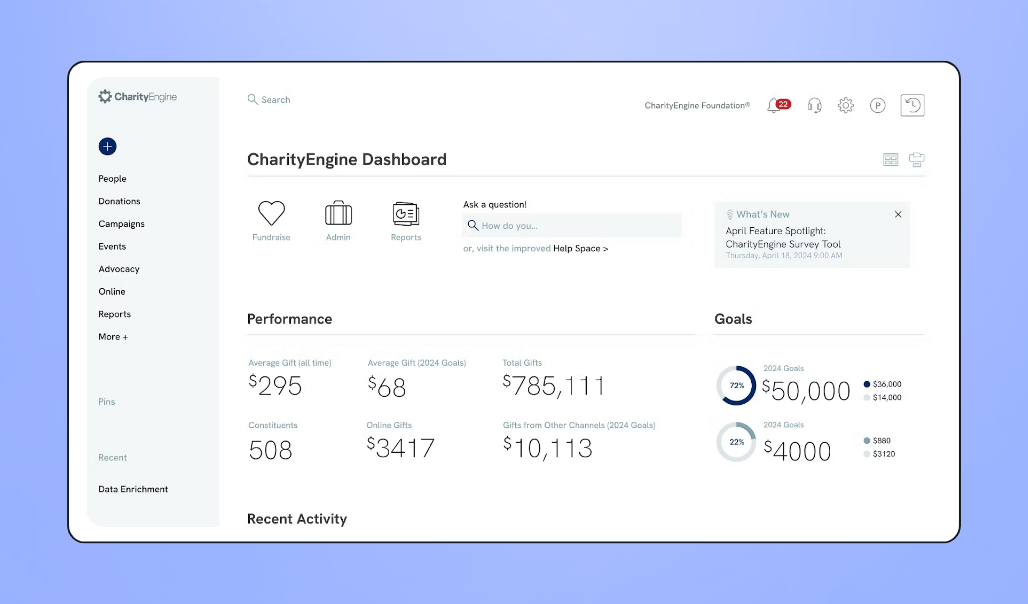
✅ What makes CharityEngine a good Neon CRM alternative: CharityEngine takes a data-first approach to fundraising. It unifies donor and transaction data across campaigns, payments, and engagement tools, making it easier to analyze performance, measure results, and act on insights without stitching reports together.
🔥 Standout features:
- Unified CRM, fundraising, and email marketing platform
- Donation processing and recurring gift management
- Event management and ticketing
- Marketing automation and segmentation
- Payment processing and donor self-service portal
- Advanced reporting and analytics
💰 Cost: CharityEngine offers several packages with pricing that varies based on the features you need and your organization’s size. Request a demo to receive a customized quote that fits your goals and budget.
3. Bloomerang: A CRM-first platform with fundraising add-ons ➕
Bloomerang is a CRM helping nonprofits understand, retain, and grow their supporter base. The platform has been formed through the acquisition of multiple tools over time, including Qgiv, Kindful, and InitLive, which is why fundraising, events, CRM, and other features often live in separate modules with separate costs.
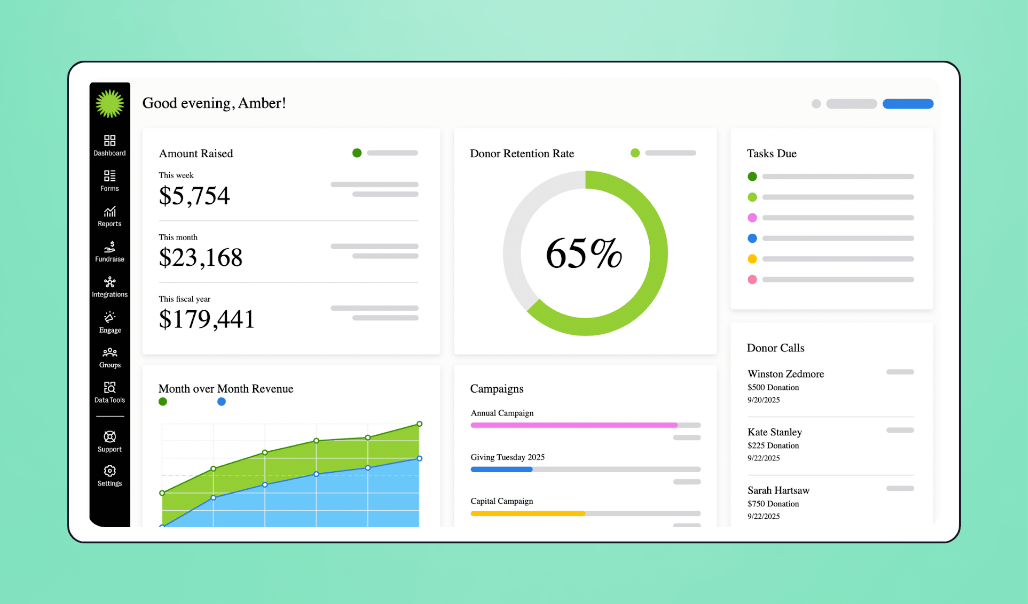
✅ What makes Bloomerang a good Neon CRM alternative: Both platforms are CRM-first, but Bloomerang places a heavier emphasis on retention metrics, engagement scoring, and donor insights designed to help teams understand why supporters give, and when they might lapse.
🔥 Standout features:
- Interactive dashboard
- Donor timeline
- Data segmentation
- Wealth screening
💰 Cost: Bloomerang’s pricing starts at $125 per month, billed yearly. You can choose to add fundraising tools for $40 a month or invest in volunteer management or membership management for additional monthly fees.
4. Bonterra: A tech ecosystem for large nonprofits 🤖
Bonterra is a comprehensive nonprofit technology ecosystem designed for large organizations that need enterprise-level CRM, fundraising, volunteer management, and data-driven tools.
Bonterra has been built through the acquisition of multiple nonprofit platforms. Because of this, it offers a broad range of capabilities across fundraising, CRM, volunteer management, and reporting. However, the experience can feel more like a connected suite of products than a single, unified system.
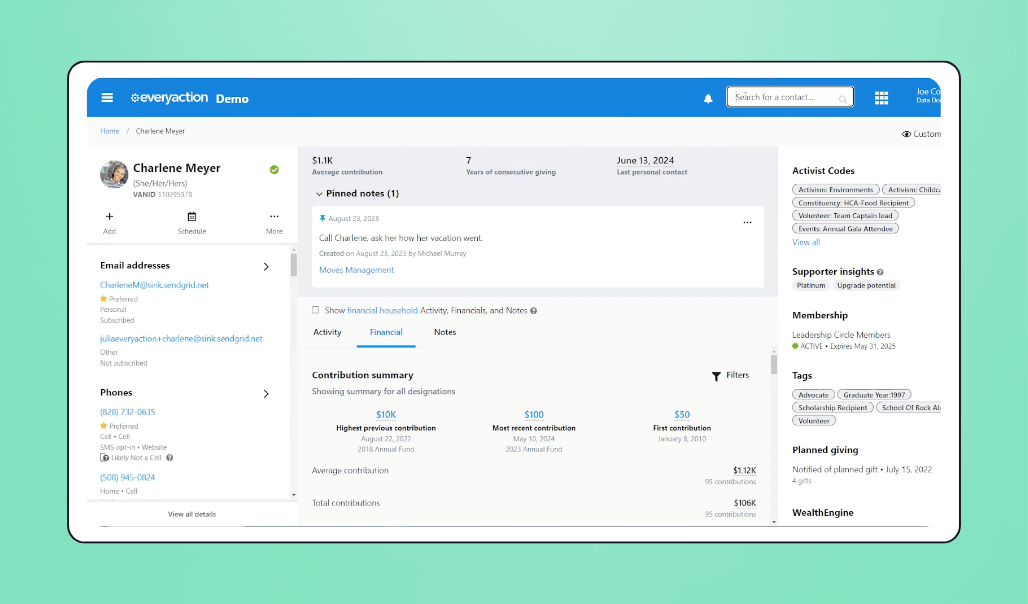
✅ Why Bonterra is a good Neon CRM alternative: While Neon CRM is well-suited for mid-sized nonprofits managing fundraising and donor data in one system, Bonterra offers a broader technology ecosystem that can support enterprise-level operations.
🔥 Bonterra’s standout features:
- Contact management
- Donation tracking
- Pledge tracking
- Household & organization grouping
- Custom fields
- Volunteer tracking
- Reporting & analytics
💰 Cost: Bonterra doesn’t list its pricing model publicly. You will need to request a custom quote.
How to choose your Neon CRM alternative
Before choosing a new platform, it helps to step back and look at how your team actually works day to day. Go ahead and ask yourself a few questions:
How much complexity can my team realistically manage?
Some platforms offer deep customization and advanced workflows, but that often comes with a steeper learning curve. Consider whether your team has the time, technical expertise, or dedicated admin support to manage a more complex system, or if simplicity and ease of use matter more.
Where do I feel the most friction today?
Is it reporting and pulling the data you need? Event setup and guest management? Everyday tasks like searching records or generating lists? Identifying your biggest pain points will help narrow down which alternative actually solves your Neon CRM frustrations.
What’s my budget, and how will it scale?
Monthly fees, add-ons, per-contact pricing, and required upgrades can add up quickly. Make sure you understand what’s included upfront and how costs will change as your donor base, campaigns, or team grows.
Give better with Givebutter
Neon CRM helps nonprofits manage donor data. Givebutter helps them build momentum.
Fundraising happens in real time, insights are easy to access, and everything stays connected. With Givebutter, you don’t need a dedicated admin or months of setup to get started. Instead, you can launch quickly, experiment with new ideas, and grow at your own pace.
And because nonprofits of every budget and size deserve access to great tools, Givebutter’s core fundraising and CRM features are free to use. With optional donor tips, many nonprofits pay $0 in platform fees, so more of what you raise goes directly toward the work you care about. If you’re looking for a simpler way to fundraise and manage donor relationships, Givebutter is a butter way forward. 🧈
FAQs about Neon CRM alternatives
How does Givebutter compare to Neon CRM on pricing?
Givebutter offers its core fundraising and CRM tools for free, while Neon CRM charges a monthly subscription starting at $99. That’s before adding any additional fundraising features available on the wider Neon One platform.
Givebutter’s free model is supported by optional donor tips. When tips are enabled, many nonprofits pay $0 in platform fees. If tips are turned off, a flat 3% platform fee applies, plus standard payment processing. Paid upgrades (Givebutter Plus) are optional and designed for teams that want advanced tools like text messaging or enhanced email. The add-on is never required to fundraise or manage donors.
Can I migrate donor data from Neon CRM to Givebutter?
Yes. Givebutter provides easy-to-use import templates that make it simple to move donor records, contact details, and recurring donation data from Neon CRM.
Most teams can complete migration without an IT team or long implementation process. Once your data is imported, you can start fundraising immediately with Givebutter’s donation forms, campaigns, and events.
Do I need a standalone CRM, or will one platform do it all?
No. Givebutter is a CRM as well as a fundraising platform. You can track giving history, manage relationships, build segments, and surface donor insights—all in the same platform you use to run campaigns, host events, and process donations. For most nonprofits, that level of donor management means one less tool to pay for, learn, and maintain while getting the benefit of fundraising features.
Share this article








.svg)
.svg)