.svg)
.svg)
.svg)
.svg)
.svg)
.svg)
.svg)
.svg)
.svg)


.svg)
.svg)
.svg)
.svg)
.svg)
.svg)
.svg)
.svg)

.svg)
.svg)
.svg)

.svg)

.svg)
.svg)
.svg)
.svg)
.svg)


.svg)
.svg)
.svg)
.svg)
.svg)
.svg)
.svg)





.svg)




%20(1).png)

⚖️ Disclaimer: Raffle laws vary by state. Some require permits or licenses, while others specify what must appear on your ticket—or prohibit raffles entirely. This guide is for informational purposes only and is not legal advice. Always confirm your state's requirements before running a raffle and consult a licensed attorney if you have questions.
You've secured prizes. Recruited volunteers. Mapped out your email campaign. Somehow, the raffle ticket is still sitting at the bottom of your to-do list.
A ticket that's missing a numbered stub, legal disclaimers, or winner contact fields can create complications on event day. That doesn't mean you have to start from scratch.
Below, you'll find 10 free, customizable raffle ticket templates built for nonprofits, plus a breakdown of exactly what every compliant ticket needs to include.
What to look for in a raffle ticket template
Choosing the right template upfront saves time and keeps your raffle running smoothly. Before you start customizing any free printable raffle ticket, make sure it checks all the boxes below.
- Fully editable ✏️ You should be able to easily customize your logo, event details, and legal text without any design experience required.
- The right size Standard raffle tickets are 5.5" x 2". Make sure your template matches your intended print format.
- Numbered stub 🔢 Look for a template with a tear-off stub and matching ticket numbers to track entries and winners.
- Space for required fields ⚖️ Include room for ticket price, drawing date, organization name, prize information, and any legally required language.
- Print-ready 🖨️ Choose a template that exports cleanly to PDF and prints clearly on cardstock.
Every template below already checks all five boxes, so you can skip the vetting and get straight to customizing.
10 free printable raffle ticket templates
We've rounded up 10 free printable raffle ticket templates covering everything from casual community fundraisers to polished galas. Each option is easy to customize and includes the fields you need to run a smooth, compliant raffle.
1. Classic nonprofit raffle ticket 🏆
A clean, classic design that's easy to brand with your nonprofit's name and event details. It features clearly labeled fields for date, time, and location, plus space to share standout moments from your event.

🎨 Style: Clean, professional
🏷️ Best for: Galas, annual fundraisers
🔗 Customize this template on Canva →
2. Simple printable raffle ticket 🖨️
A minimalist option, perfect for smaller events or quick-turnaround printing at home. Its high contrast makes it ideal for black-and-white tickets, while it also offers space to add your logo or raffle details.

🎨 Style: Minimal, black-and-white friendly
🏷️ Best for: Home printing, small events
🔗 Customize this template on Canva →
3. 50/50 raffle ticket template 🎲
Designed specifically for 50/50 raffles, where the prize is half of the total ticket money collected. This bold layout clearly highlights ticket number, price, and a tearable stub. It also has space to add a link for your raffle event page.

🎨 Style: Bold, high-contrast
🏷️ Best for: 50/50 drawings, sporting events, school fundraisers
🔗 Customize this template on Canva →
4. Gala raffle ticket template ✨
A sophisticated raffle ticket design with room for your organization's name, logo, and event branding, plus essential fields like prize details and drawing date. It's polished enough to sit next to a place card at a formal dinner and simple enough to customize in minutes.

🎨 Style: Elegant, upscale
🏷️ Best for: Fundraising galas, black-tie events, annual dinners
🔗 Customize this template on Canva →
5. Holiday raffle ticket template 🎄
A festive template that works well for holiday fundraisers or seasonal events. Bold headers and clear form fields make it easy for participants to quickly find key details without feeling cluttered.

🎨 Style: Bold, festive
🏷️ Best for: Holiday galas, year-end fundraisers
🔗 Customize this template on Canva →
6. Numbered raffle ticket template 🔢
A structured, compliance-friendly option that's easily customizable to include your license, permit, and raffle ticket numbers. You can also replace the barcode with a QR code to share additional event details.

🎨 Style: Black and white, printer-friendly, legally compliant
🏷️ Best for: Licensed raffles, larger events
🔗 Customize this template on Canva →
7. DIY raffle ticket template ✂️
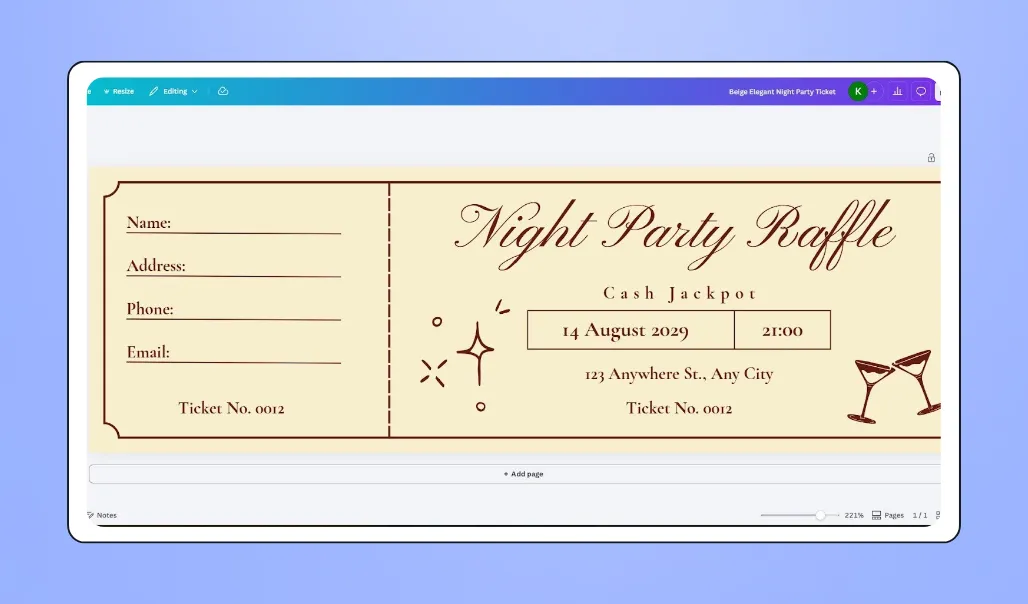
A simple layout that contains all the essential raffle ticket categories, so all you need to do is customize it to fit your event and organization, then print. Ideal if you want something flexible that you can quickly tailor with your logo, prize descriptions, or legal disclaimers.
🎨 Style: Casual, customizable
🏷️ Best for: Small community fundraisers, DIY events
🔗 Customize this template on Canva →
8. Editable raffle ticket template (Google Docs/Word) 📝
A straightforward Microsoft Word template for those who prefer working outside of Canva. Multiple raffle tickets appear on a single sheet, making batch printing a breeze. While it doesn't feature a tearable edge, tickets are designed to be cut in half with the ticket number clearly shown on both sides.

🎨 Style: Simple, text-based
🏷️ Best for: Fundraisers who prefer Word or Google Docs
🔗 Find this template in Microsoft Word (Templates > search "raffle tickets")
Did you know? If you've never used Canva before, don't worry! It's designed so anyone can easily create professional-looking designs with no experience required. Plus, Givebutter's Canva integration helps you maintain consistent branding across all your marketing materials and fundraising pages.
9. Fundraising raffle ticket 💰
A bold, image-forward design to highlight your cause and fundraising goal. Easily swap in a compelling photo or graphic to keep your organization's mission front and center.

🎨 Style: Bold, eye-catching
🏷️ Best for: Nonprofits with a specific fundraising goal
🔗 Customize this template on Canva →
10. Easter raffle ticket 🐰
A seasonal raffle ticket sample that's easy to print. Includes a clear, tearable edge and space to highlight raffle prizes, boosting excitement and ticket sales. You can also customize the design to feature Easter eggs or spring flowers in just a few clicks.

🎨 Style: Printable, minimalist
🏷️ Best for: Nonprofits hosting spring or Easter-themed fundraisers
🔗 Customize this template on Canva →

What to include on every raffle ticket
You don't need to squeeze everything onto one side of a 5.5" x 2" ticket. Most fields live on the main ticket; contact information goes on the stub; and longer legal text, like terms and conditions, can move to the back in smaller print or link out via QR code.
Raffle requirements vary by state. In Texas, for example, the date prizes will be awarded must appear on the ticket. The fields below support compliance for most raffles, but always confirm your state's specific rules before you finalize your design.
- Organization name and logo 🏷️ (main ticket) Builds instant credibility. Add your brand colors and fonts to make the ticket feel like a natural extension of your event.
- Event name and drawing date 📅 (main ticket) Include the exact date, time, and location. In many states, this is a legal requirement, not just good practice.
- Prize description 🎁 (main ticket) Specific details drive ticket sales and are a formal requirement in some states. Link to your full prize list via QR code if you need more space.
- Ticket price 💰 (main ticket) Make the cost clear and visible, including any bundle deals like 3 tickets for $10.
- Sequential ticket number 🔢 (main ticket and stub) Every ticket needs a unique number for recordkeeping. Required in some states.
- Tear-off stub with matching number 🎫 (stub) The participant keeps the main ticket. The stub goes into the drawing. Both should show the same number so you can match the winning stub to its buyer.
- Buyer contact information 📋 (stub) Include space for the purchaser's name, phone number, and email so you have a reliable way to reach your winner after the drawing.
- Legal disclaimers ⚖️ (back of ticket) Include any legally required language, such as "no purchase necessary," your tax ID, or terms and conditions.
💡 Pro tip: For a fair, transparent way to select your raffle winner, use Givebutter's random number generator.
Sell more raffle tickets with Givebutter
A well-designed raffle ticket template sets the stage, but you still need a way to manage sales, track entries, and follow up with donors.
Givebutter makes it easy to sell tickets alongside event registrations, accept payments via Venmo, Apple Pay, and more, and keep your donor and event data in a centralized CRM. Whether you're hosting a small fundraiser or a large event, the right tools make all the difference. With Givebutter, you can run a seamless raffle from start to finish without juggling spreadsheets or manual processes.

Sell more tickets with a free online raffle platform
Sign up for Givebutter today and launch your fundraising raffle with confidence.
FAQs about how to make raffle tickets
How to number raffle tickets?
Raffle tickets are typically numbered sequentially so each entry can be tracked. Tools like Canva's Bulk Create and Microsoft Word's mail merge will do this automatically. Just be sure the same number appears on the ticket and its tear-off stub.
Where can I find free raffle ticket templates?
Canva has the largest selection of free, customizable raffle ticket templates for nonprofits. Microsoft Word and Google Docs both include basic raffle ticket templates in their built-in template libraries, too.
Does Word have a raffle ticket template?
Yes. Open Microsoft Word and search "raffle tickets" in the template search bar. It fits multiple tickets per page and is easy to customize with your event details.
How do I make my own raffle tickets?
To easily create raffle tickets, start with a template from Canva or Microsoft Word. Customize it with your organization's name, logo, event details, ticket number, price, and a tear-off stub.
What size should raffle tickets be?
A standard raffle ticket size is around 5.5" x 2", which works well for most print formats and fits neatly in a wallet or pocket.
Share this article




.webp)




.svg)
.svg)