

.svg)
.svg)
.svg)
.svg)
.svg)
.svg)
.svg)
.svg)
.svg)


.svg)
.svg)
.svg)
.svg)
.svg)
.svg)
.svg)
.svg)

.svg)
.svg)
.svg)

.svg)

.svg)
.svg)
.svg)
.svg)
.svg)


.svg)
.svg)
.svg)
.svg)
.svg)
.svg)
.svg)





.svg)



%20(1).png)

Choosing the right donation platform for a nonprofit is a big call, and Donorbox often makes it onto many shortlists. It's got the free plan, the polished forms, and the recurring giving setup that helps nonprofits bring in steady revenue from existing donors.
However, once you start digging into what users are saying, you’ll find hundreds of Donorbox reviews to sort through across G2, Capterra, Trustpilot, and GetApp, and reading them all isn't how many people want to spend a workday afternoon.
So we did the wading for you.
This guide pulls together the patterns nonprofits keep mentioning about Donorbox so you can confidently decide if it's the right fit for your organization.
What is Donorbox?
Donorbox is an online fundraising and donation platform designed to help organizations collect contributions from supporters online. It launched in 2014 and has since grown into one of the more widely used donation tools in the nonprofit space, with users in over 96 countries.
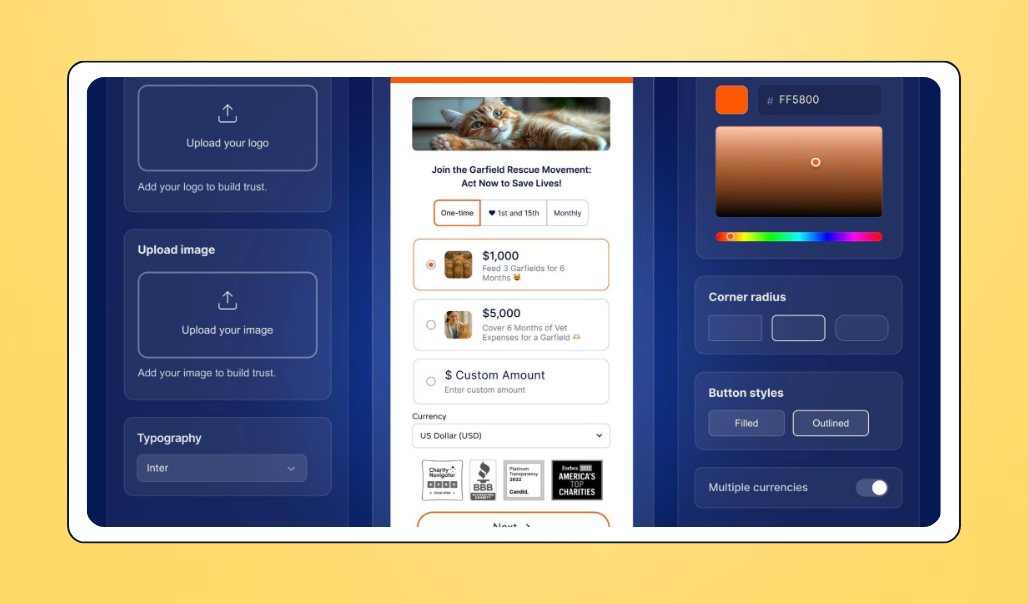
The platform is best known for a few things:
- Embeddable donation forms that organizations can drop directly into their existing websites without needing to redirect donors to a third-party page.
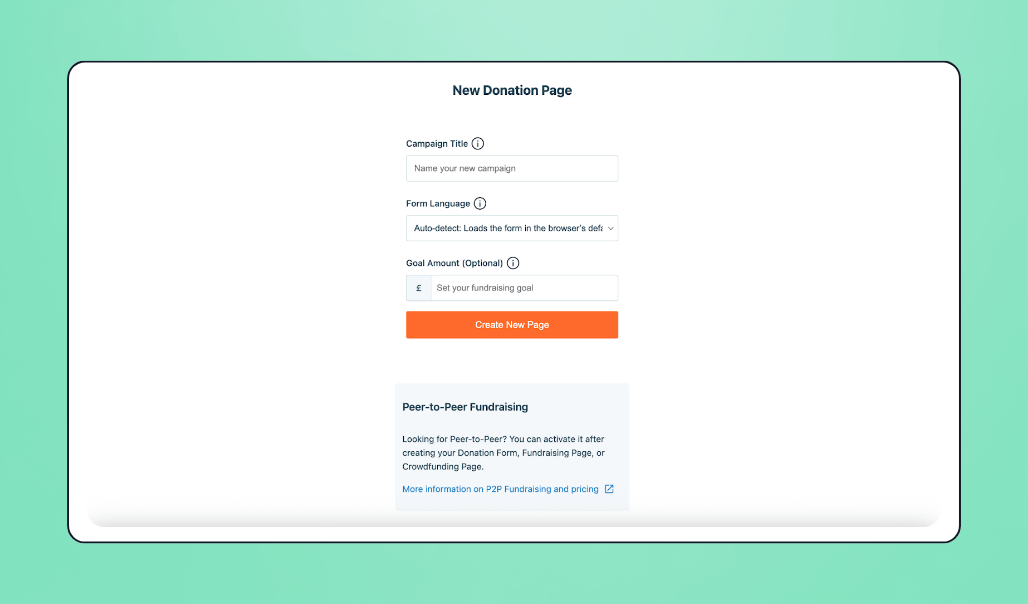
- Dedicated campaign pages that nonprofits can build and customize for specific fundraising drives, appeals, or seasonal giving moments.
- Peer-to-peer fundraising tools that let supporters create their own fundraising pages tied to a parent campaign, expanding reach through personal networks.
- Recurring donation support with options for weekly, monthly, quarterly, and annual giving, which helps organizations build a more predictable revenue stream over time.
- Multi-currency and multi-payment processing, including cards, ACH, PayPal, Apple Pay, Google Pay, and digital wallets like Venmo, which makes it accessible to a global donor base.
Donorbox markets to nonprofits, charities, churches, schools, and individual fundraisers, with tools that work for organizations of all sizes, from small grassroots causes to larger established institutions.
Donorbox pricing
Donorbox runs on a tiered pricing model with three plans:
- Standard (free): This plan has no monthly fee but charges platform fees of 2.95–3.95% per transaction, depending on the feature you use.
- Pro ($150/month): This plan lowers platform fees to 1.75–2% and unlocks new features like advanced form customization, tracking, Zapier & API access, crypto & stock donations, and Jay.AI (Donorbox’s AI-powered virtual assistance)
- Premium (custom pricing): This plan offers the lowest platform fees, ranging from 1.6% to 2%, along with 24/7 priority support, a dedicated success manager, custom domains, and guided onboarding. You'll need to contact sales for a quote.
Donorbox has two add-ons (Text-To-Give and Live™ Kiosk) and a CRM that you have to join a waitlist to access. If you’d like any (or all) of these products, you’ll likely end up paying more than the base plan fees, so check the pricing page directly before signing up to confirm what fees and add-on costs apply to your situation.
💡A quick note: All plans require you to pay Stripe and PayPal processing fees (1.99% + 49¢ for non-AMEX). However, Donorbox lets you give your donors the option to cover processing fees at checkout, so you receive the full donation.
Donorbox reviews: What users are saying about the platform
A few themes recur across Donorbox reviews on sites like G2, Capterra, Trustpilot, and GetApp. Here’s a breakdown of these themes and what nonprofits keep flagging:
1. On ease of use 👍
Donorbox’s setup speed is the feature that’s mostly consistently praised across reviews. In fact, as of April 2026, 442 reviews on G2 mention it as a pro of the platform.
Sadoki Y., an executive director reviewing Donorbox on G2, shared that getting up and running was quick, with smooth website integration and useful built-in features like recurring donation options and automatic email receipts.
Kayamone S., a digital brand strategist also on G2, echoed that the Donorbox form was easy to embed on their church website and that church members across different age groups and tech comfort levels found it easy to use.
Donorbox also seems to play nicely with custom-built sites. Michael S., a business owner on G2, reported that Donorbox forms loaded as quickly as the rest of his PHP-built site without needing any IT intervention.
The pattern here is pretty clear: if you need a donation tool that doesn't require a developer to launch, Donorbox tends to deliver on that promise.
2. On donation pages & management 💰
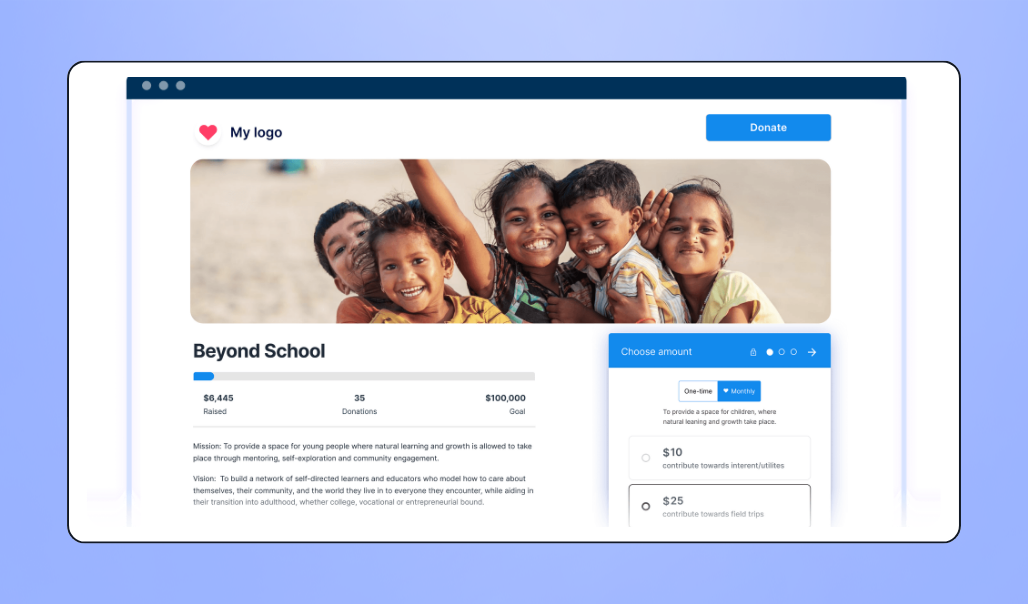
Donors and admins alike appreciate how Donorbox handles the donation experience itself.
Kendra Sloan on Trustpilot shared that switching to Donorbox made it easier to manage donor information and gave her team better visibility into giving behavior. Kyrie Barnes, also on Trustpilot, noted that the secure look and feel of Donorbox's donation pages helped build donor trust in their organization and contributed to repeat giving.
That said, Donorbox’s donor/donation management features have gaps that some users want addressed.
For example:
- Lisa S., an operations manager on G2, mentioned wanting features such as legacy donation options and donor email validation to reduce bounced thank-you notes.
- Daniela G. on G2 flagged that the recurring donation setup can confuse donors who sign up monthly without realizing it, and suggested that Donorbox provide clearer prompts during checkout.
- Cassidy L. on G2 shared that Donorbox’s donor-tracking feature is somewhat limited. Since the platform has limited import/export options, her team often has to use spreadsheets to analyze donors.
3. On fundraising & campaign management 📈
Donorbox also earns high marks for how it handles the actual mechanics of fundraising.
Siim S., a founder and director on G2, praised the platform’s transparent fees, smooth Stripe and PayPal integrations, and reliable performance on WordPress websites. And Amanda White on Trustpilot, whose community arts organization juggles multiple campaigns at once, said Donorbox keeps each one organized with clear, campaign-specific reporting.
Nonprofits also appreciate how speedily Donorbox allows them to access donations.
Lauren L., an executive director on GetApp, shared that her organization works with street children and often faces emergencies needing fast funding, and Donorbox's fast payouts mean they don't have to wait a month for emergency donations to land.
4. Customization & integrations 🎨
While Donorbox is easy to set up, many users (69 reviews on G2 alone in April 2026) complain that its customization and integrations are limited.
For example, Wasseem E., a founder and executive director on G2, shared that Donorbox handles the basics of donation forms and giving well, but deeper customization (like advanced form styling, conditional logic, and complex donor journeys) often requires developer help or workarounds, which slows down campaigns.
On the integration front, Ethan L., a producer on G2, expressed frustration that integrations critical to keeping financial data clean often come with extra costs, even for paying customers.
Sharon E., a marketing manager on G2, complained about both the customization and integration functionalities. She shared that:
- Donorbox’s design options are limited, which makes forms across different organizations look the same (unless you use other platforms to edit them).
- With Donorbox, you may hit a ceiling if you’re trying to create a very specific donor journey or a highly tailored experience.
- Some features and integrations require an upgrade, which can be frustrating for growing organizations that suddenly need more tools not included in lower tiers.
5. On fees 💵
Donorbox’s free plan gets genuine appreciation, particularly from smaller and volunteer-led nonprofits.
Margie E., a board president on G2, shared that Donorbox’s free plan and percentage-based fee structure (rather than a recurring subscription) were a great fit for her volunteer-run organization. Jennifer E. on Software Advice made a similar point, saying that the free tier made the platform accessible during early development and that the transaction fees are competitive.
The paid plans, though, draw a different reaction. 92 G2 reviews as of April 2026 mention pricing as an issue.
Noelle C., an executive director on Capterra, described Donorbox as expensive, given that most nonprofits operate under tight budgets. Wasseem E. on G2 added that Donorbox’s platform and transaction fees scale as donation amounts increase, which may lead larger organizations to start evaluating alternatives.
Other users are simply confused by Donorbox’s pricing system. Daniel Widdis, for instance, shared on Trustpilot that the combined Donorbox and Stripe fees cost him 6% of every donation. He also complained that the available documentation is confusing, as it lists multiple different Stripe rates depending on where you look.
Who is Donorbox best for?
Based on the reviews we looked at and how Donorbox publicly markets itself, here are the organizations that the platform is best suited for:
- Small to mid-sized nonprofits. Donorbox is a great choice for smaller teams because it offers powerful fundraising features with a low entry cost (through the free Standard plan). Non-technical staff can embed donation forms and launch hosted fundraising pages in minutes, which makes it a good fit for organizations without a developer on hand.
- Religious institutions and ministries. Donorbox actively markets to churches and faith-based organizations with tools built for consistent giving. For example, the Recurring Donation Upsell feature encourages one-time donors to switch to monthly or weekly contributions, and the Donorbox Live™ Kiosk turns tablets into giving stations, allowing for easy on-site tithes and offerings.
- Schools and educational institutions. Both K-12 schools and universities use Donorbox for specialized campaigns. The crowdfunding and peer-to-peer fundraising features work well for student-led fundraisers, club sports, or department-specific projects, while the event ticketing tool simplifies the process of selling tickets for school plays, galas, or alumni events.
- Organizations with global or tech-savvy donors. Donorbox integrates with modern payment methods, including Apple Pay, Google Pay, Venmo, PayPal, and even cryptocurrency and stock donations (on Pro and Premium plans). This makes it well-suited for organizations targeting a younger or international audience. Donors can also give in their local currency, which is vital for international relief or journalism-focused nonprofits with global reach.

Considering a Donorbox alternative?
If you're a nonprofit that:
- Has outgrown Donorbox's free plan but doesn't want to pay for Pro or Premium
- Doesn't want to pay extra for CRM features, integrations, or other add-ons
- Wants donor management, fundraising, events, and marketing in one platform
…Givebutter is a top Donorbox alternative.
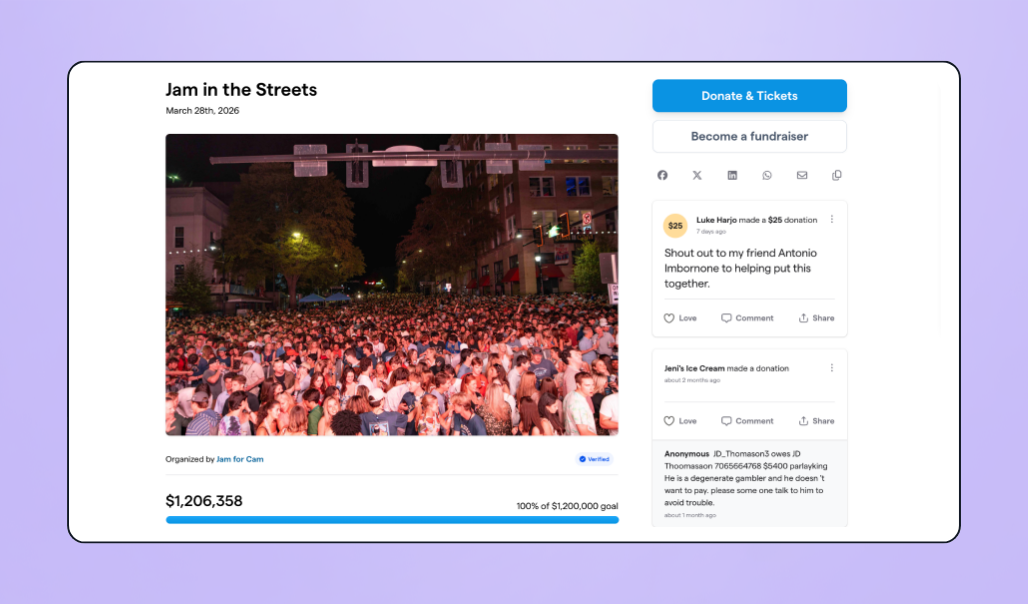
Givebutter is an all-in-one fundraising platform that gives small to midsize nonprofits access to a powerful CRM, donation forms, fundraising pages, event management, auctions, marketing and engagement tools, and payment processing all in one place.
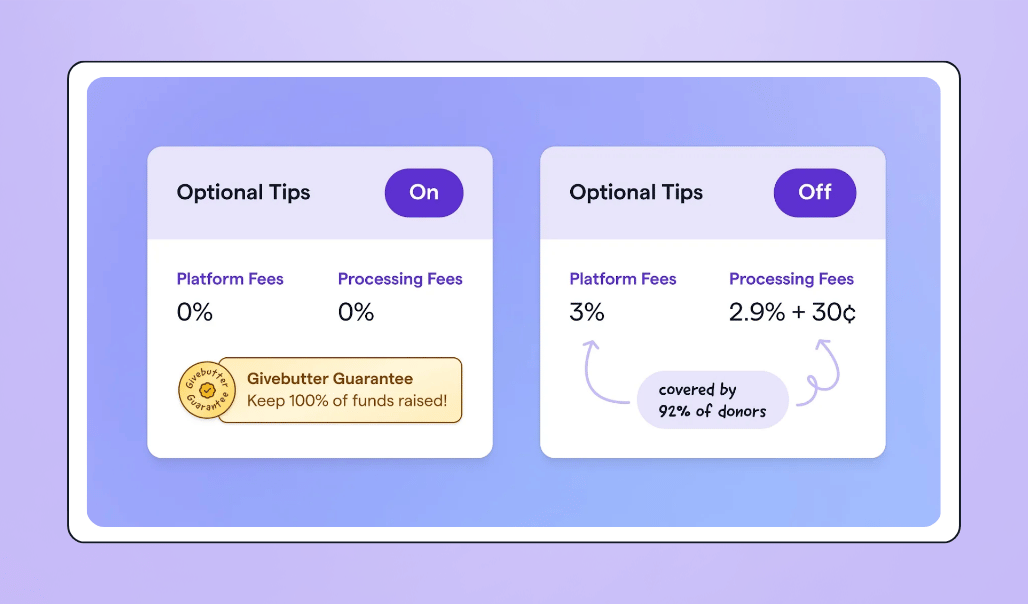
Unlike Donorbox, which offers a limited free plan and paid plans starting at $150 per month (with separate pricing for the CRM and other add-ons), Givebutter's core features are free to use. With optional donor tips are enabled, your nonprofit pays $0 in platform and processing fees thanks to the Givebutter Guarantee.
If you'd rather turn tips off, you can instead pay a flat 3% platform fee plus standard payment processing fees, with the flexibility to pass those fees on to donors, make them optional, or cover them yourself.
Organizations also switch to Givebutter for its all-in-one platform. As Stephanie L., Fund Director & VP of Development at The Catherine Peachy Fund, explains:
"We needed a CRM, an online fundraising platform, and a vehicle for our online auction. Givebutter provided one-stop shopping for all of these needs, as well as flexible payment options”
💡 Already on a different CRM or juggling a patchwork of tools?
Switching platforms doesn't have to mean losing your donor history or rebuilding your database from scratch. Givebutter's self-service import tools let you bring over your contacts and historical donations, and even migrate active recurring gifts from supported Stripe-powered platforms like Donorbox. Automatic field mapping, duplicate detection, and import templates help you get up and running quickly.
So, is Donorbox the right fit?
Donorbox is a solid pick for nonprofits that want easy-to-embed donation forms, recurring giving, and a free plan to start with. Reviews show it works especially well for small to mid-sized teams, churches, schools, and organizations with global donors. However, users pointed out that Donorbox offers limited customization, integrations that come with extra costs, and paid plans that get pricier as donation volume grows.
Now, you've got what you need to decide whether Donorbox fits your nonprofit's setup and budget.
If you're still weighing your options, see how Givebutter compares with Donorbox. And if it sounds like the better fit, sign up for a free Givebutter account and start fundraising in minutes.
FAQs
1. Is Donorbox actually free? 💸
Donorbox offers a free Standard plan with no monthly fee, but transaction fees still apply. The platform charges between 2.95% and 3.95% per donation (depending on the feature), plus payment processing fees from Stripe or PayPal.
This differs from Givebutter’s model, which gives you access to our donor CRM and the entire suite of fundraising tools for free when you enable donor tips. Thanks to the Givebutter Guarantee, you keep 100% of the money you raise.
2. Does Donorbox integrate with other nonprofit tools? 🔌
Donorbox integrates with fundraising tools like Double the Donation and The Giving Block, along with several other tools nonprofits commonly use:
- CRMs: Salesforce, HubSpot, Little Green Light, Neon One
- Payment processors: Stripe, PayPal
- Data tracking & analytics tools: Google Analytics, Meta Pixel
- Marketing tools: ActiveCampaign, Mailchimp
- Web platforms: WordPress, Squarespace, Shopify, Wix
- Zapier, which connects Donorbox to thousands of other platforms
3. How does Donorbox handle recurring donations? 🔁
Donorbox lets donors set up recurring gifts on a weekly, monthly, quarterly, or annual basis directly from a donation form.
The platform also includes a recurring donation upsell feature on Pro and Premium plans, which prompts one-time donors to convert their gift into a recurring contribution at checkout. Many reviewers credit this feature with helping them grow steady, predictable revenue from their existing donor base.
4. How does Donorbox compare to GoFundMe? ⚖️
Donorbox is a fundraising platform built specifically for nonprofits, with embeddable donation forms, recurring giving, and tools for ongoing fundraising. GoFundMe is primarily a crowdfunding platform geared toward personal causes and one-time campaigns, though it does have a separate offering for charities.
The two serve different needs, with Donorbox better suited for nonprofits running ongoing fundraising programs. For a deeper breakdown, see our full Donorbox vs. GoFundMe comparison.
5. What are the best Donorbox alternatives? 🔄
Common Donorbox alternatives include Givebutter, GoFundMe Pro (formerly Classy), Bloomerang, and Funraise, each with distinct strengths depending on your nonprofit's needs. Givebutter, however, tends to top the list for all-in-one fundraising, since it combines donation forms, events, auctions, marketing tools, and a CRM in a single free platform.
Share this article


.webp)





.svg)
.svg)


