.svg)
.svg)
.svg)
.svg)
.svg)
.svg)
.svg)
.svg)
.svg)


.svg)
.svg)
.svg)
.svg)
.svg)
.svg)
.svg)
.svg)

.svg)
.svg)
.svg)

.svg)

.svg)
.svg)
.svg)
.svg)
.svg)


.svg)
.svg)
.svg)
.svg)
.svg)
.svg)
.svg)




.svg)


%20(1).png)

Givebutter is ranked #1 on G2 for nonprofit CRM. Yet many think of it as "just fundraising software."
In fact, when organizations start evaluating Givebutter more seriously, they often ask some version of the same question: "But can it function as a full-fledged CRM?"
We get it. The nonprofit software space is crowded with tools that promise the world only to deliver half-baked features, hidden costs, and complexity. So when someone wonders whether Givebutter's CRM is actually effective—or just something bolted onto a fundraising platform—their skepticism is fair.
Here's the short answer: Yes, Givebutter is a full CRM built specifically for nonprofits.
The caveat, however, is that it's not necessarily a fit for all nonprofits.
Read on for the full picture. You'll learn:
- What Givebutter's CRM actually does
- The biggest myths about Givebutter's CRM
- Who Givebutter CRM is a great fit for (and who it isn't)
- How to switch to Givebutter without stress or data loss
But first…
Givebutter vs. Givebutter Plus: What's the difference?
Here's a table outlining the differences between Givebutter's free platform and its paid version, Givebutter Plus.
💡Givebutter gives nonprofits everything they need to run their fundraising operations, completely free, while Givebutter Plus is an optional upgrade for teams that also need workflow automation, task management, advanced email marketing, and deeper reporting.
For example, if you're currently paying for a separate tool like Mailchimp or Constant Contact, Plus often consolidates everything into one platform at a lower cost.

Why so many nonprofits still run on fragmented tech stacks
In January 2026, Givebutter conducted a survey on nonprofit predictions. One of those predictions was that most nonprofits would stick with a mix of specialized tools rather than move to an all-in-one platform in 2026.
39.6% of respondents agreed, and 41.3% said they weren't sure. Only 19.1% disagreed.
The reality is that many nonprofits today use a CRM separate from their fundraising software. And while that system may work okay, it can quickly become expensive.
A typical small nonprofit running Bloomerang, Mailchimp, Eventbrite, and a texting tool can easily spend $2.7K–$5K+ per year. With Givebutter, you get a CRM, donation forms, campaigns, events, and more, all in one place, for free. Need more? Givebutter Plus layers in workflow automation, text messaging, and advanced donor insights without adding another subscription to the pile.
However, nonprofits aren't hesitant to switch because they enjoy juggling tools. The real barrier is inertia. Switching platforms feels risky when your organization has no room for costly mistakes.
In our webinar discussing the survey results, fundraising expert Michael Mitchell noted that switching systems can be a herculean task, especially for larger nonprofits managing significant data and multiple programs. When change feels risky, sticking with the current setup often feels safer.
What Givebutter's CRM actually does (& what's changed)
The CRM you're evaluating today is not the same product people reviewed 12 months ago.
Givebutter has been and continues to actively invest in CRM functionality. In 2025 alone, it shipped 180+ new features, like Cash App and Givebutter Wallet. It has also expanded the public API to support deeper integrations.
It's more robust, more connected, and built with long-term growth in mind.
Here's what Givebutter's CRM includes today:
1. Centralized donor profiles 🗂️
Givebutter stores unlimited contact records with detailed donor profiles. Each profile consists of:
- Contact information
- Complete giving history (online and offline)
- Event attendance and ticket purchases
- Email engagement data
- Recurring donation plans
- Internal notes and activity logs
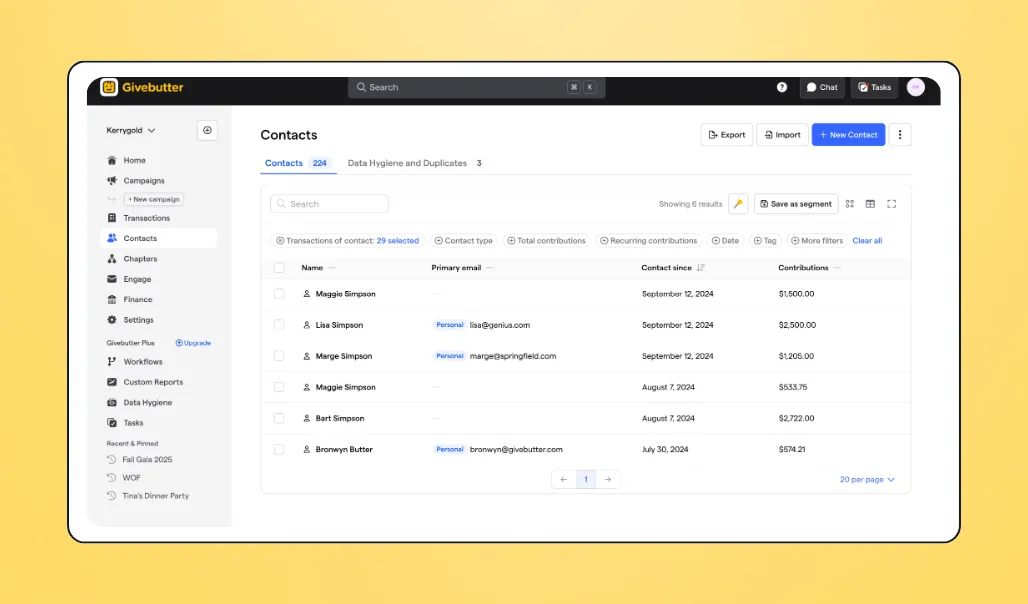
Every contact has a clear, chronological timeline that shows key moments, like donations, campaign participation, outgoing emails, ticket sales, and more. So instead of exporting spreadsheets to see the full picture, you can see it all at a glance.
Nonprofits can also track corporate relationships using dedicated company contact records. Each company gets its own profile, where you can link individual contacts, designate a primary point of contact, and keep your segmentation and reporting clean.
2. Donor segmentation 🏷️
Givebutter makes it easy to organize and find the right donors at the right time with donor segmentation.
You can apply custom tags such as "Board Member," "Volunteer," "VIP," or "Alumni" to categorize supporters in ways that reflect how your organization actually operates.
Built-in and custom filters also allow you to sort contacts by donation amount, last gift date, campaign participation, recurring status, and more. From there, you can build smart segments such as:
- Lapsed donors
- First-time donors
- Monthly supporters
- Event-only attendees
- Smart filters
- Contact insights
These segments can be saved and reused, exported when needed, or used directly for outreach.
3. Households & relationships 👥
Donors don't exist in isolation. Spouses give together, families attend events as a unit, and board members are tied to businesses that sponsor your work.
Givebutter CRM lets you link contacts to households and define relationships between individuals and organizations. You can view shared giving totals at the household level, track joint donations accurately, and understand how supporters are connected.
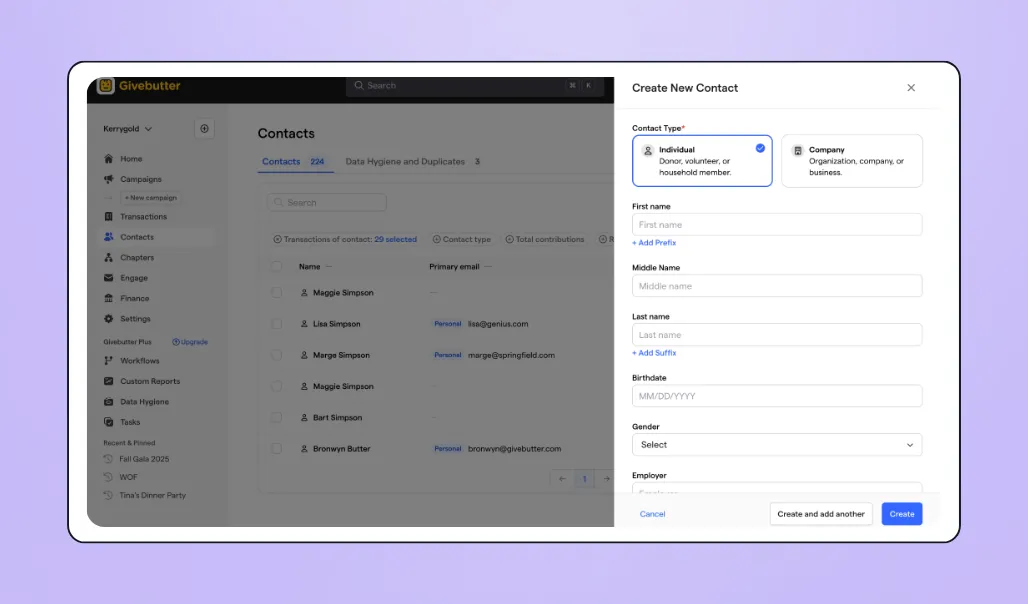
This reduces duplicate records, prevents awkward communication mistakes (like sending duplicate appeals to spouses), and helps your team approach relationship-building more thoughtfully.
4. Transaction management 💳
The Givebutter CRM automatically tracks every donation and ticket transaction.
You can:
- Customize and automate donation and ticket receipts
- Resend receipts instantly
- Issue refunds directly from the platform
- Record offline gifts (checks, cash, corporate matches)
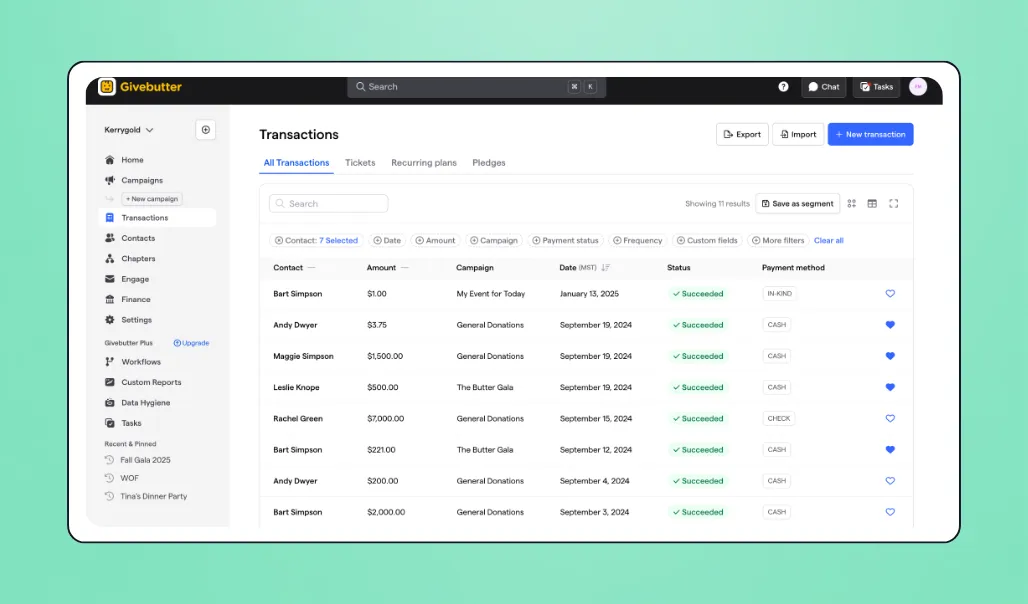
All transaction details, including payout information, are visible in the CRM, making reconciliation easier.
5. Wealth screening
Givebutter CRM allows you to access wealth screening insights directly within a contact profile through its native integration with DonorSearch.
That means you can evaluate their giving capacity, philanthropic history, and other relevant data without exporting your list to another vendor. Although you will need an active paid DonorSearch account, as it is not automatically available by signing up for Givebutter.
This helps you know which donors to prioritize and tailor conversations more strategically.
6. Pledges, matching gifts, & sponsorships 🤝
Givebutter CRM allows you to log and manage donation pledges, matching gifts, and sponsorship commitments directly within a donor's profile.
You can create secure payment portal links for pledged amounts, set up custom installment schedules, and track fulfillment over time. This makes it easier to manage larger commitments without relying on spreadsheets and ensures nothing slips through the cracks when it's time to collect.
7. Marketing & communication tools 📣
Givebutter's free nonprofit marketing tools cover more ground than most standalone paid platforms.
You get a built-in email editor with branded templates, merge fields, and conversion tracking, plus contact segmentation, automated thank-yous and receipts, one-click social sharing, auto-generated QR codes, a native Canva integration, and even direct mail.
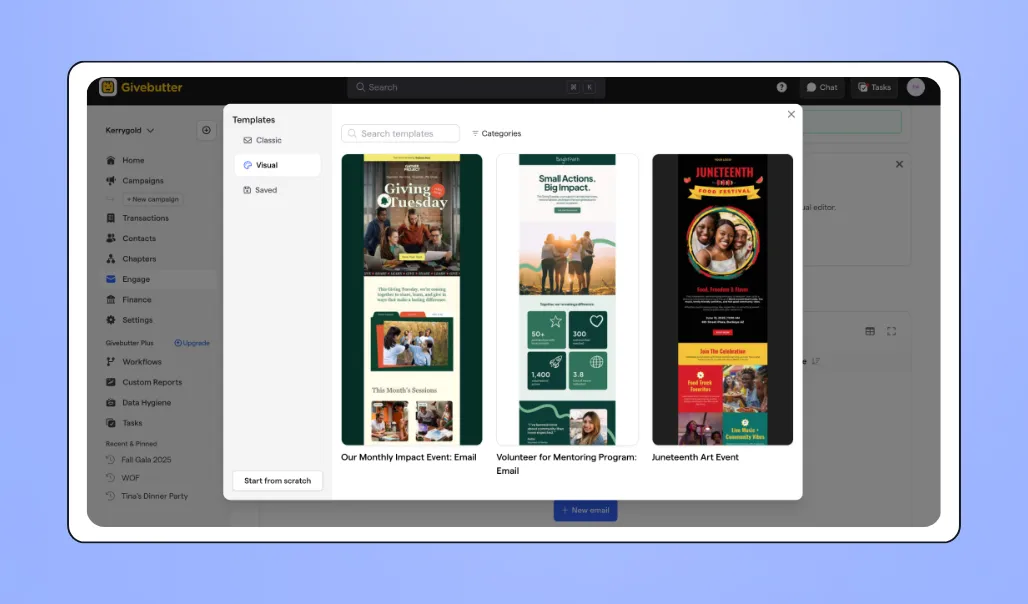
Givebutter Plus unlocks an advanced drag-and-drop email editor.
It also includes a texting tool for SMS outreach and discounted direct mail capabilities, so you can send physical mail to donors, all without exporting lists or juggling multiple tools.
8. Workflow automation & task management ⚙️
Givebutter Plus also provides workflow automation and task management—features that many smaller CRMs don't offer natively.
Since Givebutter CRM already stores donation, event, and engagement data, you can automate actions based on real supporter behavior, including:
- Sending a welcome email series
- Setting up a dynamic email workflow that sends things based on the action the donor takes
- Notifying a team member when a major gift comes in
- Automatically tagging donors after attending an event
- Triggering outreach to lapsed supporters
The task management feature allows you to assign tasks to team members, set due dates, track progress, and ensure follow-ups are sent at the right time.
9. Reporting & analysis 📊
Givebutter CRM provides practical reporting tools to generate exportable transaction reports, payout reconciliation summaries, and end-of-year giving statements.
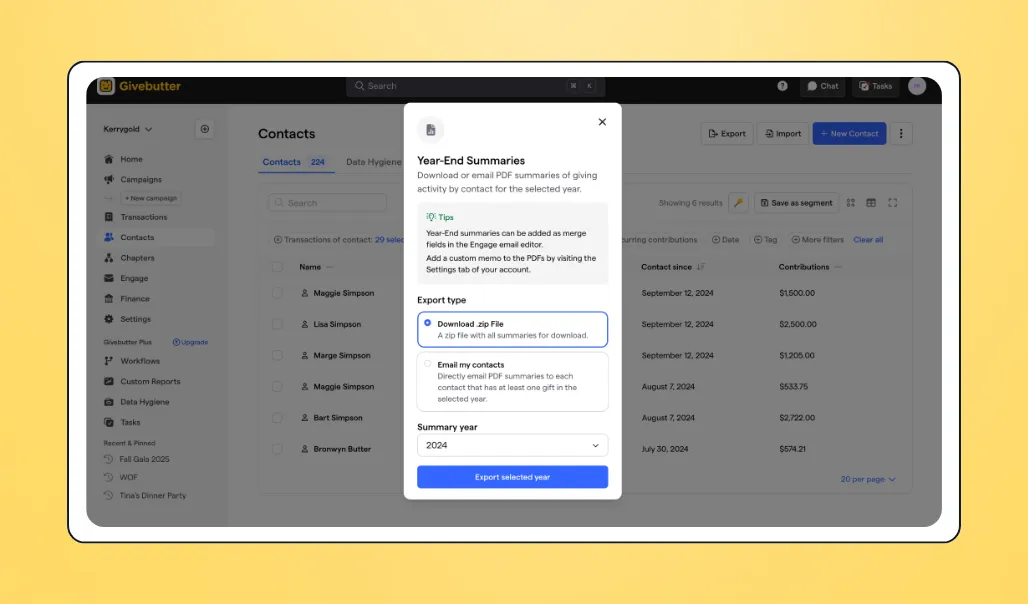
You can view giving summary charts that show how much an individual and a household have given this year, last year, or all time, making it easy to prepare donor updates and reports.
Is it Salesforce-level reporting with fully custom dashboards and complex data modeling? No.
But 90%+ of small-to-mid-size nonprofits don't need Salesforce-level reporting. They need clear, accessible reports that leadership can understand and actually use, without hiring a database administrator. Givebutter CRM provides that.
The 8 biggest myths about Givebutter as a CRM—debunked
There's a reason the question, "Is Givebutter a real CRM?" keeps coming up. When a platform is known for fundraising, it's easy to assume the CRM is secondary.
Let's address the most common myths about Givebutter directly.
Myth 1: "It's just a fundraising tool with a list of names." 📊
Reality: Givebutter is a full-scale CRM that automatically creates and updates supporter profiles based on every interaction. It tracks unlimited contacts, complete transaction histories, engagement timelines, recurring plans, event attendance, and more, without manual data entry. Every donation, ticket purchase, and email is stored in a structured contact record.
Myth 2: "It can't handle complex donor relationships." 👥
Reality: Givebutter supports households and company contacts, allowing you to track relationships between individuals, families, and businesses. It also includes soft credits so donations can be attributed to the right influencers, along with pledge management for tracking multi-year commitments and sponsorships.
Myth 3: "You need Givebutter Plus to access the CRM." 💸
Reality: Givebutter's CRM is completely free, and that's not changing. Every nonprofit gets unlimited contact records, full giving histories, engagement timelines, and all core CRM features at no cost. Givebutter Plus adds workflow automation and task management on top of that, but the CRM itself has always been, and will always be, part of the free product.
Myth 4: "It lacks automation & advanced workflows." ⚙️
Reality: Givebutter Plus includes workflow automation and task management to reduce repetitive work. You can automate email sequences, tag donors based on behavior, notify staff about major gifts, trigger outreach to lapsed donors, and assign follow-up tasks to your team. You can also schedule custom reports to be delivered directly to your inbox.
Myth 5: "Reporting is too basic for board-level insights." 📈
Reality: Givebutter offers smart segmentation with custom filters (e.g., identifying donors who gave $1K+ last year but not this year) and giving summary charts that show contributions by individuals and households. Saved segments provide one-click access to priority groups, and the native DonorSearch integration helps you understand your donors' giving potential.
Myth 6: "It doesn't play well with other professional tools." 🔗
Reality: Givebutter is designed to be a fundraising home base, with powerful integrations for apps like Double the Donation, Canva, Meta Fundraising, QuickBooks Online, and more. Through Zapier, it connects to thousands of additional apps, allowing data to flow across your broader tech stack without manual exports.
Myth 7: "Switching to Givebutter is a data migration nightmare." 🚚
Reality: Givebutter makes it easy to migrate from another platform with a self-serve data extraction process that securely transfers your donor records and historical data in about 3 days. We also offer hands-on support for organizations with more complex migration needs.
Myth 8: "Free means limited." 💸
Reality: Givebutter's business model doesn't involve stripping features for a "Lite" tier. The free version includes nearly every tool most nonprofits need to operate professionally, including a CRM, household grouping, automated receipts, and a mobile app for on-the-go donor management.
It stays free by giving donors the option to leave a small tip to cover platform costs. And if they choose not to tip, we cover those costs as long as optional tips are enabled.
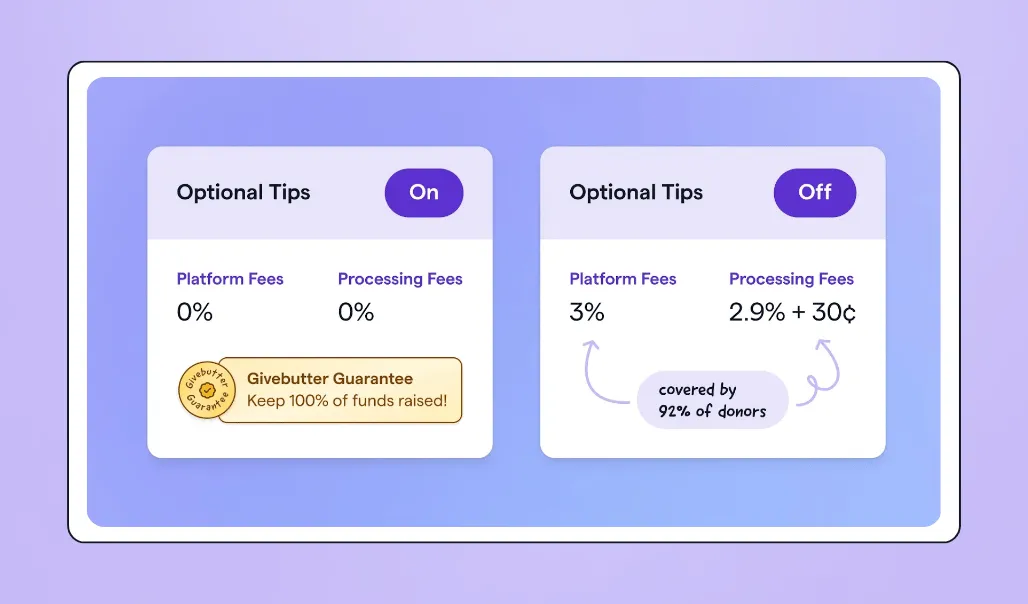
Givebutter Plus, which provides additional tools for organizations looking to take their donor management to the next level, starts at $29/month for 250 contacts and adds workflow automation, task management, advanced email tools, texting, direct mail, and more, without locking core CRM functionality behind enterprise pricing.
Who should (& shouldn't) switch to Givebutter's CRM
The Givebutter CRM is powerful and it's built for nonprofits of all sizes. Here's who most commonly benefits from Givebutter's CRM most.
1. Small to mid-size nonprofits consolidating multiple tools
Givebutter is ideal for organizations currently using multiple disconnected tools, like PayPal or Venmo for donations, Eventbrite for events, and Mailchimp for email.
When your stack is fragmented like this, donor data gets scattered across platforms, and it's easy for information to slip through or get lost entirely.
Givebutter consolidates these tools into one platform, so every transaction, interaction, and communication flows into the same donor record automatically. This consolidation can save hours every week and thousands of hours per year.
2. Event-driven organizations
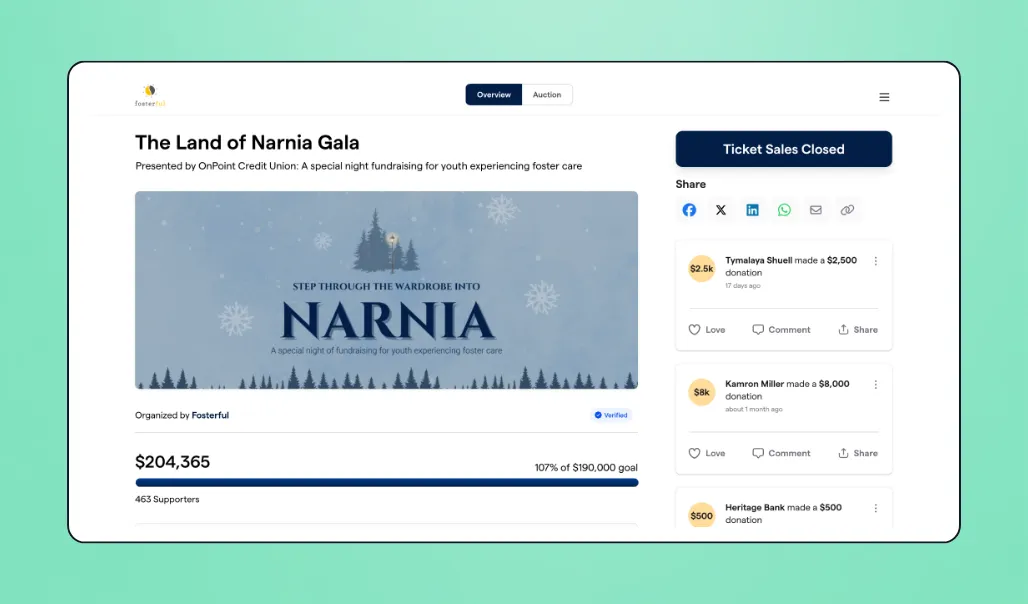
Nonprofits hosting 150–500-attendee events, such as annual galas, auctions, or peer-to-peer campaigns, will benefit from Givebutter. The CRM connects directly to ticketing, registration, sponsorships, and donor tracking, so event data flows automatically into supporter profiles.
3. Organizations seeking simplified data management
Givebutter works well for nonprofits who want:
- Automatic contact profile creation from donations
- Data hygiene tools to maintain clean lists
- Activity feeds that track every donor interaction
Instead of manually updating records, interactions flow directly into the CRM.
4. First-time CRM buyers graduating from spreadsheets
Managing donor data in spreadsheets means manual updates, version confusion, and limited visibility into giving history.
Givebutter centralizes everything, including donations, emails, events, and notes, into structured, searchable profiles. It's significantly more robust than spreadsheets, but easier to navigate.
5. Teams where staff adoption—not feature depth—is the bottleneck
Givebutter is designed to be intuitive. Most teams can get started in minutes, not weeks, and without technical training. If questions come up, there's a comprehensive help center with documentation, plus 24/7 support via live chat and email, even on holidays.
6. Budget-conscious organizations paying for tools they've outgrown
Maintaining multiple subscriptions adds up quickly, especially when those tools don't scale well together.
Givebutter consolidates CRM, fundraising, events, auctions, email, and more under one roof. And as your supporter base and campaigns grow, Givebutter grows with you—from the free core tools to Givebutter Plus.
Who Givebutter CRM is not the right fit for (yet) 🚫
Here are the organizations Givebutter CRM isn't the best fit for just yet:
1. Organizations using Salesforce as their source of truth
If your nonprofit relies on deep Salesforce integrations, highly customized dashboards, and complex cross-system data architecture, switching to Givebutter may not be the best decision right now.
2. Nonprofits that need enterprise-grade grant management today
If grant applications and tracking are central to your fundraising strategy, Givebutter may not yet fully meet that need. Grant tracking is on our 2026 roadmap, but it's not a full-fledged feature just yet.
3. Very large organizations with complex multi-entity hierarchies and dedicated database staff
Nonprofits managing tens of thousands of contacts across multiple chapters, programs, or legal entities—often with full-time database administrators—may require deeper customization and infrastructure than Givebutter currently offers.
How to switch to Givebutter CRM without losing your mind (or your data)
Let's be honest: Migrating from one nonprofit CRM to another has historically been a nightmare. It can take months, involve endless CSV exports, field mapping, and manual cleanup, and sometimes lead to incomplete records, mismatched fields, or missing historical data.
Givebutter's Magic Migration makes that process significantly simpler. We offer a self-serve data migration process that lets anyone on your team migrate data from platforms such as Bloomerang, DonorPerfect, Little Green Light, and Constant Contact. Most transfers are completed in around three days. For organizations with more complex migration needs, we offer hands-on support.
Because Givebutter combines your CRM, fundraising tools, email marketing, and event management in one place, your team spends less time getting up to speed and more time actually using it.
If you're already using Givebutter for fundraising campaigns, you can migrate your full donor history into the CRM to get a complete picture of every supporter, including contacts that may have come in through other platforms.
The bottom line: Is Givebutter the right CRM for your nonprofit?
If you came into this wondering whether Givebutter is actually a CRM, the short answer is yes. Givebutter is a purpose-built nonprofit CRM with donor profiles, segmentation, automation, reporting, and built-in fundraising tools, all in one place.
It's not designed for every large, highly complex organization. But for small-to-mid-size nonprofits tired of juggling disconnected systems, rising software costs, and manual data entry, it's more than capable.
If you're ready to simplify your tech stack and put your donor data to work, start a free Givebutter account or explore Givebutter Plus.

Try Givebutter's CRM for free
FAQs
Is Givebutter a real CRM for nonprofits?
Yes. Givebutter is a purpose-built nonprofit CRM that stores unlimited contact records, tracks giving history, manages households and relationships, and supports segmentation, reporting, and communication. Every campaign, donation, ticket, and interaction automatically updates structured supporter profiles inside the CRM.
Can Givebutter replace Bloomerang?
For many small-to-mid-size nonprofits, yes. If your organization uses Bloomerang primarily for donor management, segmentation, reporting, email communication, and event tracking, Givebutter consolidates those functions into one platform. This reduces both software costs and administrative overhead.
How does Givebutter handle data migration from another CRM?
Givebutter offers a self-serve data migration process that allows anyone on your team to securely transfer donor records, giving history, and campaign data from platforms like Bloomerang, DonorPerfect, Little Green Light, and Constant Contact. Most transfers are completed in around three days. For more complex migration needs, we offer hands-on support to make sure everything transfers accurately.
Is Givebutter's CRM free?
Yes. Givebutter's core CRM is free, supported by our tip-or-fee model. Nonprofits can store unlimited contacts, track donations, and manage campaigns without platform fees, provided that optional donor tips are enabled. The CRM is a full product on its own and doesn't require an upgrade to be useful.
For teams that want to go further, Givebutter Plus starts at $29/month and adds workflow automation, task management, enhanced email tools, outbound texting, and discounted direct mail on top of everything Givebutter already offers.
Share this article






.svg)
.svg)