

.svg)
.svg)
.svg)
.svg)
.svg)
.svg)
.svg)
.svg)
.svg)


.svg)
.svg)
.svg)
.svg)
.svg)
.svg)
.svg)
.svg)

.svg)
.svg)
.svg)

.svg)

.svg)
.svg)
.svg)
.svg)
.svg)


.svg)
.svg)
.svg)
.svg)
.svg)
.svg)
.svg)





.svg)



%20(1).png)

You'd be hard-pressed to find someone who hasn't heard of GoFundMe. Plenty have used it themselves as it was built for individual fundraising.
Donorbox, by contrast, has always been a nonprofit-first platform. GoFundMe has actually had a presence in the nonprofit space for a while too—but that presence has become more formal in recent years with offerings like GoFundMe Pro and its acquisition of Classy.
Now, nonprofits have more to weigh than ever when deciding which platform is best positioned to help them raise more for their cause.
Both have their strengths. But "well-known" and "right for your organization" aren't the same thing. This guide breaks down Donorbox vs GoFundMe across features, pricing, and ease of use—and introduces a third option for nonprofits who want an all-in-one platform and CRM without the platform fees.
Donorbox vs. GoFundMe overview
Donorbox caters to nonprofits with embeddable donation forms and recurring giving options, while GoFundMe runs two distinct products: a consumer platform for personal campaigns and GoFundMe Pro, a separate nonprofit-focused product with more advanced features.
Here's how Donorbox and GoFundMe stack up:

Donorbox at a glance 🔍
Donorbox launched in 2014 to give nonprofits an easy way to add a donation form to their website. The platform offers embeddable donation forms, recurring giving options, and a checkout flow designed to reduce donor drop-off.
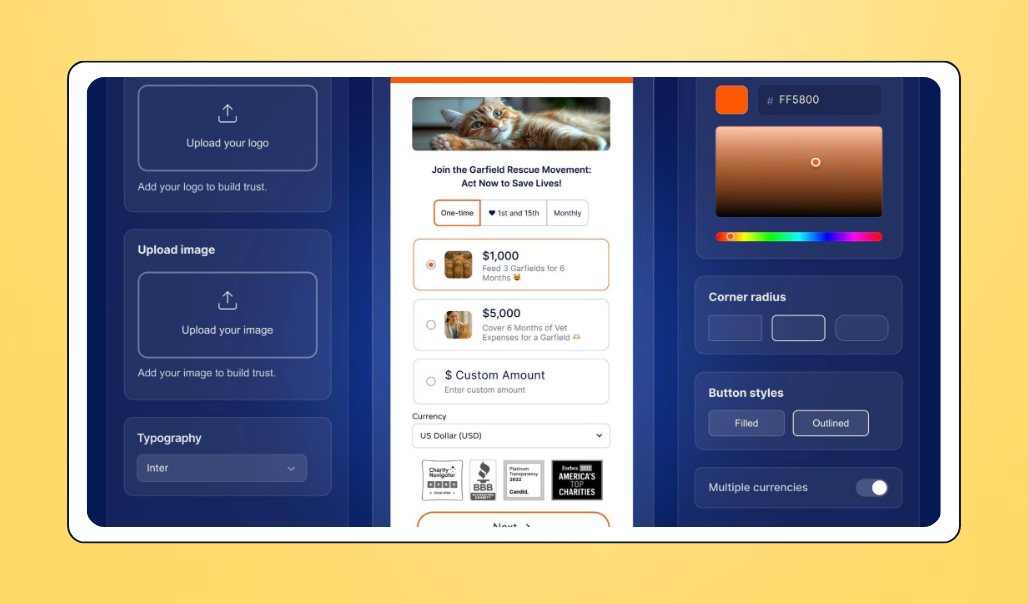
Over the years, Donorbox has expanded beyond donation forms. It now offers peer-to-peer fundraising, events and ticketing, text-to-give, memberships, and a donor CRM for tracking gifts and contacts.
Donorbox has a free plan with transaction-based platform fees, plus two paid tiers (Pro and Premium) that lower those fees and unlock additional features. Many small nonprofits start on the free plan and upgrade as their donation volume grows.
GoFundMe at a glance 🔍
GoFundMe was founded in 2010 as a consumer crowdfunding platform for personal campaigns, such as medical bills, memorial funds, and community causes. It's grown into one of the most recognized fundraising names globally, with millions of campaigns launched on the platform.

Today, GoFundMe operates two separate products:
- GoFundMe (consumer platform): Built for individual organizers and grassroots fundraisers. There's no monthly fee or platform fee for donations, though processing fees and donor tips apply.
- GoFundMe Pro: A nonprofit-focused product, formerly known as Classy before GoFundMe acquired it in 2022. It includes advanced features like live events, auctions, peer-to-peer campaigns, recurring giving, and CRM integrations, and is geared toward established nonprofits running multi-channel fundraising programs.
Donorbox vs. GoFundMe: Feature-by-feature comparison
Let's break down how Donorbox stacks up against GoFundMe across usability, fundraising features, reporting, and customer support.
Ease of use & setup 🚀
With a 4.6/5 rating on G2, Donorbox is consistently praised for making it easy for nonprofits to launch donation campaigns without technical help.
Wasseem E., an executive director, noted on G2 that the embedded forms were straightforward to customize and integrated smoothly with his website. Siim S., a founder, also shared on G2 that the donation forms looked clean and professional, and he was able to start accepting donations quickly with no technical overhead.
GoFundMe also proves easy to use. For example, Zoe D., a student reviewing on Capterra, mentioned that the consumer platform can feel a bit intimidating when you're new to it. But reviewers found GoFundMe Pro easier to set up.
Connor K., a program coordinator, shared on G2 that once he got acclimated, the GoFundMe Pro platform was straightforward to use, especially for managing event pages and tracking ticket sales.
- Choose Donorbox if you want to launch a donation form fast without technical help
- Choose GoFundMe if you're running a personal or community campaign and don't mind a short learning curve
- Choose GoFundMe Pro if your team has the time to ramp up on a more feature-rich nonprofit platform
Fundraising tools 🧰
Both platforms cover the fundraising basics, but they take different approaches.
Donorbox's free plan gives nonprofits unlimited and customizable donation forms and pages, crowdfunding campaigns, peer-to-peer campaigns, and event ticketing. As nonprofits scale, they can upgrade to unlock features like advanced form customization, crypto and stock donations, and recurring donation upsell.
Users especially love the recurring donation upsell feature, with Amy B., a reviewer on Trustpilot, sharing that this feature led to more supporters choosing to give monthly without her having to follow up.
GoFundMe’s products have different fundraising setups:
The consumer platform is built for individual crowdfunding campaigns, where a single page collects donations, and supporters share the link to spread the word. There are no embeddable donation forms or recurring giving options for nonprofits.
GoFundMe Pro is built for nonprofits, with tools for event ticketing, live events, peer-to-peer, recurring donations, and corporate giving, all of which Lauren A. on G2 says have helped her organization raise funds.
- Choose Donorbox if you want fundraising tools embedded directly into your nonprofit's website
- Choose GoFundMe if you're running a personal or community campaign and want to tap into its global audience
- Choose GoFundMe Pro if you're running events, auctions, and peer-to-peer fundraising alongside crowdfunding
Donor and donation management 📋
Donorbox has a CRM that allows users to organize donor records and cultivate relationships. Kendra S. shared on Trustpilot that switching to Donorbox made it easier to manage donor information in one place, which helped her team better understand donor behavior and build stronger relationships.
For payouts, Amanuel, a reviewer on G2, noted that Donorbox has swift payout times, which mattered to him given how slowly other platforms had moved funds in the past.
However, user Greg B., on G2, reported frustration that Donorbox doesn’t facilitate payments on its own and found it difficult to get payment set up.
GoFundMe doesn’t include a native CRM. So, unless users integrate a separate CRM, they can’t deeply manage donor information and communication on the platform.
- Choose Donorbox if you want to manage donor records and receive donations in a single system.
- Choose GoFundMe Pro if you already have a donor CRM and only need a fundraising tool to run campaigns.
Reporting & analytics 📊
Both platforms offer reporting tools, but the depth varies, with GoFundMe Pro generally going the deepest.
Donorbox covers the basics with built-in reports for donations, recurring giving, campaign performance, and donor activity. However, some reviewers, such as Wasseem E., note that features like custom report building, cohort analysis, and advanced filtering would reduce the need to export data elsewhere.
GoFundMe's consumer platform keeps reporting simple, showing organizers the donation activity, donor names, and amounts on the campaign dashboard.
GoFundMe Pro goes much further by providing campaign analytics, donor records, and reporting tools built for nonprofit fundraising. Daniela H. shared on G2 that her organization uses Pro to compile donation records and pull analytics on top-performing campaigns to track progress toward their goals.
- Choose Donorbox if you need standard reporting on donations, recurring giving, and campaigns.
- Choose GoFundMe if you only need a basic view of campaign activity and donor names.
- Choose GoFundMe Pro if you want deeper analytics to track campaign performance and fundraising goals.
Customer support 💬
Donorbox earns a lot of praise for its support team. Noah W., a reviewer on Trustpilot, shared that the team has been responsive and walks customers through solutions step by step, giving nonprofits confidence to launch more ambitious campaigns.
Reviewers also appreciate the free resources the team makes available, with Kelly M. writing on Trustpilot that the resources Donorbox provides for free are valued across the nonprofit community.
GoFundMe's support reviews were also largely positive.
On the positive side, Sarah S. said on Trustpilot that she appreciated being able to chat with a real person who worked out a solution to her issue. Stephanie K. shared a similar experience on Trustpilot, where two support agents helped her resolve a frustrating issue she couldn't solve through the default AI chat.
- Choose Donorbox if responsive support and free educational resources are important to your team.
- Choose GoFundMe if you're comfortable with a mix of self-serve, AI chat, and live support depending on the issue.
Donorbox vs. GoFundMe: Pricing breakdown
Pricing is one of the most important differences between these two platforms. We don't mean the cost alone, but how transparent they are about it and how layered the fees can get.
Donorbox pricing 💵
Donorbox offers three plans:
- Standard plan: Free, with platform fees between 2.95% and 3.95%
- Pro plan: $150/month, with platform fees between 1.75% and 2%
- Premium plan: Custom pricing, with platform fees between 1.6% and 2%
On top of platform fees, you'll pay processing fees through your payment provider. These vary based on the payment method donors choose:
- Stripe (cards and digital wallets): 2.2% + $0.30 per transaction
- Stripe (ACH bank transfers): 0.8%, capped at $5 per transaction
- Stripe (other payment methods): Between 80¢ and 1.6% + $0.30, depending on the method
- PayPal (non-AMEX): 1.99% + $0.49 per transaction
📝 Note: PayPal rates for AMEX may differ, and Stripe processing rates can shift depending on the payment method. It’s worth factoring in if your donors use a mix of payment options.
Donorbox add-ons and other costs ➕
A few things to know about Donorbox's plans:
- Donorbox CRM isn't included in any plan. To use it, you'll need to contact the sales team for pricing.
- Text-to-give isn't part of the Standard or Pro plans. It costs $19/month on the Free plan, and $50/month for a custom keyword.
- Donorbox Live™ Kiosk costs $80/month (or $820/year) for Standard and Pro plan users, and $50/month for Premium plan users.
The Live Kiosk also has its own fee structure. The platform fee drops to 1.75%, and Stripe processing comes in at 2.7% + $0.05 per transaction, which differs from the regular plan rates.
💡 Pro tip: Donorbox lets you give donors the option to cover processing fees at checkout, so your nonprofit receives the full donation amount at no extra cost.
GoFundMe pricing 💵
- GoFundMe's consumer platform is free to set up a fundraiser, with no monthly fee and no platform fee on donations. Organizers pay a processing fee of 2.9% + $0.30 per transaction.
- GoFundMe Pro pricing isn't publicly listed. To get an accurate cost for your organization, you'll need to request a demo directly from the GoFundMe Pro team.
That lack of pricing transparency is worth factoring into your evaluation. If you're on a tight timeline or budget, going through a sales call just to get a quote adds friction to your decision-making process.
Donorbox vs GoFundMe: Which should you choose?
The right choice depends on how your nonprofit fundraises, who your donors are, and what you need from the platform day-to-day. Here's a quick way to decide.
Choose Donorbox if:
- You need a nonprofit-first tool with flexible, embeddable donation forms, strong recurring giving options, and multi-currency support.
- You're comfortable managing platform and processing fees that scale with your donation volume.
- You'd rather pay add-on costs for features like text-to-give or Live Kiosk as you grow into them.
- A clean, self-serve dashboard matters more to you than enterprise-level customization.
Choose GoFundMe (consumer platform) if:
- You're running a one-time personal or emergency campaign and need zero-setup fundraising.
- You want to tap into a widely recognized brand and built-in social sharing to spread the word.
- You don't need embeddable forms, recurring giving, or deeper nonprofit reporting.
Choose GoFundMe Pro if:
- You're a larger nonprofit with the budget and bandwidth for a custom contract.
- You need tools for event management, auctions, and peer-to-peer fundraising at enterprise scale.
- You're running multi-channel fundraising programs and want to manage them all under one roof.
- Your team can dedicate time to onboarding and ramp-up.
A third option worth considering: Givebutter
If neither Donorbox nor GoFundMe quite hits the mark (maybe the layered fees feel hard to plan around, or the missing CRM is a dealbreaker, or you just don't want to sit through a sales demo), Givebutter is worth a look.
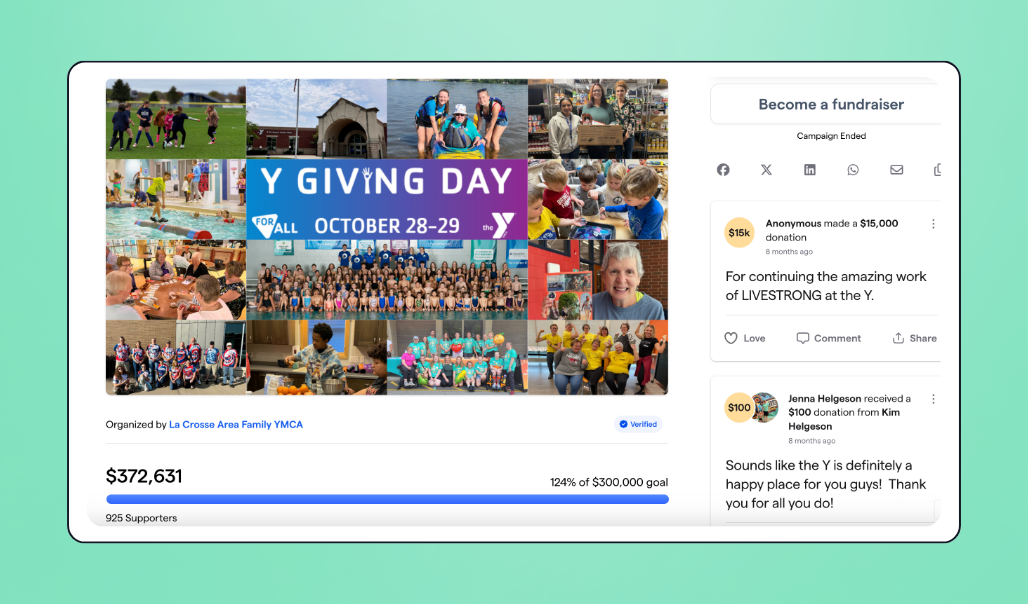
Givebutter is a free, all-in-one fundraising platform built specifically for nonprofits. Unlike Donorbox, which charges extra for its CRM, and GoFundMe, which doesn't offer one at all, Givebutter offers a powerful donor CRM, along with other fundraising tools, at no cost.
Here's what's included:
- Donor CRM
- Donation forms
- Fundraising pages
- Events
- Auctions
- Email and SMS marketing
- Text-to-give
Everything lives in one place, so your team isn't toggling between platforms or paying for add-ons to set up campaigns.
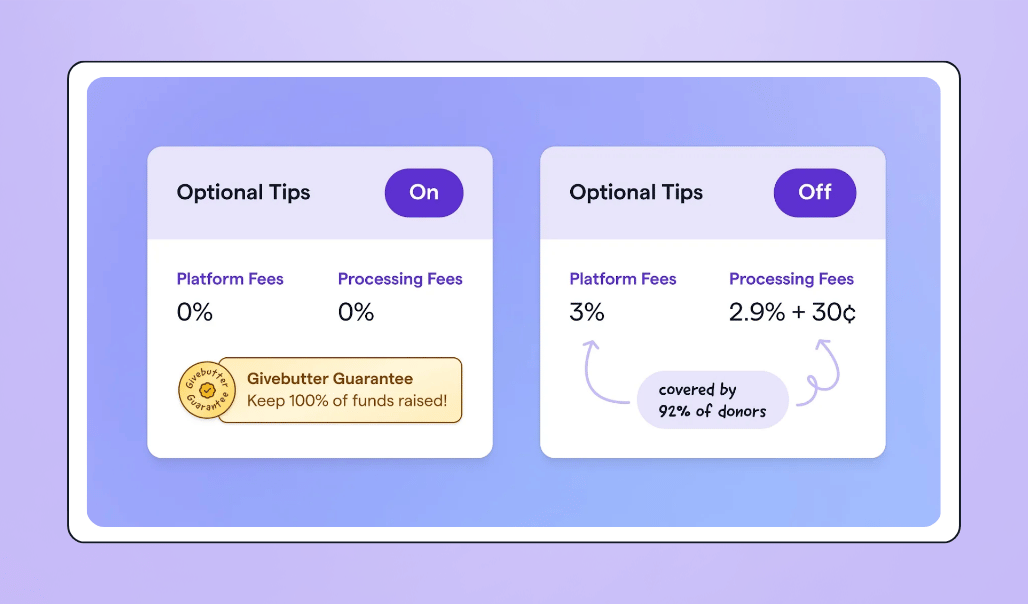
With the Givebutter Guarantee, your nonprofit can pay $0 in platform and processing fees when donor tips are enabled. If you'd rather disable tips, a flat 3% platform fee applies instead.
💡 Pro tip: Keep your donor history intact when you switch. Givebutter's self-service import tools help you bring over contacts, historical donations, and recurring gifts from supported Stripe-powered platforms, so you can pick up right where you left off.

See Givebutter in action
Donorbox vs. GoFundMe FAQs
What is the main difference between Donorbox and GoFundMe? 🔍
The main difference between these tools is who each was built for. Donorbox has always been geared toward nonprofits, with features like embeddable donation forms, recurring giving options, and an event ticketing tool.
GoFundMe, on the other hand, started as a general-purpose, high-traffic crowdfunding platform focused on personal fundraising, social sharing, and quick, one-time campaigns. It only entered the nonprofit space later, after acquiring Classy and rebranding it into GoFundMe Pro, its dedicated nonprofit product.
Is Donorbox or GoFundMe better for nonprofits? 🤷
It depends on what your nonprofit needs.
Donorbox works well for small to mid-sized nonprofits that want a quick (and cost-effective) way to start accepting online donations. GoFundMe Pro, however, is geared toward larger nonprofits running event-based and peer-to-peer fundraising programs.
The consumer GoFundMe platform isn't really built for nonprofit operations, but it can work for one-off campaigns or community fundraisers.
What are the best alternatives to Donorbox and GoFundMe? 💡
There are plenty of fundraising tools in the space, but Givebutter is one of the strongest alternatives to both Donorbox and GoFundMe. It's free to use when donor tips are enabled, and there are no layered or confusing fees to plan around.
Givebutter also offers a powerful donor CRM at no extra cost, alongside donation forms, fundraising pages, events and auction, peer-to-peer campaigns, email, and SMS, so nonprofits can run their entire fundraising and donor management workflow in one place.
Share this article


.webp)




.svg)
.svg)


