

.svg)
.svg)
.svg)
.svg)
.svg)
.svg)
.svg)
.svg)
.svg)


.svg)
.svg)
.svg)
.svg)
.svg)
.svg)
.svg)
.svg)

.svg)
.svg)
.svg)

.svg)

.svg)
.svg)
.svg)
.svg)
.svg)


.svg)
.svg)
.svg)
.svg)
.svg)
.svg)
.svg)





.svg)



%20(1).png)

Most nonprofits have plenty of data. The challenge is turning that data into something meaningful that board members and supporters can quickly understand.
Fortunately, you don’t need expensive software to turn raw data into useful visualizations. With the right tools, chart types, and know-how, nonprofit data visualization can help you tell your story in board reports, impact reports, donor appreciation letters, and more.
We’ll share the chart types to use, best practices to follow, and tools to make data visualization easy.
Key takeaways
- View your data at a glance 👀 With data visualization, anyone can quickly understand and digest your nonprofit’s data.
- The right formats make a difference 📊 Bar charts, line charts, pie charts, scatter plots, and fundraising thermometers can effectively illustrate your nonprofit’s progress and growth.
- It’s not just for board reports 🧑💼 You can use data visualizations for impact reports, donor appreciation letters, social media, and your website alongside board reporting.
- Tell a story with every visual 📕 Whether you’re making a case for a new program or showing donors what their generosity makes possible, consider the story behind each visual.
- Collect your data with visualizations in mind 🤔 Consider the visualizations you’ll want to create as you collect and track your nonprofit’s data.
- Opt for tools that make it easy 🧈 Givebutter automatically tracks your fundraising data, and Givebutter Plus includes ready-made reports like Giving Overview, Donor Health, and Recurring Giving.
What is nonprofit data visualization?
Nonprofit data visualization is the practice of representing your nonprofit’s data through simple visuals that any board member, donor, or future supporter can easily understand. Data visualization for nonprofits can help you illustrate current impact, create transparency about your operations, and share plans for future growth.
While nonprofit data analytics focuses on reviewing and understanding trends, data visualization focuses on creating simple representations of those trends.
.webp)
How to use nonprofit data visualization
Data visualization isn’t just for board reports. It can help build donor trust and keep supporters invested and giving to your mission. Here are four places to use data visualizations in your nonprofit communications.
- Board decks 🧑💼 Highlight your progress and areas for improvement in a way your board members can easily digest. Pair your charts with a fundraising report card to show how you’re tracking against your goals.
- Impact & annual reports 📈 Practice transparency and build trust with impact reports and annual reports featuring eye-catching data visualizations.
- Donor thank-yous 💛 Drive home the tangible impact of donor generosity by adding data visualizations to donor thank-you letters.
- Website & social media 💻 Add graphs that illustrate your impact and programming to your website for visitors researching your mission before they donate, or share them on social media to celebrate milestones.
💡 Pro tip: Plan your visualizations as you collect data. Givebutter’s customized forms and automatic data tracking help you collect the right data to build your nonprofit’s data visualizations.

5 chart types every nonprofit needs (& when to use each)
Different types of nonprofit data require different types of visualizations. From bar charts to fundraising thermometers, the table below breaks down which charts are best for which metrics and when to use each one.
💡 Pro tip: Skip building these charts by hand. Givebutter Plus’s ready-made reports turn your giving, donor, and outreach data into charts automatically.
Data visualization design tips for nonprofits
The best data visualizations for nonprofits are clear and easy to read. Follow these tips to make your visuals more effective.
- Tell a story 📖 From making a case for launching a new program to showing donors why their support matters, get clear on the “why” behind each of your visualizations.
- Limit your color palette 👩🎨 Opt for two or three colors per visualization, and align with your brand palette if possible.
- Label axes and data points 📈 Don’t assume viewers know what your visuals are showing. Make it clear with data and axis labels.
- Add a headline 📰 Include a separate title for each data visual so viewers can quickly understand what it shows.
- Make it accessible 👐 Avoid hard-to-read color schemes like red and green, which are more challenging for colorblind or visually impaired viewers.
- Highlight key points ✍️ Draw attention to your most important data points using color, size, or placement.
- Optimize for mobile 📱 Use large font sizes and graphics that are easy to view on mobile.
Easily visualize your nonprofit’s data with Givebutter
With nonprofit data visualization, you can share progress in board meetings, highlight donor impact, and build trust through transparent visuals in reports and campaigns.
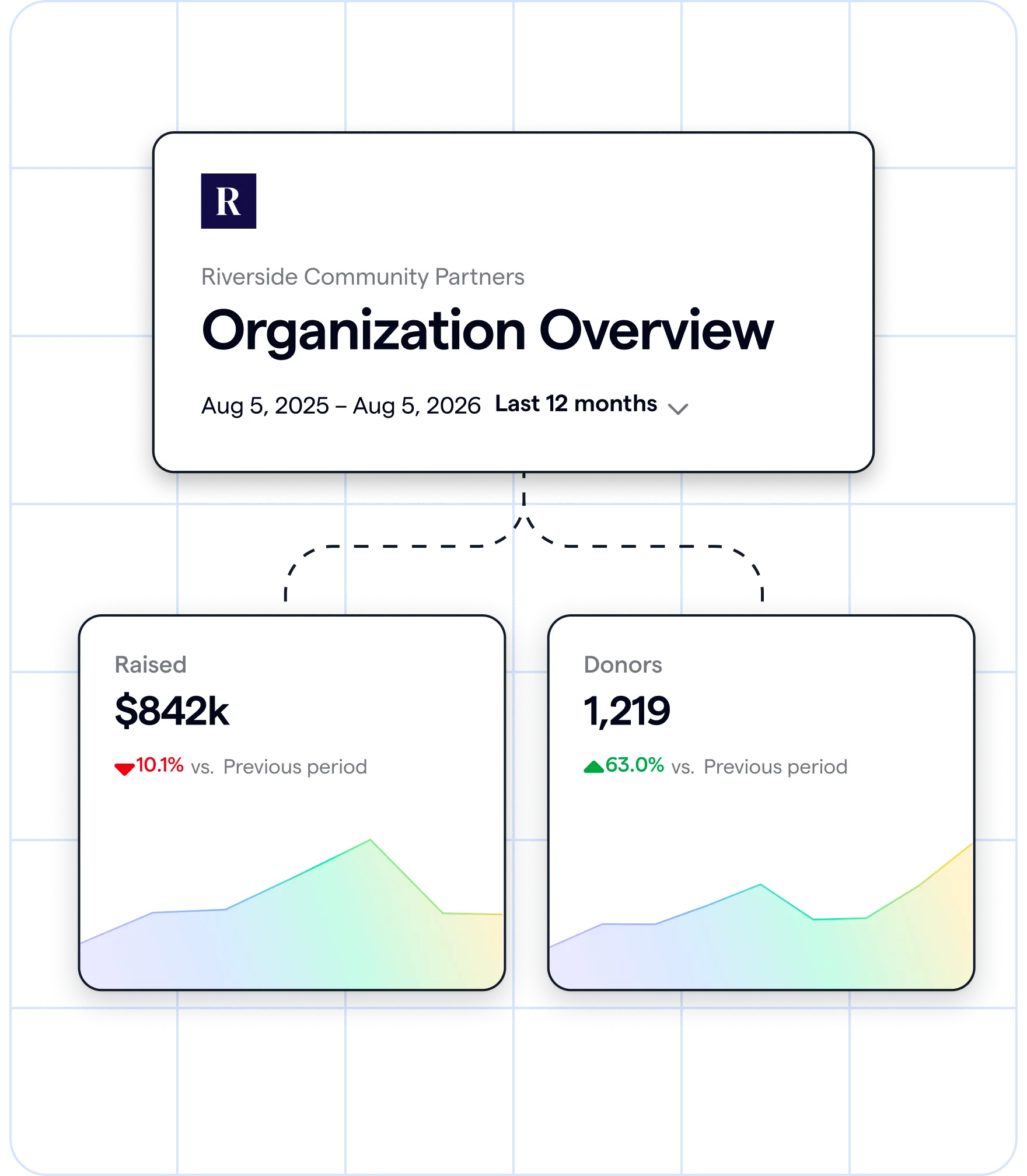
Givebutter Plus makes this easy. Ready-made reports like Giving Overview, Donor Health, and Recurring Giving fill in automatically with your Givebutter data, so you can see what deserves your attention at a glance. Choose a date range to compare changes over time and spot trends before your next board meeting.
.webp)
To dig even deeper, use Givebutter Magic’s AI connectors to ask ChatGPT or Claude about your Givebutter contacts, transactions, and campaigns. As an all-in-one fundraising, event management, and nonprofit CRM platform, Givebutter keeps your data in one place so you can focus on visualizing your nonprofit’s story.
See your data at a glance with ready-made reports
Sign up for Givebutter for free, then try Givebutter Plus free for 30 days to see your data in ready-made reports.
FAQs about nonprofit data visualization
What are the best free data visualization tools for nonprofits?
Google Sheets, Canva, Datawrapper, and Flourish offer free tools for nonprofits to create data visualizations. You’ll also need a platform to collect and track your data.
Givebutter’s core fundraising, event management, and CRM tools are free to use, and Givebutter Plus (starting at $29 per month) adds ready-made reports, so you won’t need to worry about cross-referencing multiple platforms and spreadsheets or building your own visualizations manually.
How do I visualize donor retention rate?
Use a line chart showing your donor retention percentage by quarter. Aim to track at least four quarters to identify more meaningful trends.
You can calculate your donor retention rate with this formula:
(returning donors ÷ prior period’s donors) × 100
Or skip the math: Givebutter Plus’s Donor Health report charts your retention over time automatically and compares it to your previous period.
.webp)
What charts should I use in a nonprofit board presentation?
In nonprofit board reports and presentations, aim for easy-to-read charts that track your financial health, program impact, and fundraising trends over time.
Try including these charts and data visualizations:
- Bar chart showing campaign-to-campaign performance comparison
- Line chart showing year-over-year donor retention by quarter
- Pie chart showing nonprofit fund allocation
Share this article


.jpg)




.svg)
.svg)


