

.svg)
.svg)
.svg)
.svg)
.svg)
.svg)
.svg)
.svg)
.svg)


.svg)
.svg)
.svg)
.svg)
.svg)
.svg)
.svg)
.svg)

.svg)
.svg)
.svg)

.svg)

.svg)
.svg)
.svg)
.svg)
.svg)


.svg)
.svg)
.svg)
.svg)
.svg)
.svg)
.svg)





.svg)



%20(1).png)

A telethon fundraiser can bring to mind PBS broadcasts, celebrity hosts, and production budgets that feel out of reach. But today’s nonprofits can create that same live, community-driven momentum with reliable internet, a thoughtful run of show, and an easy way for supporters to give.
This guide walks you through every stage of planning your telethon—from choosing a platform and structuring the broadcast to building momentum, collecting donations, and following up with supporters.
Key takeaways
- Simplify your tech setup 💪 Centralize your embedded livestream, donations, fundraising thermometer, and donor recognition in one place.
- Plan your segments 🎬 Map out where you’ll share impact stories, make live donation asks, and celebrate milestones.
- Promote early and often 📣 Build excitement across email and social before you go live, then share real-time updates throughout the broadcast.
- Ditch the studio 📺 A quality microphone, stable internet connection, and quiet space are enough to host a great telethon.
- Follow up after the broadcast 💛 Send automated receipts right away, a personal thank-you within 24 hours, and an impact update within two weeks.
- Run it all through Givebutter 🧈 Embed your livestream, display fundraising progress and donor recognition in real time, and automate follow-up from one campaign hub.
What is a telethon fundraiser?
A telethon is a type of a-thon fundraiser: a live broadcast that combines entertainment, storytelling, and real-time donation collection. While telethons were traditionally held on television, today’s nonprofits can host them on YouTube, Facebook, or Instagram Live.
Unlike a regular livestream, a telethon uses community-driven elements—like a fundraising thermometer, donor shoutouts, and live milestones—to encourage supporters to give in the moment.
Is a telethon right for your nonprofit?
A telethon can be a powerful way to bring supporters together around a shared fundraising goal—but it works best when your team has time to plan, promote, and create a broadcast worth tuning in for. Consider these pros and cons before deciding whether a telethon fundraiser is right for your nonprofit.
✅ Pros
- Can spark real-time giving: A live goal, deadline, and visible progress can motivate supporters to give while they’re watching.
- Works for any mission: Live storytelling and donor momentum can engage supporters around nearly any cause.
- Reusable format: Once you’ve hosted a successful telethon, you can refine the format and build anticipation for the next one.
- Builds community energy: Working toward one shared goal gives viewers a reason to participate, celebrate, and spread the word.
⚠️ Cons
- Requires advance planning: Most first-time telethons need several weeks to plan programming, promotion, and team roles.
- Tech setup needs testing: Test your streaming software, donation flow, and live display before the broadcast.
- Needs content to fill the runtime: A 1–3 hour broadcast needs planned segments, guest speakers, impact stories, or entertainment to sustain energy.

How to run a telethon fundraiser
Use these six steps to plan a live fundraising event that builds momentum, keeps supporters engaged, and makes giving easy.
1. Set your fundraising goal 🎯
A clear, compelling goal gives your telethon fundraiser a reason to rally around. Before you plan the broadcast, decide what you’re raising, what it will fund, and how supporters can help you get there.
- Set an ambitious but achievable dollar goal: An ambitious goal creates excitement, while an achievable one builds trust—especially for your first telethon. Use fundraising goal-setting best practices to land on a number that fits your audience and campaign.
- Create milestone moments: Pair fundraising milestones with something fun or meaningful, like: “If we hit $10K, our Executive Director will shave their head live!” These moments give supporters another reason to donate and help keep the broadcast entertaining.
2. Choose your platform & campaign type 📺
Many nonprofits use one platform to stream, another to collect donations, and a third to manage registration. That setup can work, but it also creates extra steps for your team and your donors.
Instead, create a central event hub with nonprofit event management software. You can embed a YouTube or Facebook livestream, accept multiple payment methods, display real-time fundraising progress, and add optional registration or ticketing—all from one campaign page. That means less tool juggling and a smoother giving experience for supporters.
3. Plan your broadcast segments 🎥
Most nonprofit telethons run for one to three hours. A simple run of show keeps viewers engaged and gives your team clear moments to make an ask, celebrate progress, or shift the energy.
Consider this sample structure:
- Welcome and mission story: Introduce your organization, explain the fundraising goal, and share why it matters. You might open with a pre-recorded fundraising video to bring the impact to life.
- First live ask: Invite viewers to give early, then let them know you’ll share stories, updates, and more chances to participate throughout the broadcast.
- Guest or entertainment segment: Bring in a guest speaker, performer, staff challenge, behind-the-scenes tour, or other engaging moment that gives viewers a reason to stay tuned in.
- Milestone celebration: Share the current total, celebrate a milestone, and thank donors by name when appropriate.
- Second live ask: Build on the energy after a powerful story or milestone. Remind viewers how close you are to the next goal and exactly what their gift can make possible.
- Closing: Thank donors, guests, volunteers, and viewers. Share the final total or remaining goal, make one last invitation to give, and tell supporters what to expect next.
💡 Pro tip: Make your live asks right after an emotional story, a matching-gift announcement, or a milestone moment—when supporters feel most connected to your mission.
4. Set up your tech stack 🖥️
You don’t need a studio to host a great telethon. Focus on a reliable, easy-to-use setup and test it before you go live.
- Gather your essentials: Start with a quality microphone, stable internet connection, streaming software or platform, and a Givebutter Event campaign page with your livestream embedded.
- Set up your Live Display: Put your live display on a second screen or monitor so your team can track real-time donations, donor recognition, and fundraising milestones during the broadcast.
- Run a full rehearsal: At least 48 hours before your telethon, test the stream, donation flow, audio, camera framing, links, and Live Display. Make sure every guest knows when and how they’ll join, too.

5. Promote before & during the broadcast 📣
Promoting your fundraiser is just as important as the telethon itself. Give supporters plenty of reasons—and reminders—to tune in live.
- Before the event: Send an announcement email two weeks out, a reminder one week out, and a final teaser the day before. Use social posts to share countdowns, behind-the-scenes moments, guest announcements, and segment previews.
- During the event: Share clips and updates in real time, celebrate milestones publicly, and remind viewers where to give. Ask supporters to share the stream link with their own communities to help extend your reach while you’re live.
6. Follow up & steward donors 💛
Your telethon may be over, but the donor experience is not. Use your follow-up to thank supporters, show the impact of their gifts, and keep the relationship going.
- Send donation receipts right away: Make sure every donor receives an automated receipt and immediate acknowledgment after giving.
- Offer personal gratitude: Within 24 hours, have your Executive Director, host, or another leader send a personal thank-you that references the telethon and recognizes the supporter’s role in its success.
- Show the impact: Within two weeks, share an update with the final amount raised, what those funds will support, and a clear invitation to stay connected with your mission.
Download the free telethon run of show template
A telethon has a lot of moving parts, from cueing guests and sharing donation links to celebrating milestones at the right moment. This free run of show template gives your team one shared place to map every segment and stay coordinated while you’re live.
Customize the timed broadcast grid with your segments, talking points, donation asks, and transitions. Then share it with your host, production team, and guests—and keep it open on a second screen throughout the broadcast.
Telethon fundraiser examples to inspire your event
From traditional television broadcasts to large-scale livestreams and urgent community campaigns, telethons can help organizations bring supporters together around a clear goal. Here are three examples to inspire your own event.
1. Camp Sunshine x WMTW Winter Telethon 📺
Camp Sunshine supports children with life-threatening illnesses and their families through free programs and getaways. For its annual Winter Telethon, the organization partnered with local television station WMTW to pair a live broadcast with an online donation page—reaching its $50K goal.
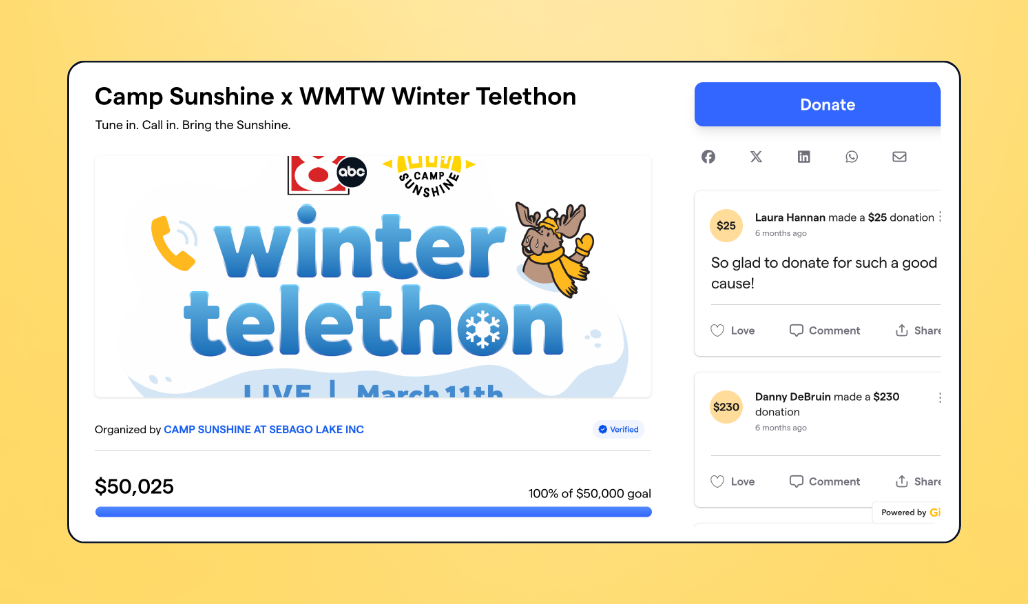
💸 Results: $50K+ raised from 215 donors
📺 Format: Television broadcast paired with an online fundraising page
⭐ Best for: Nonprofits with a local television or media partner
💛 What made it work: A clear goal, broad media reach, and an easy way for viewers to give while watching
2. Save Oasis 🌴
Save Oasis rallied a large community around an urgent effort to help keep a queer nightclub open. Its telethon component gave supporters a timely, visible way to take action—and the campaign ultimately raised $274K+, reaching 137% of its $200K goal.
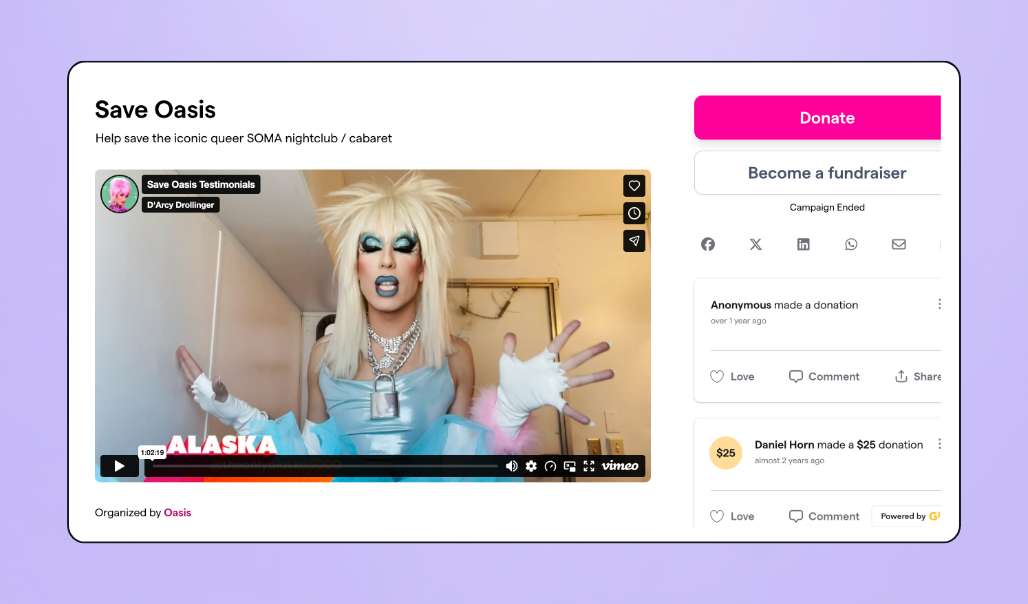
💸 Results: $274K+ raised from 2,635 donors—137% of its goal
📺 Format: High-urgency fundraising event with a telethon component
⭐ Best for: Emergency, preservation, or time-sensitive campaigns
💛 What made it work: A compelling, urgent need, broad community support, and continued giving beyond the initial broadcast
Run your telethon on Givebutter
A great telethon doesn’t need a studio-sized budget or a polished TV production. It needs a clear story, a goal supporters can rally behind, and a well-paced live experience that keeps people engaged, celebrates each milestone, and inspires them to give.
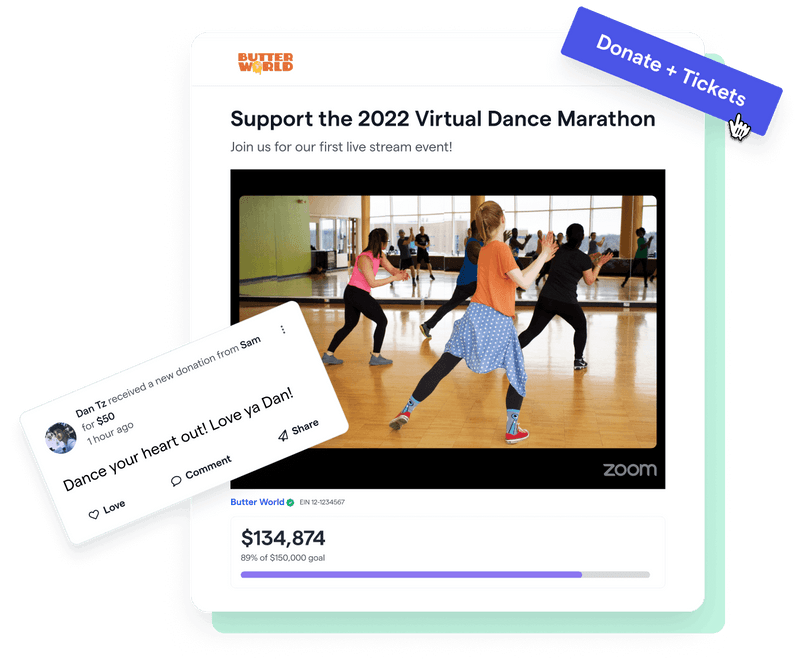
Givebutter gives you one central event campaign for your telethon, where supporters can watch an embedded livestream, register if needed, donate with their preferred payment method, and follow your progress in real time. Use live display to celebrate donations and recognize supporters as your campaign builds momentum.
Start livestreaming your telethon with Givebutter
Create your free Givebutter account and start building a telethon that supporters will want to tune in for.
FAQs about telethon fundraisers
How long should a telethon be?
For most nonprofits, a telethon lasts one to three hours. A 60–90 minute broadcast is a strong choice for first-time organizers or smaller audiences: it’s long enough to share a few stories, build momentum, and make multiple donation asks without losing energy. Longer telethons work best when you have enough guests, entertainment, or interactive segments to keep the program moving.
How much money can a telethon raise?
There’s no set amount a telethon can raise. Results depend on the size and engagement of your audience, how early you promote the event, the clarity of your fundraising goal, and how well you keep supporters engaged during the broadcast.
The examples above range from $50,000 to more than $274,000 raised, but a successful telethon is one that sets a realistic goal for your organization and gives supporters a compelling reason to help reach it.
How do I run a telethon online?
- Choose where you’ll livestream, whether that’s Givebutter, YouTube Live, Facebook Live, Instagram Live, or another streaming platform.
- Create a Givebutter Event campaign page where supporters can watch, donate, and follow your fundraising progress.
- Set your fundraising goal, add your donation link to the stream and chat, and test the full giving experience before you go live.
- Promote the broadcast before and during the event, then share updates and donation milestones in real time.
Do I need a studio or professional equipment to run a telethon?
No. A polished broadcast can be helpful, but it isn’t what motivates people to give. A quality microphone, stable internet connection, quiet space, and a well-prepared host are enough to create an engaging experience. Many successful nonprofit telethons are hosted from an office, living room, or other simple setup.
Share this article





.svg)
.svg)


