.png)


.svg)
.svg)
.svg)
.svg)
.svg)
.svg)
.svg)
.svg)
.svg)


.svg)
.svg)
.svg)
.svg)
.svg)
.svg)
.svg)
.svg)

.svg)
.svg)
.svg)

.svg)

.svg)
.svg)
.svg)
.svg)
.svg)


.svg)
.svg)
.svg)
.svg)
.svg)
.svg)
.svg)




.svg)



%20(1).png)

As a nonprofit, you want every dollar you can spare to go toward your mission, not to monthly software subscriptions. Even if the software makes events more successful and easier to run, it would be better if it were free to use.
Good news.
There are dozens of tools that can help you run virtual events, sell tickets, collect donations, host auctions, manage volunteers, process payments, and more without adding software costs to your plate.
In this guide, we’ll break down the best free event management tools for nonprofits, grouped by what you actually need to get done. You’ll also find there are a few tools that can help you across categories, helping you keep your tech stack lean and user-friendly.
Types of free event management software
“Event software” covers a lot of ground. Some tools help you get people in the (virtual or physical) door, others help you collect donations, and some are there just to keep your crowd engaged and coming back.
Here’s what the different types of free event management software help nonprofits do:
- Host virtual events 🎥 Livestream, welcome online attendees, and run the core parts of your event end-to-end.
- Sell tickets 🎟️ Create ticket types, track sales, and check people in quickly.
- Collect registrations 📝 Gather participant details, RSVPs, signups, and preferences before the event.
- Accept donations 💛 Collect gifts during (or around) your event with mobile-friendly forms and giving options.
- Run auctions 🔨 List items, manage bidding, and handle winner checkout for online or in-person auctions.
- Process payments 💳 Take payments online, in person, or offline, then keep everything clean for reporting.
- Go open source 🧩 Self-host or customize your platform if you need maximum flexibility and control.
- Boost engagement 🎉 Add interactive moments (polls, shoutouts, challenges) that encourage participation.
- Launch peer-to-peer fundraising 🤝 Let supporters create personal/team pages to raise money for your mission.
- Organize volunteers 🙋 Recruit volunteers, schedule shifts, and communicate clearly leading up to the event.
The best free event management tools (at a glance)
Virtual event platforms
- Givebutter: All-in-one virtual fundraising
- RallyUp: Versatile virtual fundraising campaigns
Event ticketing tools
- Givebutter: Nonprofit-first flexible ticketing
- RSVPify: Controlled, invite-only ticketing
Event registration tools
- Givebutter: Registration + fundraising combined
- Cheddar Up: Detailed, structured registrations
- SignUpGenius: Simple signup coordination
Donation collection tools
- Givebutter: Unified multi-channel donations
- Charity Miles: Activity-based sponsored giving
Auction software
- Givebutter: High-energy hybrid auctions
- Auctria: All-in-one small auctions
- 32Auctions: Simple online silent auctions
Open-source event platforms
- Hi.Events: Lightweight, brandable ticketing and registration
- Pretix: Advanced, customizable ticketing and registration
Crowd engagement tools
- Givebutter: Gamified donor engagement tools
- RallyUp: Multi-format supporter challenges
- Slido: Interactive Q&A and polling
Peer-to-peer fundraising tools
- Givebutter: Gamified peer fundraising hub
- Donorbox: Easy-to-create peer campaign pages
- Fundly: No-fee basic P2P fundraising
Volunteer management tools
- POINT: Modern volunteer CRM
- Cheddar Up: Simple shift signup forms

Best free event management tools for virtual events
1. Givebutter
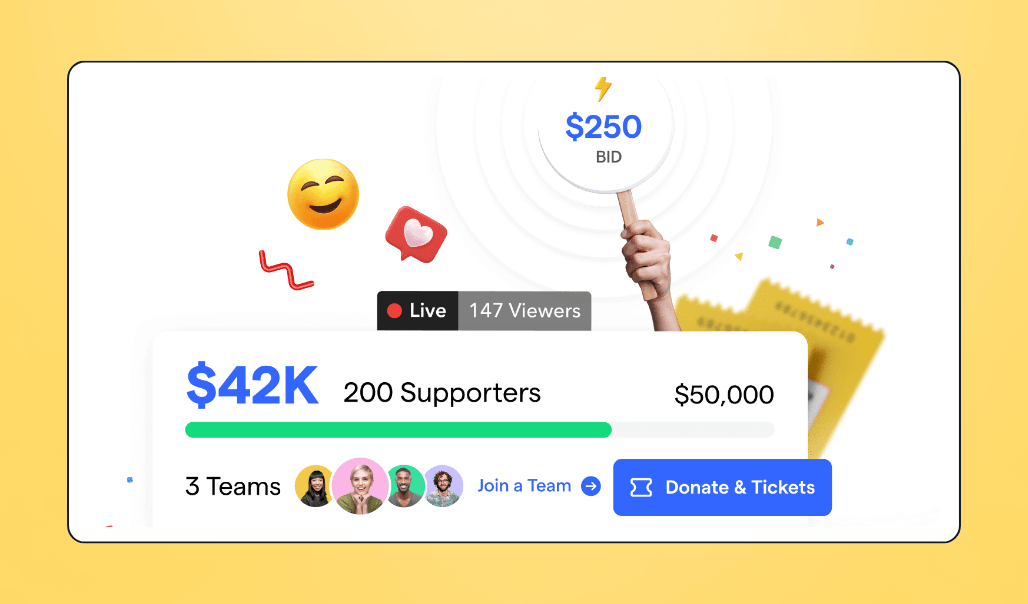
The Givebutter platform allows you to host or embed your livestream, while attendees join the moment through an interactive feed where they can post messages, GIFs, photos, or shoutouts alongside their donations as everything unfolds.
You can offer free or paid tickets, invite guests to donate during the stream, and even let them join teams or launch peer-to-peer pages without leaving the event page. Live leaderboards, goal bars, and milestone alerts keep activity moving and nudge people to participate.
For hybrid and seated events, Givebutter’s built-in event seating tools take the stress out of seating layouts, making it easy to assign guests and keep groups together automatically.
And, since Givebutter is an all-in-one fundraising and CRM platform, you’ll get access to a host of features that make it easier to run a nonprofit and are genuinely fun to use. To see what the platform is capable of, watch the demo below:
💰 Price: Free with optional donor tips, thanks to our Givebutter Guarantee. It lets you keep 100% of funds raised with $0 platform and processing fees when tips are enabled, even if donors don’t cover fees. Tips off? A flat 3% platform fee applies.
🤩 Standout features:
- Livestreaming and live display for real-time engagement
- Supporter wall with GIFs, emojis, photos, and drawings
- Text-to-donate and scan-to-donate
- Real-time donation alerts, leaderboards, and milestones
- Unlimited ticketing and registration
- Event seating with drag-and-drop layouts & group assignments
- Peer-to-peer fundraising for teams or individuals
- Built-in email tools and optional SMS
- CRM, donor tracking, and automated receipts
- Auctions you can run during the livestream
- Works for virtual-only, hybrid, or in-person events
✅ Best for: Nonprofits that want an all-in-one, free virtual event platform where livestreaming, fundraising, engagement, and supporter management (including seating) all work together seamlessly.
🔥 Our take: Givebutter offers the strongest virtual event experience for nonprofits, combining livestreaming, donor engagement, fundraising tools, and communication in one place. Where platforms like Twitch and YouTube only handle the stream, Givebutter handles the entire event. If you want energy, participation, and donations all in one flow, this is your best option.
2. RallyUp
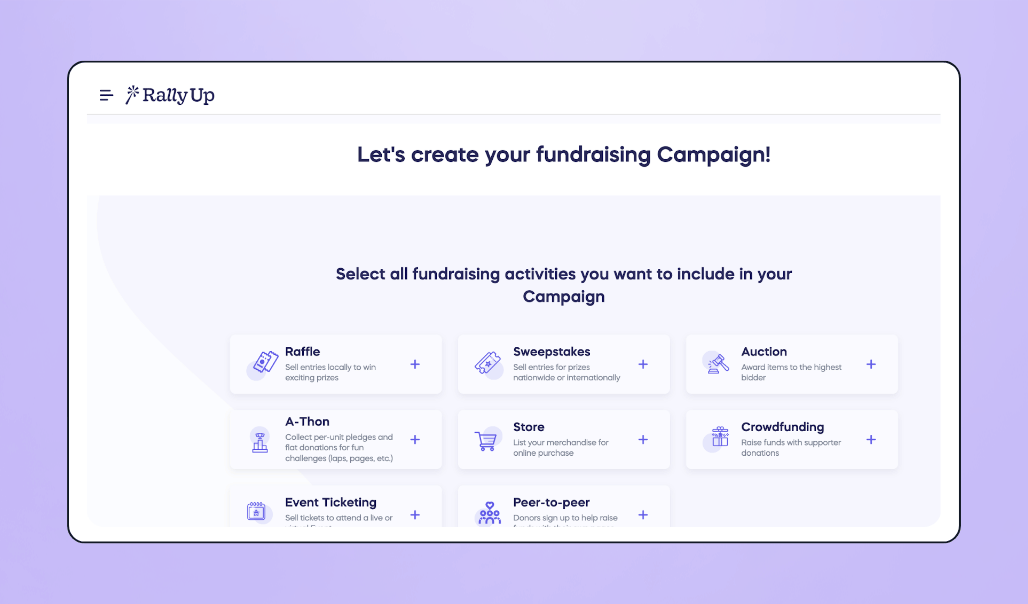
RallyUp brings together the core pieces you need for a virtual event, especially fundraising: livestreaming, ticketing and registration, plus activities like auctions, raffles, a-thons, and peer-to-peer pages.
It also allows you to access donor profiles that make giving activity easy to follow, and plays nicely with external CRMs if you already use one for ongoing donor communication or more advanced, long-term donor management.
💰 Price: Free with donor tipping and no platform fee for core features. A Flex plan is also available if you need more advanced fundraising tools, with optional donor tipping and 2.9%-6.9% platform fees based on activity.
🤩 Standout features:
- Livestreaming with live donation feed
- Virtual and hybrid event support
- Ticketing and registration
- Raffles, auctions, a-thons, and sweepstakes
- Peer-to-peer pages for teams or individuals
- Donor profiles and CRM integrations
- Clean, mobile-friendly event pages
✅ Best for: Nonprofits that want versatile virtual fundraising tools but already manage donor relationships in a separate CRM.
🔥 Our take: RallyUp gives nonprofits a lot of virtual event management and fundraising power without platform fees, which makes it appealing. Just keep in mind that if your team needs deeper donor history or ongoing engagement tools, you’ll likely rely on a separate CRM to fill that gap for some organizations, which adds extra cost or complexity compared to using a fully built-in system.

Best free event management tools for event ticketing
3. Givebutter
Givebutter makes ticketing effortless for nonprofits. Whether your event is in person, virtual, or hybrid, you can spin up tickets in minutes and customize everything (free passes, VIP tables, bundles, you name it) with all the details collected right up front.
Supporters can buy online in advance, or you can sell last-minute passes at the door with Tap to Pay using the free mobile app.
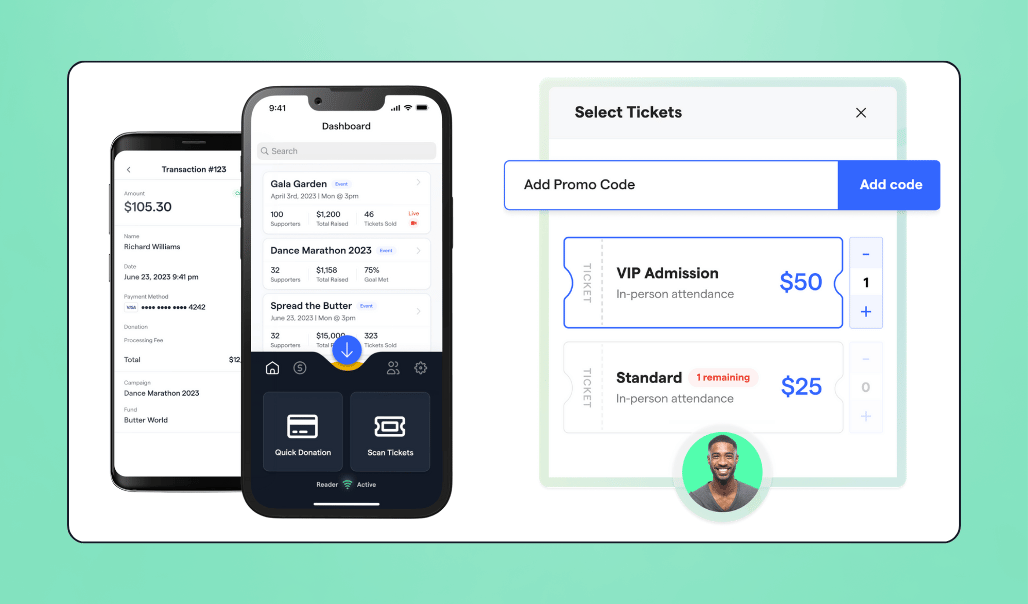
The app also lets you scan people in, look up attendees manually, and manage virtual check-ins.
For seated or ticketed experiences like galas, concerts, or tournaments, Givebutter also includes built-in event seating that complements the ticketing experience nicely, so tables, sections, and guest placement stay organized without adding another tool.
If your event involves fundraising, ticket buyers can add a donation right at checkout. No extra steps. And as your event approaches, Givebutter helps boost turnout with automated reminders.
Behind the scenes, the platform keeps all ticketing and supporter activity in one place through its powerful CRM, so tracking ticket sales, communicating with attendees, and measuring event performance feels effortless.
💰 Price: Free with optional donor tips. When tips are enabled, your nonprofit can run ticketed events with $0 platform and processing fees, even if donors don’t cover fees. If tips are disabled, a flat 3% platform fee applies.
🤩 Standout features:
- Unlimited ticket types, bundles, and promo codes (General Admission, VIP, Early Bird, etc.)
- Custom checkout questions
- Mobile app for event check-ins, ticket sales, and donations with Tap to Pay
- Automatic event reminders
- “Can’t attend? Donate!” prompts
- Payment flexibility for ticket buyers (Apple Pay, Google Pay, Venmo, PayPal, Cash App, cards, ACH)
- Automatic receipt for every transaction
- Ticket and supporter tracking in one CRM
✅ Best for: Teams that want a ticketing tool that helps fill the room with easy checkout and automatic reminders.
🔥 Our take: Givebutter offers the smoothest free ticketing experience for nonprofits, with simple, flexible setup, fast check-ins, and built-in fundraising options that help you get more out of every event.
4. RSVPify
RSVPify lets nonprofits set up ticketed events quickly, whether it’s a one-time gathering or a recurring series.
It also supports invite-only or password-protected events when you need to limit access, for example, to high-value donor events, VIP gatherings, or internal planning sessions.
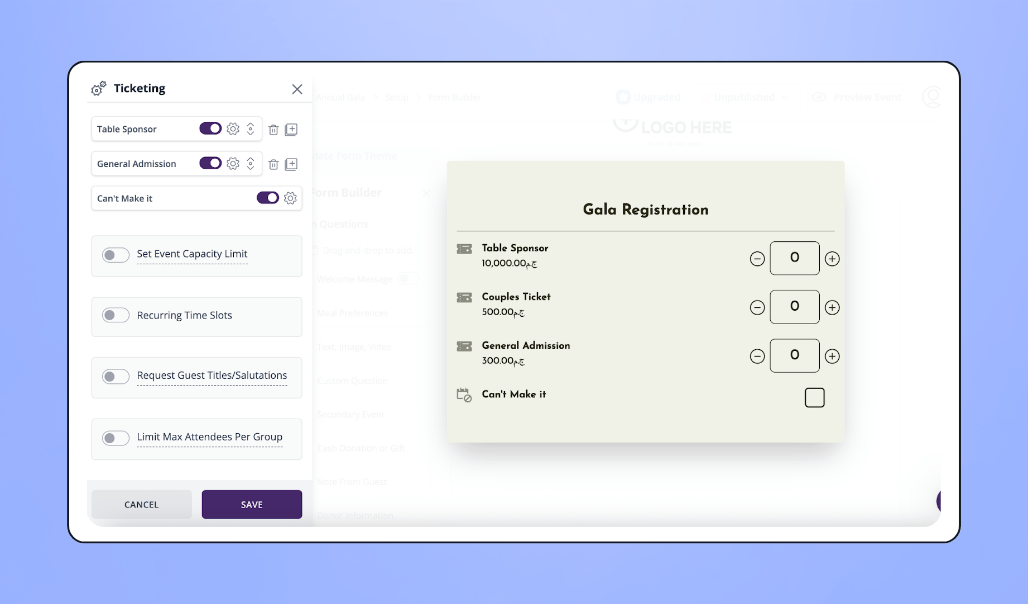
You can build custom ticket tiers, brand your pages, collect attendee details, and automate confirmation and reminder emails to keep everyone informed.
On event day, staff can check people in from any phone, tablet, or computer using RSVPify’s check-in app, something users noted works seamlessly even for large groups.
💰 Price: Free to set up ticketed events, with a 1.95% + $0.90 per ticket fee. RSVPify also offers paid subscription plans (starting $39/month) for broader event management features if your nonprofit needs them.
🤩 Standout features:
- Customizable ticket tiers and branded event pages
- Unlimited registrations per month
- Custom attendee questions (multiple formats)
- Automated confirmation and reminder emails
- QR code check-in via the RSVPify Check-In Suite (phone, tablet, or desktop)
- Support for one-time and recurring events
- Manage capacities, limits, and multiple sessions or time slots
- Invite-only or password-protected events
- Exportable attendee data (CSV)
- Email invitations and reminders
- Daily payouts through Stripe
✅ Best for: Nonprofits running invite-only events that need tight control over who attends and a private space for event details.
🔥 Our take: It’s a reliable choice if you want customizable pages and straightforward check-in tools. One consideration: RSVPify processes all payments through Stripe, which means fewer digital wallet options for attendees. Nonprofits with mobile-first audiences may want broader payment flexibility.
Best free event registration software for nonprofit organizations
5. Givebutter
Givebutter supports registration for all types of nonprofit events: free events, paid events, and everything in between.
What makes it especially impactful is the ability to turn every registration into a built-in fundraising opportunity.
Instead of stopping at “name and email and payment,” supporters can immediately join a team, set a goal, and launch a personal fundraising page in the same flow.
It pairs well with 5Ks, walks, galas, golf tournaments, school fundraisers, and any event where participation and fundraising go hand in hand.
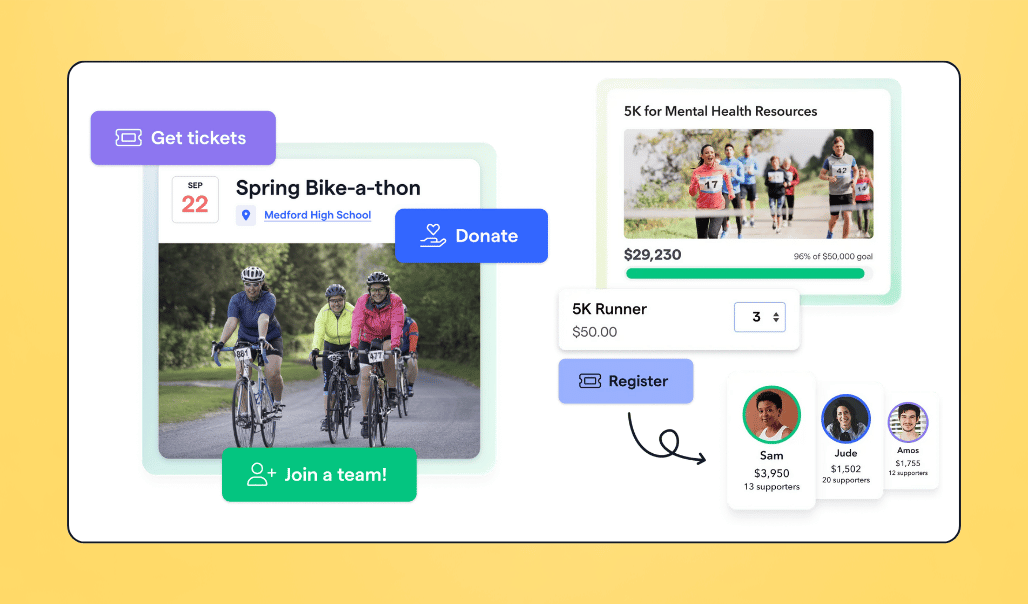
Registrants can personalize their page, share it with friends, and start raising money within minutes, whether they’re joining a team or fundraising solo. For organizers, everything lives in one dashboard. You can track registrations, monitor team activity, see who’s actively fundraising, and watch overall progress in real time.
It’s registration and fundraising in one place, designed to help nonprofits raise more with the same amount of effort.
💰 Price: Free when donor tips are enabled, even if donors don’t opt to cover fees. If tips are disabled, a flat 3% platform fee applies.
🤩 Standout features:
- Registration and peer-to-peer fundraising in one flow
- Participants can join teams, set goals, and launch fundraising pages instantly
- Unlimited ticket types inside the registration process
- Custom fields to collect any attendee or participant info
- Team leaderboards and progress tracking
- Organizer dashboard for registrations, fundraising activity, and engagement
- CRM included (track supporters, donations, and communications)
- Free email tools (targeted updates and automated thank-yous)
- Fast mobile checkout (Apple Pay, Google Pay, Venmo, PayPal, Cash App, cards, ACH)
✅ Best for: Nonprofits running events where signups and fundraising go hand in hand, like 5Ks, walkathons, tournaments, galas, and team-based campaigns.
🔥 Our take: Givebutter delivers the most practical free event-registration experience for nonprofits. It keeps signups simple, fundraising built in, and everything, from tickets to team activities, organized in one place. If you want your event to raise more without adding more tools, this is a standout choice.
6. Cheddar Up
Cheddar Up lets you collect event registrations, payments, and participant details in one place.
One standout feature is the ability to decide whether information is collected per attendee (T-shirt sizes, meal choices, ages) or per checkout (billing info, emergency contacts). This way, you only ask for what you actually need and avoid overwhelming participants.
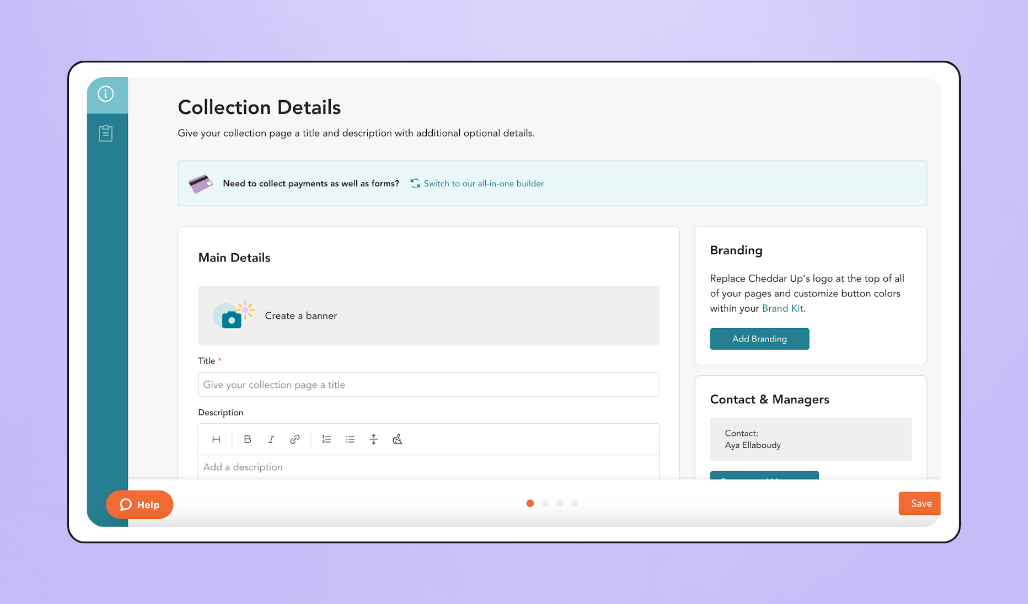
For teams that need more control, Cheddar Up also offers scheduled start and stop times on paid plans, helping manage high demand, prepare your team, or keep registration fair.
💰 Price: Free plan available for basic registrations and payments (with limits). Per-transaction processing fees are higher than many nonprofit platforms, around 3.95% + $0.95 on the free plan. Paid plans start around $20/month for expanded registration features and higher limits.
🤩 Standout features:
- Custom registration forms with 13+ question types
- Per-attendee or per-checkout data collection
- Automatic registration start/stop times
- Participant comments on signups
- Automated confirmations and reminders
- Optional donation button included with registration forms
- Attendee & payment data export (CSV or PDF)
- Easily shareable registration pages (link or embeddable button)
- Payment options: credit/debit cards, Apple Pay, Google Pay, digital wallet “Link”, and eCheck / bank transfer
✅ Best for: Events where collecting participant info and payments in an organized way matters more than having registration and fundraising in one combined flow.
🔥 Our take: A flexible option for nonprofits that need to collect detailed participant info, especially for smaller or simpler events. Just note that the free plan includes usage limits, so more complex setups may require a paid upgrade. Registration and fundraising also aren’t part of the same seamless flow as on Givebutter.
7. SignUpGenius
SignUpGenius helps nonprofits create online signups for events and volunteer coordination.
You can build unlimited signup pages (including recurring events), duplicate past signups to save time, and collect extra details from participants using simple form fields.
Participants can register from any device without needing an account and receive automatic confirmation and reminder emails so they’re less likely to miss their spot.
For organizers, SignUpGenius offers basic group management tools to see who signed up, make edits when plans change, and keep everything organized in one place.
💰 Price: Free plan available, with paid plans starting at $8.99/month for expanded features. Payment collection carries a 5% + $0.50 service fee per transaction, higher than many nonprofit-focused platforms.
🤩 Standout features:
- Unlimited signup pages (including recurring events)
- Customizable form fields for collecting participant info
- Automatic confirmation and reminder emails
- Basic group management tools (view, edit, move, or delete signups)
- Easy sharing via link, QR code, or website button
- Duplicate past signups to save time
- Optional payment or donation collection (5% + $0.50 service fee per transaction)
- Enhanced security features
- Payment options: credit cards, debit cards, Apple Pay, and Google Pay
✅ Best for: Nonprofits running free events or volunteer schedules where you just need people to sign up and show up, no ticketing or donation required.
🔥 Our take: SignUpGenius is strong for simple, no-cost coordination. But if your event requires payments or paid tickets, the 5% + $0.50 fee makes it expensive fast. This is why it’s not the best fit for revenue-generating events compared to other platforms like Givebutter, where the fees are lower.
Best free event management tools for collecting donations & accepting payments
8. Givebutter
Instead of patching together different tools for online donations, in-person payments, and offline gifts, Givebutter lets you handle every event payment in one system, at no cost.
Supporters get real flexibility in how they pay, whether it’s Cash App, Venmo, Apple Pay, or dozens of other options, so no one has to stop and think twice.
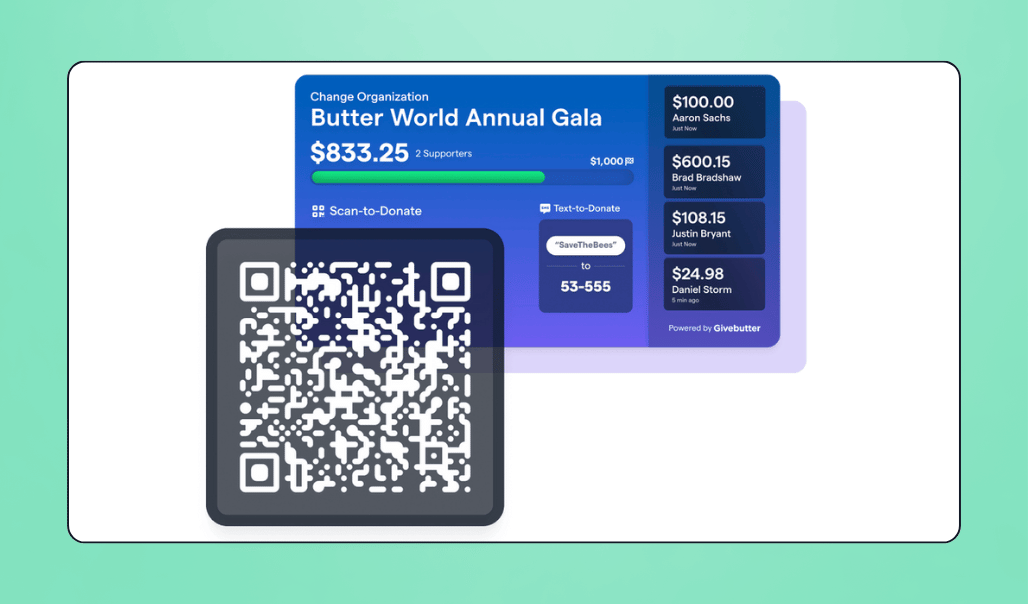
For in-person events, staff and volunteers can use Tap to Pay in the Givebutter mobile app or an optional $99 card reader to accept payments at the door or around the room. Scan-to-donate QR codes are automatically generated for every campaign, making it easy for guests to give, upgrade tickets, or complete paid add-ons on the spot. And if someone gives cash or a check, you can log it in seconds from the dashboard, so every dollar is accounted for.
Givebutter’s donation forms are designed for maximum performance through clean design, smart suggested amounts, mobile-first checkout, and recurring-gift nudges. They deliver an industry-leading 47% conversion rate.
Funds can stay in the interest-earning Givebutter Wallet, be sent through automatic daily payouts, or be withdrawn anytime. Payout and reconciliation reports make accounting straightforward.
Donation management is clean and organized with tracking, reporting, receipts, and acknowledgment tools built right into the dashboard.
Those same tools connect directly to registration, ticketing, CRM, and email features, making follow-ups very simple. You can send thank-yous, updates, or reminders from the same place.
💰 Price: Completely free as long as donor tips are enabled (even if donors choose not to cover them), so your nonprofit doesn’t pay platform or processing fees. If you turn tips off, a flat 3% platform fee applies.
🤩 Standout features:
<ul><li>Accepts all major payment methods: cards, ACH, Apple Pay, Google Pay, Venmo, PayPal, Cash App, and more</li><li>Tap to Pay and an optional $99 card reader for in-person donations</li><li>Scan-to-donate QR codes are generated automatically for every campaign</li><li>Text-to-donate for fast mobile giving</li><li>Embeddable donation forms and fundraising widgets</li><li>Pledges, recurring gifts, and matching-gift options</li><li>Automatic donation receipts with full tax information</li><li>Built-in CRM to track donor activity and gift history</li><li>Interest-earning Givebutter Wallet (<span interest-rate-element="sync">2.5%</span> APY)</li><li>Offline donation logging for cash and checks (plus bulk import)</li><li>Supports the widest range of payment methods: Cash App, Venmo, PayPal, Apple Pay, Google Pay, cards, ACH, and more.</li><li>Automated daily payouts and detailed reconciliation reports</li></ul>
✅ Best for: Nonprofits that want one system to accept donations and payments anywhere, online, at events, or on the go, with very flexible payment options and built-in donor tracking.
🔥 Our take: Givebutter delivers the complete event payment and donation experience for nonprofits. You get unmatched payment flexibility, a powerful mobile app for in-person giving, and top-tier conversion rates, without needing separate tools for donor tracking, follow-ups, or event reporting. It’s the strongest all-in-one choice for collecting donations at any type of event.
9. Charity Miles
Charity Miles takes a different approach to donation collection: supporters walk, run, or bike, and every logged mile turns into a donation funded by corporate sponsors.
Their app is free for nonprofits and donors, and it’s largely donor-led. Nonprofits can apply to be listed as a supported charity with Charity Miles, and once listed, supporters choose your organization in the app and log their activity to earn sponsor-funded donations.
They can also share a personal “pledge page” to collect sponsorships from friends and family.
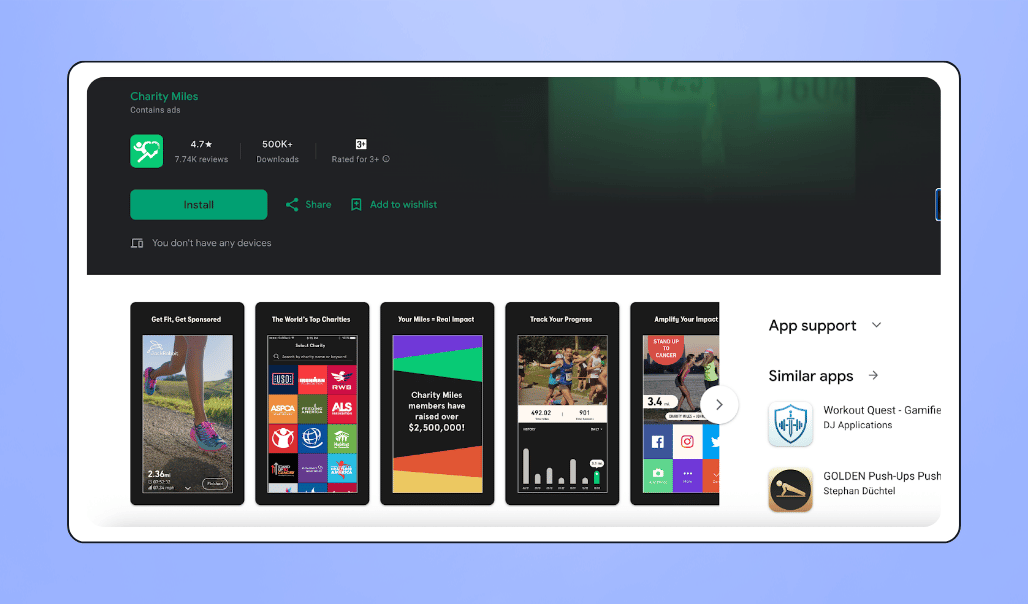
When someone donates through a pledge page, the payment is processed on the charity’s own fundraising platform, not through Charity Miles, so nonprofits use their existing donation systems to receive the funds.
💰 Price: Free app for nonprofits and donors. Donations raised through pledge pages are processed on the nonprofit’s own platform, which may incur standard processing fees through that system.
🤩 Standout features:
- Corporate-sponsored donations tied to miles walked, run, or biked
- GPS and pedometer tracking for logged activities
- Peer-to-peer “pledge pages” for individual challenges
- Syncs with Apple Health, Strava, and fitness devices
- Manual activity entry when device tracking isn’t available
- Useful for awareness campaigns, wellness challenges, and lifestyle-based giving
✅ Best for: Nonprofits that want ongoing donor touchpoints rather than large fundraising totals, especially health-focused or community groups, and already have their own donation processing system for direct gifts.
🔥 Our take: Charity Miles keeps fundraising fun and accessible, but it operates on a completely different model. Since it doesn’t process donations or offer custom forms, widgets, or event-based giving tools, it’s best used as a supplementary engagement and donation collection channel rather than a primary fundraising platform.
Best free event management software for auctions
10. Givebutter
Givebutter’s auction software makes auction events feel exciting and easy for everyone involved. Supporters can browse items, favorite their picks, and place bids straight from their phone or computer through a clean web page, no separate bidding app needed.
At in-person events, free QR code bid sheets let guests scan an item and bid in seconds. That quick, low-friction flow helps capture more bids in the heat of the moment, especially when the room is energized.
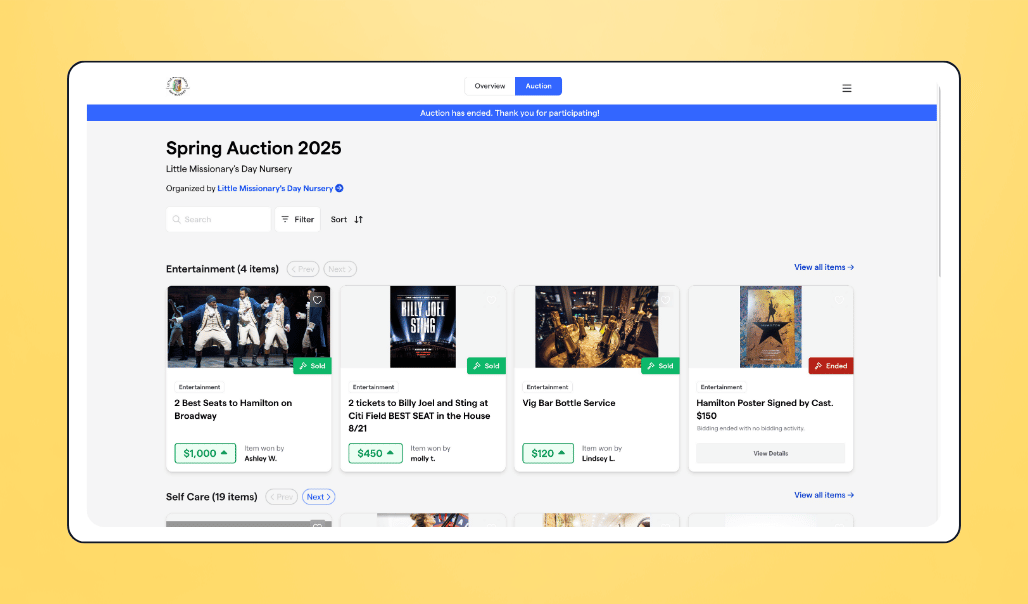
Automated email and text notifications keep the energy up throughout your auction. Bidders can set a max bid, so Givebutter automatically bids on their behalf. They will even receive alerts if they have been outbid, when items are closing, and when they’ve won.
To run the auction smoothly, nonprofits get a full management dashboard to handle bidders, track bids, oversee payments, and manage fulfillment.
You can also add unlimited items, create categories, upload photos and videos, set starting prices or Buy-It-Now options, choose reserve prices and bid increments, and schedule start/end times.
If you want to streamline checkout, you can require payment and shipping details during registration for automatic charging, or send winners a checkout email when it’s time to settle up.
💰 Price: Free with donor tips enabled, backed by the Givebutter Guarantee. If tips are disabled, a flat 3% platform fee applies.
🤩 Standout features:
- Web-based bidding, no separate app required
- QR code bid sheets for fast in-person bidding (perfect for silent auctions)
- Works for online, in-person, and hybrid auctions
- Automated bid notifications (email and SMS)
- Max-bid auto bidding
- Unlimited items, categories, photos, and videos
- Multiple selling formats: Buy-It-Now, fixed price, reserve price, bid increments
- Auction management tools for bidders, payments, and fulfillment
- Easy checkout with auto-charge or reminders
- Built-in Trust & Safety protections
✅ Best for: Nonprofits that want to maximize participation and boost bidding activity, all while keeping auction management simple and efficient.
🔥 Our take: Givebutter gives nonprofits everything they need to run high-energy, high-participation auctions for free. It keeps bidding effortless for supporters and gives teams full control of items, bidders, and payments. For any organization wanting to spark more bidding and get the most value out of auction items, this is the standout choice.
11. Auctria
Auctria gives small nonprofits an all-in-one system to run online, in-person, or hybrid auctions. Each event gets its own customizable website where supporters can browse items, buy tickets or sponsorships, and place bids online or through Auctria’s mobile bidding app.
Teams can track donors, manage items, monitor bids in real time, and handle checkout in one dashboard. You can also generate printed bid sheets, set up raffles, and recognize sponsors and donors directly on the event site.
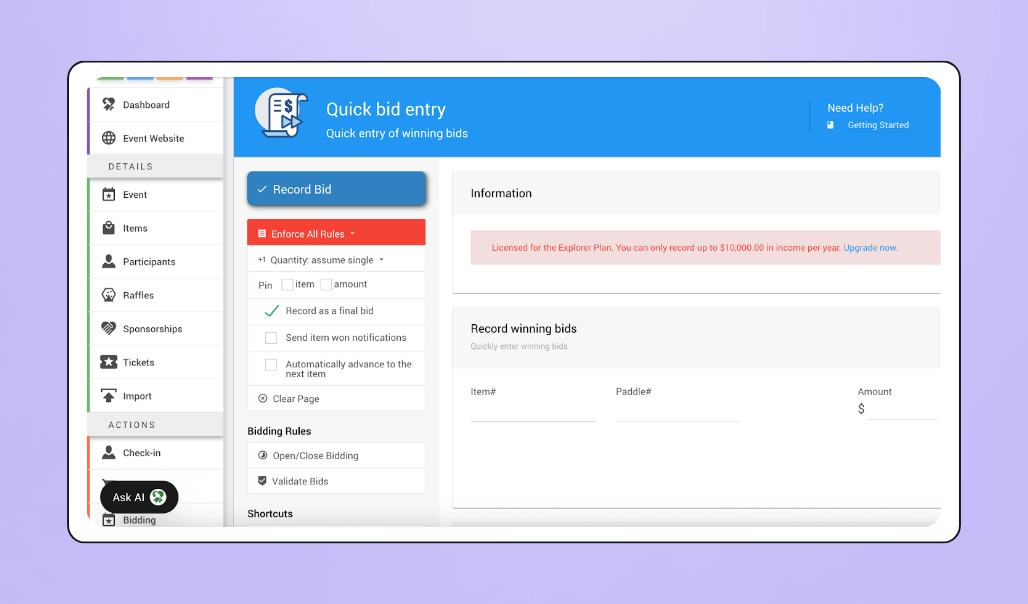
💰 Price: Free plan available (up to 250 bidders per event and a ~$10K annual income cap). Transaction fees apply (including an additional ~1% Auctria fee on the free plan). Paid plans remove limits and lower fees.
🤩 Standout features:
- Customizable event website for catalog, tickets, and donor recognition
- Mobile bidding app (iOS and Android)
- Real-time auction monitoring
- Streamlined item and inventory management
- Printed bid sheets, catalogs, and certificates
- “Buy now” options for bidders
- Sponsorship management
- Raffles for extra fundraising opportunities
- Detailed donor and bidder tracking
- Checkout tools for payments and emailed receipts
✅ Best for: Small nonprofits that want an affordable all-in-one auction tool and don’t need unlimited bidders or a modern bidding interface.
🔥 Our take: Auctria packs a lot of functionality into its free plan, making it a strong fit for smaller teams. But many users say the bidding and checkout experience can feel confusing, which matches the overall design feeling a bit dated compared to newer tools. Combined with the 250-bidder cap on the free plan, it may not be the best fit for larger or fast-moving auctions.
12. 32Auctions
32Auctions is a value-for-money option for small silent auctions. You can spin up an online auction page with your own branding, add items, and share a custom link with supporters.
Bidders place bids directly through a browser (no dedicated app needed), and the platform sends instant notifications when someone is outbid or wins an item.
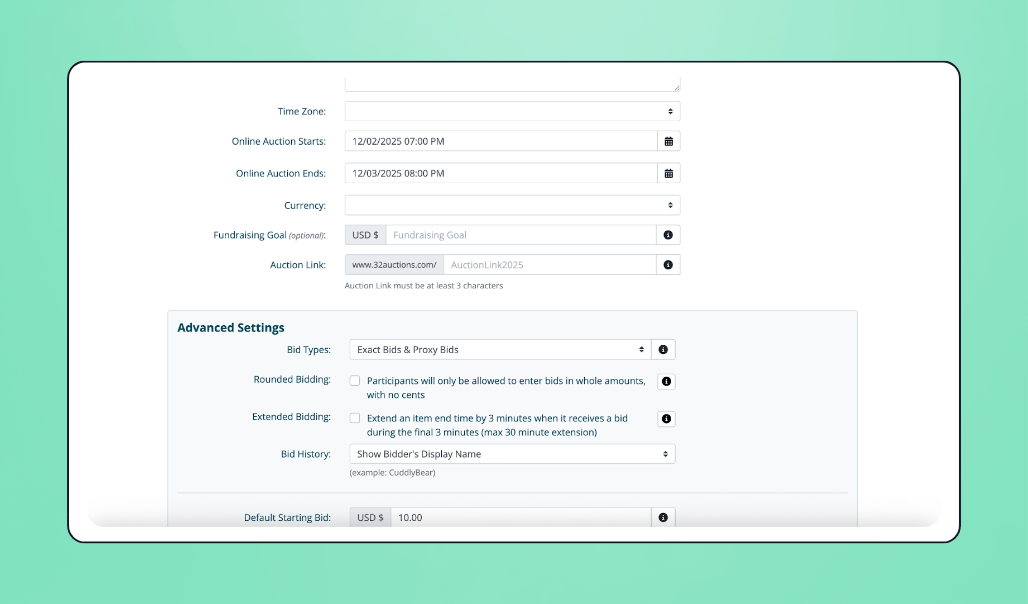
You can offer “Buy Now” pricing, recognize donors and sponsors, and accept payments online with automatic receipts.
💰 Price: Free (up to 20 items on the free plan; ads displayed unless upgraded). Payments are self-managed, meaning nonprofits connect their own payment processor and handle transaction fees and payouts themselves. Paid upgrades increase item limits and remove ads.
🤩 Standout features:
- Online silent auction pages with a custom link and branding
- Bidding through any browser (no mobile app required)
- Instant bid notifications (email alerts)
- “Buy Now” purchase option
- Donor and sponsor recognition
- User-friendly interface (widely praised by small nonprofits)
✅ Best for: Small nonprofits hosting simple online silent auctions that don’t need full event tools or unlimited item capacity.
🔥 Our take: 32Auctions is easy to use and affordable, especially for small teams. But the free plan’s 20-item limit makes it restrictive, and the platform focuses only on online silent auctions, without live-auction tools, event features, or integrations. A solid budget pick, but not ideal for larger or more dynamic fundraising events.
Best open source event management software for nonprofits
13. Hi.Events
Hi.Events gives you the choice to self-host the platform for full control or use their cloud version if you want everything handled for you.
From there, you can offer any ticket type you need (free RSVP, paid, donation-based, or VIP) and build a page that matches your brand in minutes.
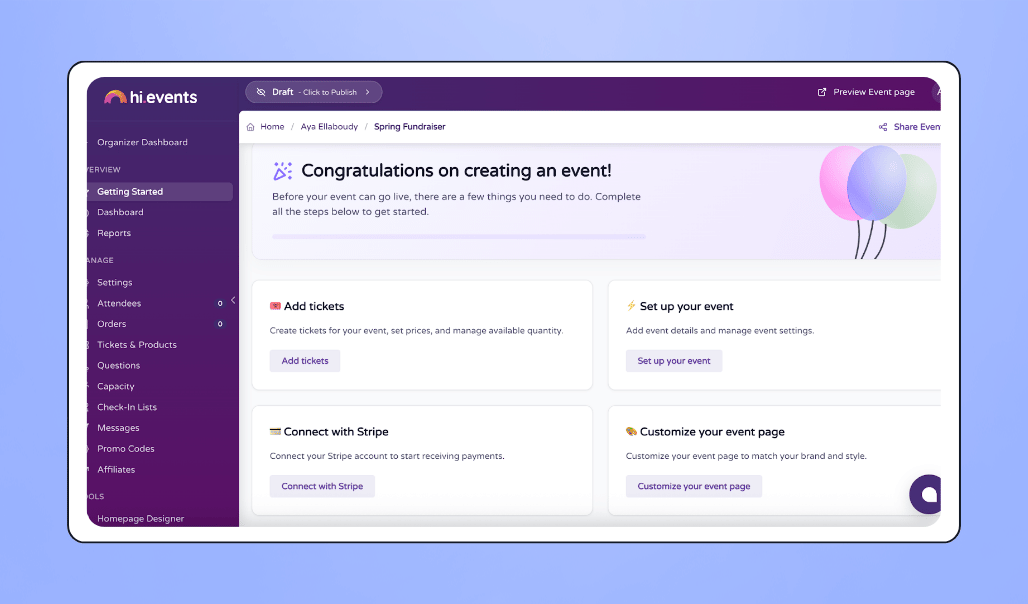
Registration can live right on your website through the embeddable widget, and event-day check-ins stay simple with QR codes, staff-friendly access links, and support for multiple check-in lists when you need them (like separate entrances or VIP access).
For nonprofit teams that want to boost revenue, you can also sell merch or add-ons during checkout, all tracked through a clear dashboard that shows ticket sales, revenue, and attendee insights in real time.
However, Hi.Events is a general-purpose event platform, not a nonprofit-specific fundraising tool, so donation and donor engagement features are limited.
💰 Price: Free and open source if self-hosted (no platform fees; standard payment processing fees apply to paid tickets). If you use Hi.Events’ hosted cloud version, free events are $0, and paid tickets include a small platform fee (0.75% + $0.40 per ticket).
🤩 Standout features:
- Flexible free, paid, and donation-based tickets
- Custom-branded event pages
- Embeddable registration widget
- QR code check-in and multiple check-in lists
- Merch and add-on sales
- Analytics dashboard for sales & attendance
- Stripe, PayPal, and offline payment options
- Open-source flexibility (self-host or cloud)
✅ Best for: Nonprofits that want a modern, customizable event setup they can host on their own site or run in the cloud without sacrificing control.
🔥 Our take: Hi.Events feels clean and intuitive while still giving you a lot of room to customize. It’s a strong choice if you want branding freedom, easy check-ins, and the option to avoid platform fees or keep full control of your data by self-hosting. However, because the platform is not built specifically for nonprofits, fundraising features are limited compared to other platforms.
14. Pretix
Pretix is built for events that need serious flexibility: reserved seating, complex ticket structures, multiple pricing layers, and detailed attendee data.
You can customize nearly every part of the ticketing experience, from product bundles and add-ons to full seat maps where guests choose exactly where they’ll sit.
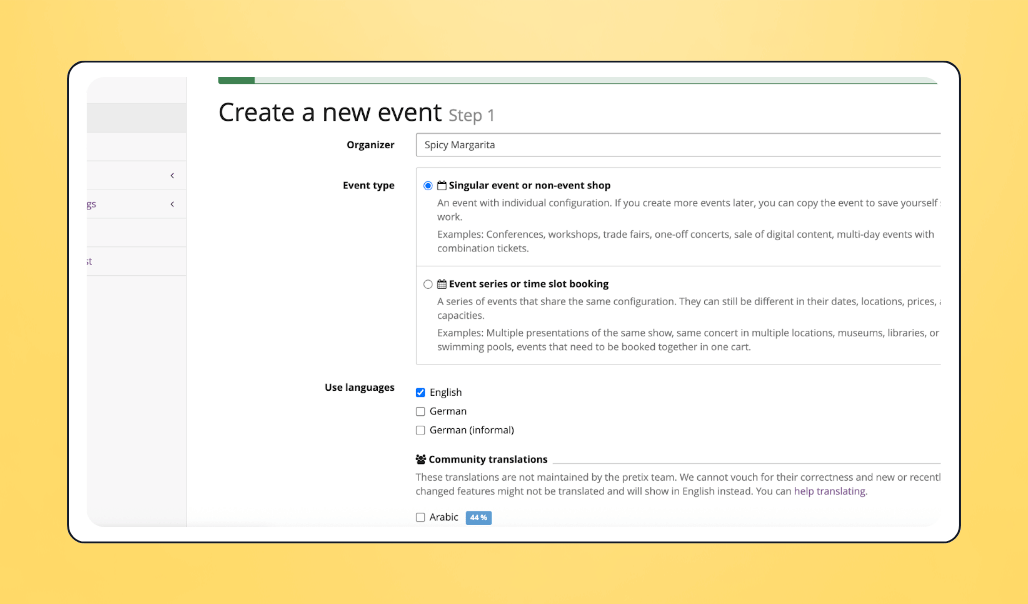
The ticket shop is fully brandable, supports multiple languages, and can even run on your own domain if you want the entire experience under your nonprofit’s umbrella. Ticket sales can also happen directly on your website through Pretix’s embeddable widget.
To round it out, Pretix includes registration tools like custom questions, automated waiting lists, discount codes, and email updates you can personalize.
💰 Price: Free – platform fees for paid tickets: <span interest-rate-element="sync">2.5%</span> per ticket (capped at €15 or the local-currency equivalent), and for free tickets: €0.50 each - first 500 per year are free
🤩 Standout features:
- Advanced ticket structures and add-ons
- Full interactive seating maps
- Fully brandable ticket shop and multi-language
- Embeddable ticket widget
- Custom registration fields
- Automated waiting list
- Discount codes
- Campaign tracking
- Stripe, PayPal, Mollie, bank transfer & more
- PDF, mobile, and paper ticket options
- Open-source flexibility (self-host or cloud)
✅ Best for: Events with complex ticketing needs: reserved seating, multiple pricing tiers, workshops, tracks, or international audiences.
🔥 Our take: Pretix is powerful when your event structure goes beyond simple tickets, but it comes with a learning curve, more complex than Hi.Events and less friendly for beginners. And the fee for free tickets after the 500-ticket allowance is something to plan around. Still, if your event requires depth and customization, Pretix is one of the most capable open-source options available.
Best free event management tools for crowd engagement
15. Givebutter
Givebutter gives nonprofits diverse tools to turn any event (virtual, in-person, or hybrid) into an engaging, community-driven experience.
Supporters can interact in real time through the platform’s interactive supporter wall, where they can post messages, photos, drawings, and GIFs that keep the energy high and make donors feel seen.
Live events get an extra boost with Givebutter’s live display and livestreaming tools. You can show real-time progress bars, donor shoutouts, milestones, and text-to-donate prompts on screens throughout the room or inside the stream.

To keep things lively, Givebutter also adds gamification features like leaderboards and milestone alerts, small touches that spark friendly competition and encourage more participation.
With the Givebutter platform’s built-in communication tools, you can send personalized email updates for free, and with Givebutter Plus, you can send targeted text messages to motivate people throughout the event.
Social sharing is simple, too. Supporters can post your campaign with one click, join peer-to-peer efforts, and even use Givebutter’s Meta integration to add a donate button to Facebook posts and Instagram stories.
💰 Price: Free, with Givebutter covering platform and processing costs when optional donor tips are enabled (even if donors don’t tip), so nonprofits can run engaging events without paying out of pocket. If tips are turned off, a simple flat 3% platform fee applies.
🤩 Standout features:
- Interactive supporter wall (messages, GIFs, photos, and drawings)
- Live display and livestreaming for real-time engagement
- Text-to-donate and scan-to-donate
- Live fundraising thermometers, goal bars, and milestone alerts
- Team and individual leaderboards
- One-click social sharing and Meta fundraising integration
- Built-in email tools and optional SMS
- Centralized giving hub for all active campaigns
- Matching donations for high-impact moments
✅ Best for: Teams that want diverse, high-impact tools to boost interaction and bring out the full engagement potential of their crowd.
🔥 Our take: Givebutter sets the standard for crowd engagement. It makes events feel alive, gives supporters a voice, and turns every moment into an opportunity to participate. If you want energy, visibility, and momentum baked in, Givebutter is the strongest free option.
16. RallyUp
RallyUp gives nonprofits a flexible way to engage supporters across different formats. You can run livestreams, raffles, a-thons, peer-to-peer campaigns, or combine several activities into one experience.
Everything happens through a mobile-optimized website.
A-thons are one of RallyUp’s strongest engagement tools. Supporters choose an activity (walking, reading, running, sketching, anything) and donors can pledge per unit completed or give a one-time gift.
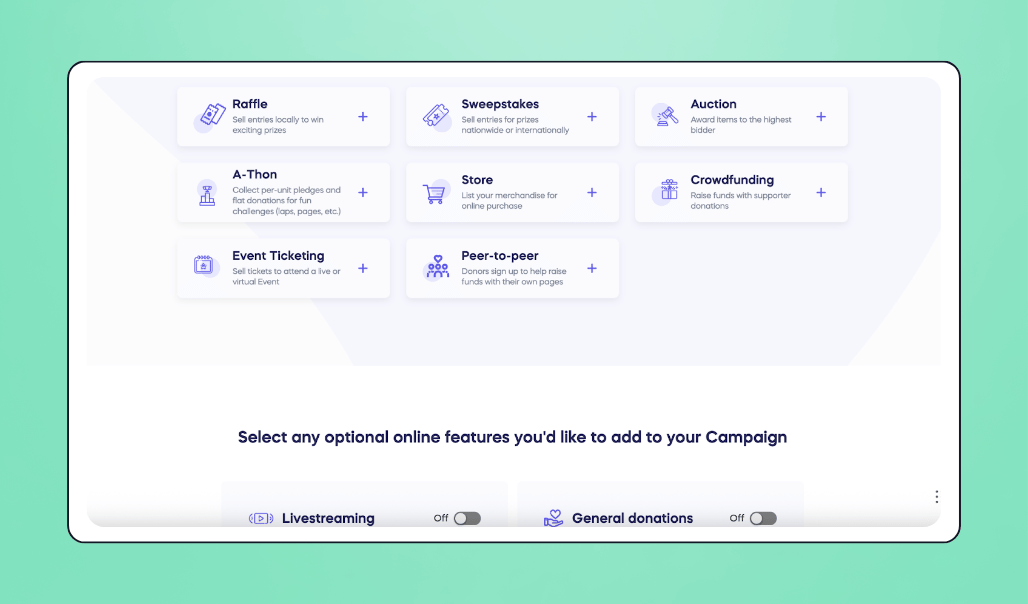
Each participant gets a shareable page for promoting their effort, as well, which helps spread the campaign and encourages team-based involvement.
For both live and virtual events, RallyUp includes built-in livestreaming with real-time donation feeds, which helps build excitement as contributions roll in and keeps viewers connected to what’s happening.
They also support raffles and sweepstakes, which come with customizable entry levels, unlimited entries, and prize-based incentives, giving people more reasons to join in and stay engaged.
💰 Price: Free pricing (donor tipping required) includes peer-to-peer campaigns, a-thons, raffles, sweepstakes, livestreaming, and ticketed events with no platform fees. Silent auctions, live auctions, Fund-a-Need, and Paddle Raise+ require Flex pricing, which adds platform fees (2.9%-6.9%) and makes donor tipping optional.
🤩 Standout features:
- Mobile-optimized browser participation (no app required)
- Livestreaming with real-time donation feed
- A-thons with pledge-per-unit or flat donations
- Peer-to-peer links for teams and individuals
- Raffles and sweepstakes with custom entry levels
- Mix multiple activities under one campaign page
✅ Best for: Nonprofits that want flexible, activity-based ways to keep supporters involved.
🔥 Our take: RallyUp shines when you want variety. It gives supporters multiple ways to participate and ties them together in one place. It’s a strong fit for teams that run interactive online campaigns and want to offer supporters more than one way to get involved.
17. Slido
Slido is built for events where a nonprofit needs interaction more than fundraising. It turns virtual sessions, workshops, or volunteer meetings into two-way conversations through live polls, word clouds, surveys, and Q&A, all in real time, with no downloads or logins required.
The Q&A feature is a highlight of the platform. Supporters can submit questions anonymously and upvote the ones they care about most, making discussions more inclusive and transparent.
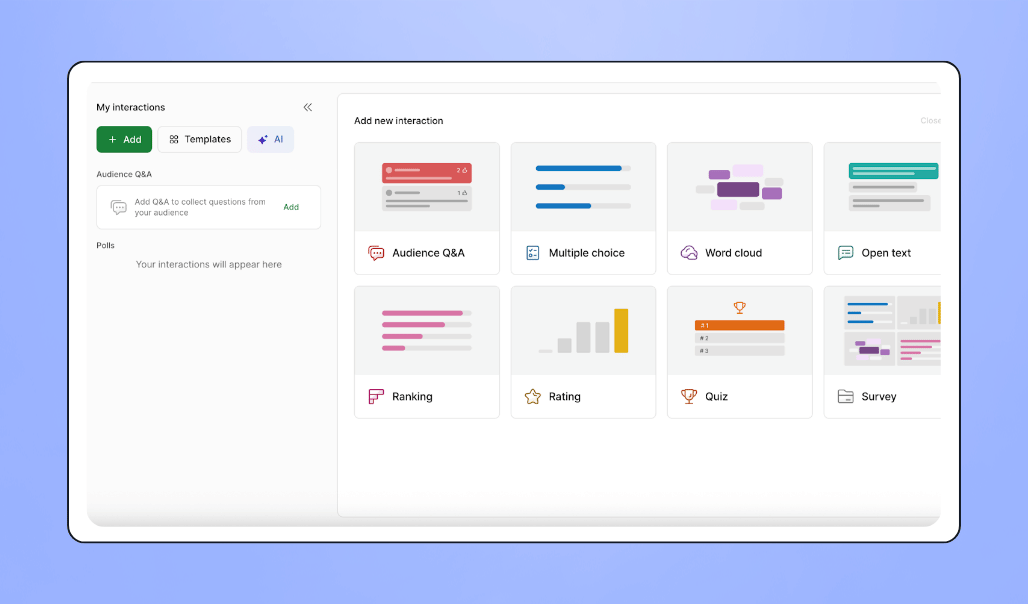
You can also mix in quizzes or quick trivia rounds to keep the crowd energized, especially during long sessions or training days.
💰 Price: Free plan available (up to 100 participants). It includes core interaction tools, though quantity limits (e.g., restricted number of polls/quizzes per event) apply. Paid plans remove interaction limits, increase participant capacity, and unlock advanced features.
🤩 Standout features:
- Live polls, surveys, and word clouds
- Anonymous Q&A with upvoting
- Interactive quizzes for group engagement
- Join from any device, no login or app required
- Works for virtual, hybrid, and in-person sessions
✅ Best for: Nonprofits that want two-way participation at events; collecting input, surfacing questions, and sparking discussion (not fundraising).
🔥 Our take: Slido makes it easy to keep people engaged during workshops, trainings, and virtual meetups with effective interaction tools. However, since the free plan has a 100-person limit, and Slido doesn’t include donation-focused features, it’s best suited for smaller, non-fundraising gatherings.
Best free event management software for peer-to-peer fundraising
18. Givebutter
Givebutter gives supporters everything they need to start peer-to-peer fundraising in minutes. Each person or team gets a customizable page with their story, progress bar, and unique link.
They can add photos, videos, or Canva designs without leaving the platform, making every page feel personal and share-ready.
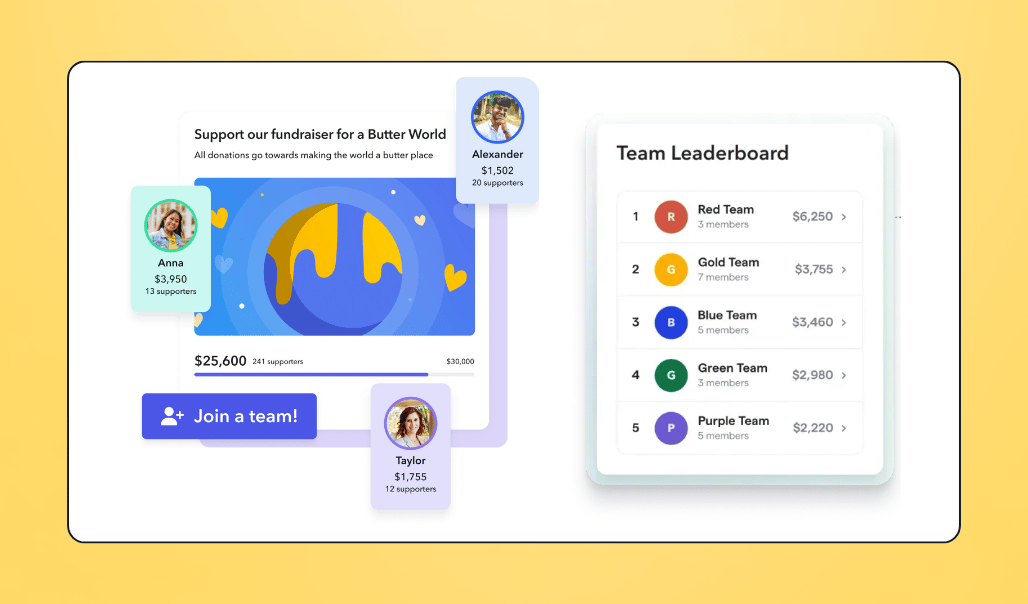
Teams can also highlight members and show exactly how they compare to other teams on the leaderboard, motivating everyone to keep pushing.
A big advantage is that peer-to-peer fundraising doesn’t have to start separately. When supporters register or buy a ticket, they’re guided to set a goal and launch a fundraising page right away through Givebutter’s registration fundraising features, potentially turning simple signups into more momentum.
For admins, our platform ensures full visibility. You can invite fundraisers, create pages for them, and manage teams if needed. Everything ties together in one dashboard, where you can track progress across individuals, teams, and the campaign as a whole.
To maximize their reach, fundraisers can send built-in emails or personalized texts, post directly to social media, or share QR codes and trackable links to their pages.
The whole experience keeps momentum high and gives fundraisers small wins to celebrate as they climb toward their goal. Meanwhile, nonprofits stay supported with clear oversight and a setup that helps every campaign perform better with less work.
💰 Price: Free with optional donor tips. Thanks to the Givebutter Guarantee, your nonprofit keeps every dollar, even if donors don’t cover fees. If you need to disable tips, a flat 3% platform fee applies.
🤩 Standout features:
- Unlimited individual and team fundraising pages
- Custom storytelling pages with photos, videos, and Canva graphics
- Goal bars, milestones, and live leaderboards
- Supporter feed with GIFs, photos, and messages
- Registration fundraising that turns event signups or ticket purchases into instant peer-to-peer fundraising pages
- Admins can set up pages on behalf of participants, so no one gets stuck on setup
- Built-in email and optional SMS for fundraisers
- Easy social sharing, QR codes, and trackable links
- Mobile-friendly payments (Venmo, PayPal, Cash App, Apple Pay, ACH)
- CRM included
✅ Best for: Nonprofits that want easy, high-energy peer-to-peer campaigns where supporters can fundraise confidently with minimal admin lift.
🔥 Our take: Givebutter makes peer-to-peer fundraising feel fun and social instead of complicated. Supporters get pages they’re proud to share, teams stay motivated, and admins have everything organized in one place. For free peer-to-peer fundraising, it’s the most complete option.
19. Donorbox
Peer-to-peer campaigns on Donorbox start with a main campaign page. From there, supporters create their own fundraising pages using photos, short messages, goal meters, and a unique share link.
Ready-made templates and onboarding emails help them launch quickly, even if they’ve never fundraised before.
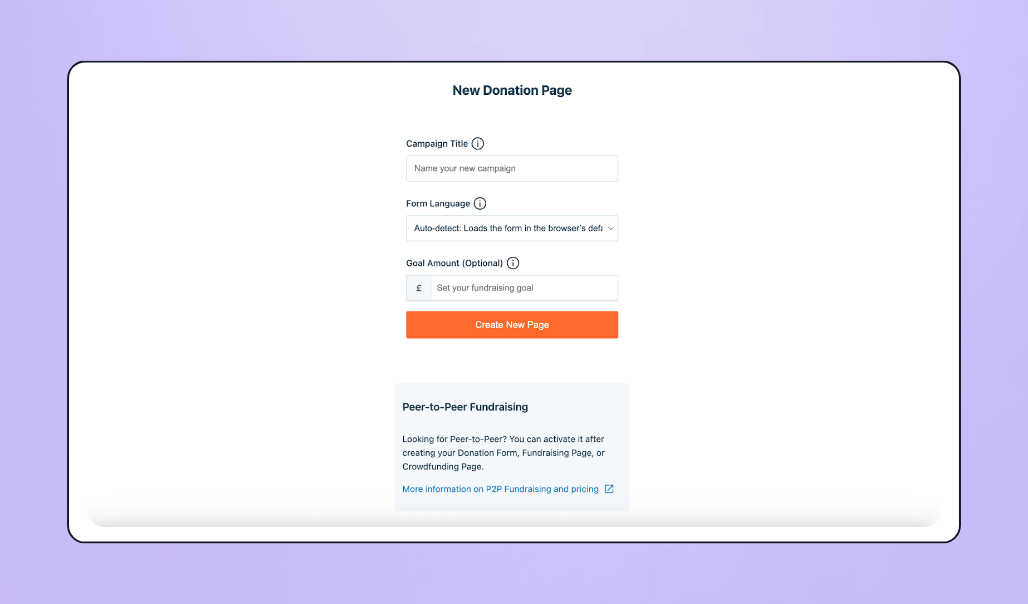
On the admin side, Donorbox’s CRM keeps all donor and fundraiser activity in one dashboard, allowing you to keep track of your campaign’s performance.
💰 Price: Free to get started, with platform fees on every donation (2.95% on the main campaign and 3.95% on peer-to-peer pages), plus processing. Donors can choose to cover processing fees. If they don’t, your nonprofit pays them. Pro and Premium plans are available if additional features are needed.
🤩 Standout features:
- Personalization: photos, stories, goal meters
- Ready-to-use templates and onboarding guidance
- Social sharing and unique fundraiser links
- Optional CRM available as a paid add-on (starting $90/month)
✅ Best for: Nonprofits that need simple, reliable peer-to-peer pages their supporters can set up and share quickly.
🔥 Our take: Donorbox makes peer-to-peer campaigns easy to set up for both supporters and admins. However, because it doesn’t offer engagement loops like supporter feeds, leaderboards, or gamified progress, fundraisers may have fewer built-in nudges to keep sharing their pages. That can make momentum a bit more dependent on each supporter’s own drive to promote their campaign.
Best free event software with volunteer management
20. POINT
POINT takes the stress out of managing volunteers. You can post volunteer opportunities, let people sign up instantly, and organize roles and shifts from a single dashboard.
Every volunteer gets a profile with hours, attendance, notes, and past activity, giving your team a volunteer-focused CRM that shows who’s engaged and where coverage is needed.
Reminders, QR check-ins, and built-in messaging keep everything running smoothly as the event approaches.
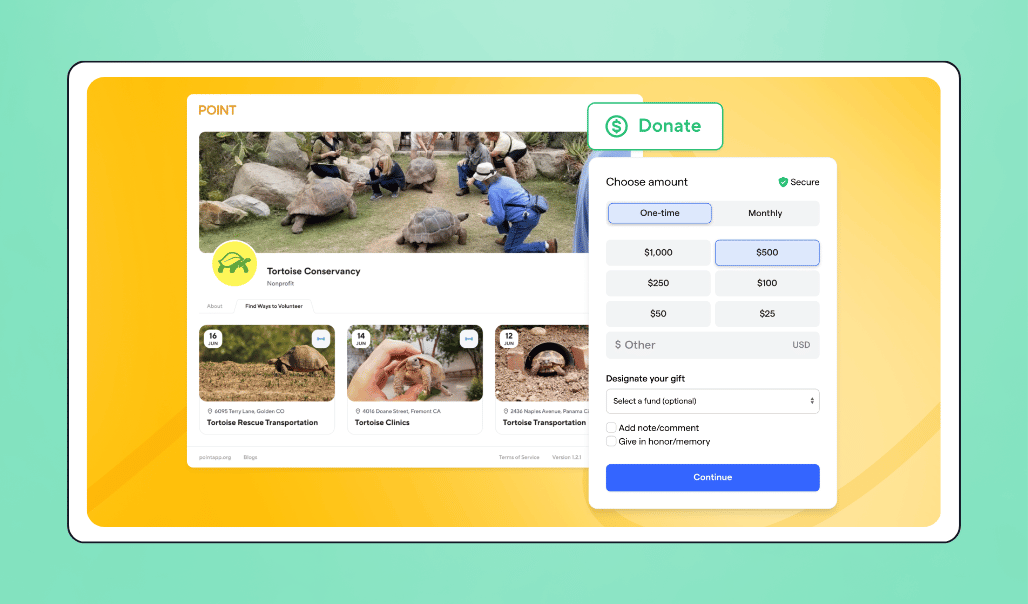
The platform supports unlimited volunteers and unlimited admins on its free plan, and volunteers can join through a browser or through the POINT app on iOS and Android, making it easy for people to get involved.
And here’s where it gets even better: POINT connects directly with Givebutter. Volunteers stay organized in POINT, while Givebutter powers donations, ticketing, and all your outreach.
With Givebutter’s built-in email tools, plus SMS through Givebutter Plus, nonprofits can send reminders, updates, and re-engagement messages that turn one-time volunteers into long-term community members. Everything works together in one ecosystem, with no monthly fees.
A standout bonus of this POINT-Givebutter connection is the built-in Givebutter donate button inside the volunteer portal. It prompts volunteers to donate and support your nonprofit without ever leaving the page, turning everyday volunteer activity into added momentum for your mission.
💰 Price: Free (CORE plan) with robust volunteer management tools. Paid plans start at $99/month for advanced features and expanded capabilities.
🤩 Standout features:
- Unlimited volunteers and unlimited admins
- Instant mobile/web signups
- Shift scheduling and role assignments
- Volunteer CRM: hours, attendance, notes, and history
- Messaging and reminders
- Self-reported hours and QR check-ins
- Deep Givebutter integration for fundraising and communication
- Built-in Givebutter donate button inside the volunteer portal
✅ Best for: Nonprofits that rely on volunteers and want a modern, no-cost system for scheduling and coordination that’s also seamlessly connected to the same ecosystem they use for fundraising.
🔥 Our take: POINT delivers volunteer management that feels effortless. Combined with Givebutter’s fundraising and communication tools, it keeps events organized, attended, and supported, without added cost.
21. Cheddar Up
Cheddar Up helps nonprofits collect volunteer signups quickly through role-based or shift-based forms. You can create unlimited pages, send reminders, and track who registered, all from the free plan.
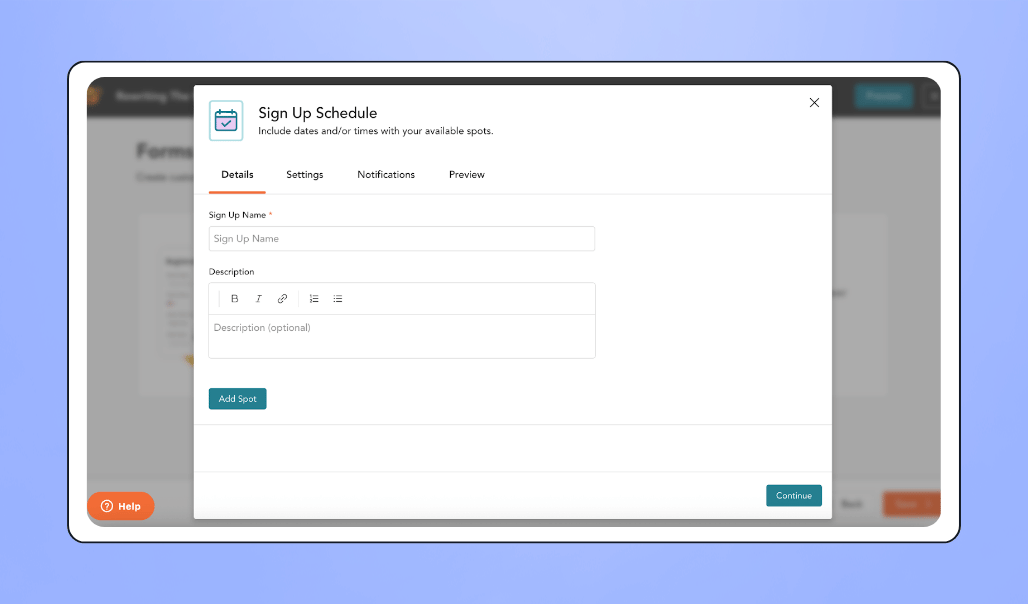
The system keeps things simple: volunteers sign up, you track responses, and everything exports cleanly for event planning.
💰 Price: Free for volunteer signups with unlimited pages but limits on forms per page and fewer customization options. Paid plans unlock higher limits and more flexibility for larger or recurring volunteer needs.
🤩 Standout features:
- Volunteer signup forms (roles, shifts, and time slots)
- Unlimited pages (5 items and 1 form per page)
- Built-in reminders and messaging
- Basic participant tracking and exports
✅ Best for: Nonprofits that only need basic volunteer registration, not advanced tracking.
🔥 Our take: Cheddar Up works well for straightforward volunteer signups, but it’s not built for full volunteer programs. Without a volunteer CRM and with page limits that restrict more complex setups, it’s best suited to one-off or small-scale needs. For nonprofits that require deeper tracking and ongoing coordination, POINT fills that gap.
How to choose which free event management tool is right for you
With so many free event management tools out there, it’s easy to grab whatever looks good in the moment and end up with a messy tech stack later.
Instead of starting with features alone, think about how each tool will actually fit into your events, your budget, and your team’s day-to-day.
Here are a few things to weigh as you decide:
1. Start with your event formats and goals 🎯
Look at the types of events you actually run in a year (virtual gatherings, galas, walks, auctions, volunteer days) and what success looks like for each.
If fundraising is front and center, tools that combine registration, ticketing, peer-to-peer pages, and donations—Givebutter is a good example—will usually serve you better than single-purpose tools you have to connect later.
2. Look past the “free” label 💸
“Free” can mean very different things. Some tools use optional donor tips, others charge platform fees on tickets or donations, and some lock key features behind paid tiers.
Check how each tool handles fees, payout schedules, and limits (items, bidders, registrations, users) so you don’t bump into surprises once your event is live.
3. Protect the supporter experience 💛
If giving or signing up feels clunky, people drop off. Look for tools with fast, mobile-friendly checkout, clear pages, and flexible payment options your supporters already use (cards, wallets, apps).
The easier it is to pay in their preferred way without having to jump between tabs or re-enter their info, the more likely they are to follow through.
4. Consider your team’s capacity ⚖️
Your staff and volunteers don’t have hours to learn complicated software. Prioritize tools that your team can understand quickly and reuse for future events.
Platforms built with that simplicity in mind, like Givebutter, tend to keep everyone moving and will outperform a complex one that slows everyone down.
5. Minimize tool sprawl & siloed data 🧰
Every time you add a new platform, you add another place to check numbers and download reports. Whenever possible, choose tools that play multiple roles (for example, ticketing, donations, and a basic CRM) or integrate cleanly with what you already use.
That way, your attendee, donor, and volunteer data stays connected, and follow-up becomes much easier.
6. Think beyond one event 🗓️
The best tool is the one you can reuse. As you compare options, ask yourself whether this platform could support more than one event type over the next year.
If you can handle ticketing, registrations, P2P fundraising, and crowd engagement in the same ecosystem, you’ll spend less time rebuilding from scratch every time you plan something new.
Manage your next nonprofit event with ease (for free!) using Givebutter
The best free event management software for nonprofits gets you through more than just one big night. It gives you a setup you can reuse for every fundraiser, challenge, or community gathering you run without stretching your budget.
Givebutter is built with that in mind. From ticketing and livestreaming to auctions, peer-to-peer campaigns, and volunteer-friendly tools, nonprofits can manage everything inside one free platform, with room to grow into Givebutter Plus if you need more automation or advanced messaging later.
If you’re ready to stop rebuilding your workflow from scratch every time and want to run successful events that feel more connected from planning to follow-up, Givebutter gives you the structure to make that happen.
Dare we say, it makes running your nonprofit smooth as butter.

Nonprofit event management made easy
Sign up for Givebutter for free and start running events, donations, and engagement from a single, easy-to-use hub.
FAQs about free event management software tools for nonprofits
What features are essential in nonprofit event management software?
For most nonprofits, the “must-haves” are the things that protect your time, budget, and supporter experience. When planning events, here’s what we recommend you look for:
- Ticketing and registration tools
- Various donation and payment options
- Marketing and communication tools
- Standard CRM and contact tracking
- Reporting and exports
- Branding and supporter experience
Everything else (automation, advanced analytics, integrations) is helpful, but these are the core building blocks.
What are the best no-cost event planning tools for charities?
If you want one no-cost hub that can handle most of your charity events without stacking tools, Givebutter is the standout choice. It combines event pages, ticketing, donations, auctions, and supporter engagement in one place, with no monthly fees. Most nonprofits pay $0 in platform fees when donor tips are enabled, which makes it especially appealing for small teams that want to stay organized, look professional, and avoid surprise costs.
What are the limitations of free event management software?
Free tools can save your nonprofit money, but they often come with trade-offs. The most common limitations include:
- Feature caps
- Hidden or higher fees
- Limited branding
- Data siloing
- Basic or slow support
If you want to avoid most of these limitations, Givebutter’s free plan is one of the few that includes custom branding, events, CRM, donations, ticketing, auctions, and 24/7 support without forced platform fees.
How do I set up online ticketing for a free nonprofit event?
You can set this up quickly using a free tool like Givebutter. Create an event page with your date, time, and details, then add free ticket types and keep registration questions minimal. Share the registration link through email, social media, and your website. Automatic confirmation and reminder emails help reduce no-shows, and QR-code tickets or a live attendee list make event check-in simple on event day.
How can my small nonprofit use free software to manage a fundraising gala?
You can run an entire fundraising gala using Givebutter’s free tools without piecing together multiple platforms. Start by creating a single event page for tickets, donations, and updates. You can sell individual tickets or tables, collect guest details during checkout, and use tools like text-to-donate or QR codes during the event to boost giving. After the gala, all guest and donation data are already organized in one place, making thank-yous, reporting, and follow-up simple.
Share this article



_4x.webp)




.svg)
.svg)


%201.webp)