

.svg)
.svg)
.svg)
.svg)
.svg)
.svg)
.svg)
.svg)
.svg)


.svg)
.svg)
.svg)
.svg)
.svg)
.svg)
.svg)
.svg)

.svg)
.svg)
.svg)

.svg)

.svg)
.svg)
.svg)
.svg)
.svg)


.svg)
.svg)
.svg)
.svg)
.svg)
.svg)
.svg)





.svg)

.webp)

.webp)


On October 1, 2026, thousands of changemakers tuned in to The Spread, Givebutter’s third annual product launch event. But this year, the program didn’t end when the livestream was over.
For the past decade, Givebutter has been on a mission to make fundraising easier: eliminating silos, reducing friction, and finding new ways for nonprofits to raise more and build the world they believe in. And from the beginning, our customers have had a hand in everything we’ve built.
This spirit of building together was at the heart of this year’s theme: Co-Create. Our users’ feedback helped shape all the new features we unveiled at The Spread product launch. Then, they put their new tools into action during a community hackathon in partnership with We Are For Good.
Press play to watch the full product launch livestream from The Spread 2026 (captions available) 🎬
Everything we launched at a glance
There’s a lot to unpack! Jump to any launch below for the highlights, or keep scrolling to explore everything in order.
- Givebutter Magic AI features throughout the platform
- AI connectors for ChatGPT, Claude, and more
- Ready-made reports
- Brand new email editor
- Fundraising blocks for emails
- Personal video messages
- A self-service donor portal
- Redesigned contact profiles
- Smart filters for your contact list
- Expanded Magic Migration services
- More ways to spend & manage Givebutter Wallet funds
- Mobile check acceptance in the Givebutter app
- Events & auctions upgrades
- Easy web building with Wix
- Volunteer management with POINT
Keep reading to dive deeper into every new Givebutter feature, including key details and resources to help you explore even further. Plus, get a first look at what changemakers built at our first-ever community hackathon.
Making AI practical for nonprofits
At Givebutter, our job is to listen to what changemakers need and build technology that helps you do your work better. So we’ve taken our time to understand what AI looks like when it’s built around the needs of nonprofits—how we can make it safe, accessible, and actually useful for everyday changemakers.
Introducing Givebutter Magic 🪄
Givebutter Magic is a brand new suite of responsible AI features built throughout Givebutter—not another disconnected tool nonprofits need to learn. Magic is woven throughout Givebutter to help you get past the blank page, make smarter fundraising decisions, and find the answers hiding in your data.

First, it works inside your dashboard, offering smart recommendations and helping with time-consuming tasks, with features including:
- Campaign creator ✨ Skip the blank page and start with a branded, ready-to-edit campaign draft, complete with a compelling story, recommended goal, and images pulled from your website.
- Smarter goals 🎯 Set a data-informed fundraising target with recommended goals, then keep the momentum going with stretch goals that automatically increase as you raise more.
- Suggested amounts 🎁 Replace one-size-fits-all giving tiers with suggested amounts informed by millions of real Givebutter donations and automatically matched to your campaign type, cause, and donor’s device.
These are just a few of the new Magic features now live and free for all Givebutter users, with even more ways to put AI to work throughout the platform. They’re also optional, and you always have final say on what gets published.

Take it further with AI connectors ⚡
The second way Givebutter Magic works is by extending Givebutter into the AI tools you already use. Because AI is much more helpful when it actually understands your organization, your supporters, and your fundraising, our new AI connectors let you securely connect your Givebutter data to AI tools like ChatGPT and Claude.
From there, the possibilities are wide open. You can:
- Ask questions about your donor data and get answers grounded in your actual organization.
- Analyze past campaigns to uncover trends and opportunities.
- Bring Givebutter together with other tools to build entirely new workflows.
- And so much more!
Not sure where to start? Check out our list of AI prompts for nonprofits for ideas and inspiration.
See it in action 💡 Check out this product demo from Syd, Givebutter’s Customer Education Specialist, to learn more about how the new AI connectors work and what you can do with them.
At the heart of all of these developments is our commitment to building technology you can trust. We’ve always taken the responsibility of managing your data seriously, and Givebutter Magic is no different. Our approach is guided by three simple principles:
- Your data is yours.
- You stay in control.
- You always know where AI is being used.
This approach aligns with Fundraising.AI’s framework for responsible and beneficial AI in the fundraising sector, and we can’t wait to see how these new tools help lighten your load.
“AI connectors have made finding answers so much faster, so much simpler, and also allows us to use data from other sources from around the organization to really tell a better story.” - Kyle DeGood, The DeGood Foundation
Turning donor data into action
Over the past year, we’ve been enhancing Givebutter’s CRM to help you better understand each supporter, spot patterns across your supporter base, and know where your attention can make the biggest difference. But first, you need to have all of your data in one place.
Make the move with Magic Migration 🚛
Since introducing Magic Migration at The Spread in 2025, we’ve helped hundreds of organizations leave their legacy CRMs behind and make the move to Givebutter. Now, we’re expanding our migration support with free Magic Data Extraction available for all users, taking one of the most tedious parts of switching platforms off your plate.
Our team handles all the technical work of extracting your data from popular platforms and mapping it into Givebutter’s import templates for you—no more rebuilding years of donor history by hand.
Redesigned contact profiles 👥
We believe your CRM should help you manage relationships, not just records. That’s why we’ve completely redesigned every contact profile to give you a clearer, more complete picture of each supporter—who they are, what matters right now, and what to do next—without digging through cluttered records.
From an activity feed that’s easier to scan and filter to AI-powered contact summaries that bring the most important context to the top of each profile, you now have a quick, clear view of an individual’s history and key details, along with recommended next steps for engagement.
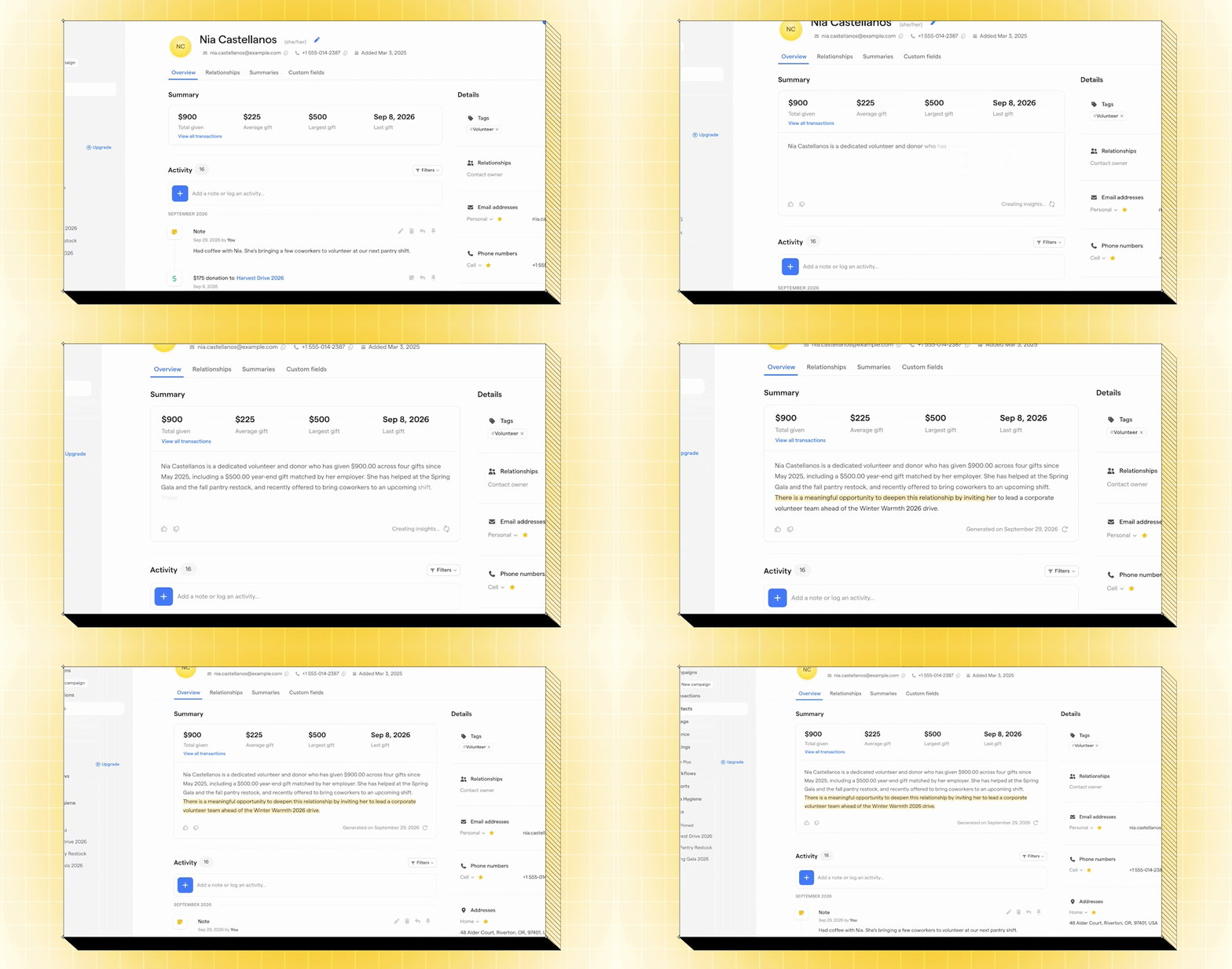
You can also now assign contact owners, one of our longest-standing CRM requests, so everyone on your team is clear on who’s responsible for each relationship.
And, because donor conversations don’t always happen in front of a laptop, contact profiles have been upgraded in the Givebutter mobile app, too. Pull up supporter details on the go, and use our new speech-to-text feature to quickly add notes on the fly.
Smart filters that save time 🔎
Understanding one supporter is only part of the picture. When you want to zoom out, our new smart filters help you quickly find exactly the supporters you’re looking for.

Just describe what you have in mind in plain language, and Givebutter Magic builds the filter for you. From there, you can create, refine, and save segments to come back to anytime. Now, "Who gave last year but hasn't given again?" is just a search away, not hours spent digging through a spreadsheet.
Reporting built around top nonprofit questions 📊
You asked us for reporting that’s clearer, faster, and easier to use. Now, Givebutter Plus subscribers can skip building every report from scratch and instead start with a set of new, ready-made reports designed around nonprofit best practices.
Compare results across any time period, filter by campaign or giving type, see where donors are coming from on a live map, and dig into donor health—including new and returning donors, retention rates, and who may be at risk of lapsing.

We’ve also added deeper insights into recurring giving, so you can see how long monthly donors stick around and where you may be losing them.
And coming soon, you’ll be able to build custom reports with Givebutter Magic. Just describe what you want to see, like “Show me first-time donors from our spring gala who haven’t given again,” and we’ll build the report for you.
With ready-made reports available now and AI-powered custom reporting on the way, we’re building toward a CRM that doesn’t just hold your data, it helps you understand it and decide what to do next.

A new email editor for everyone 💌
We've completely rebuilt our email editor from the ground up, and it's something really special, designed specifically for nonprofits. With drag-and-drop content, flexible layouts, and brand controls, it’s easier than ever to create beautiful, personalized emails that look great in Gmail, Outlook, and on mobile.
A new library of templates helps you get started for real nonprofit moments—like welcoming a new donor, launching a campaign, thanking supporters, or sharing your impact. And merge tags now work in subject lines, too, so you can personalize your message before someone even opens it!
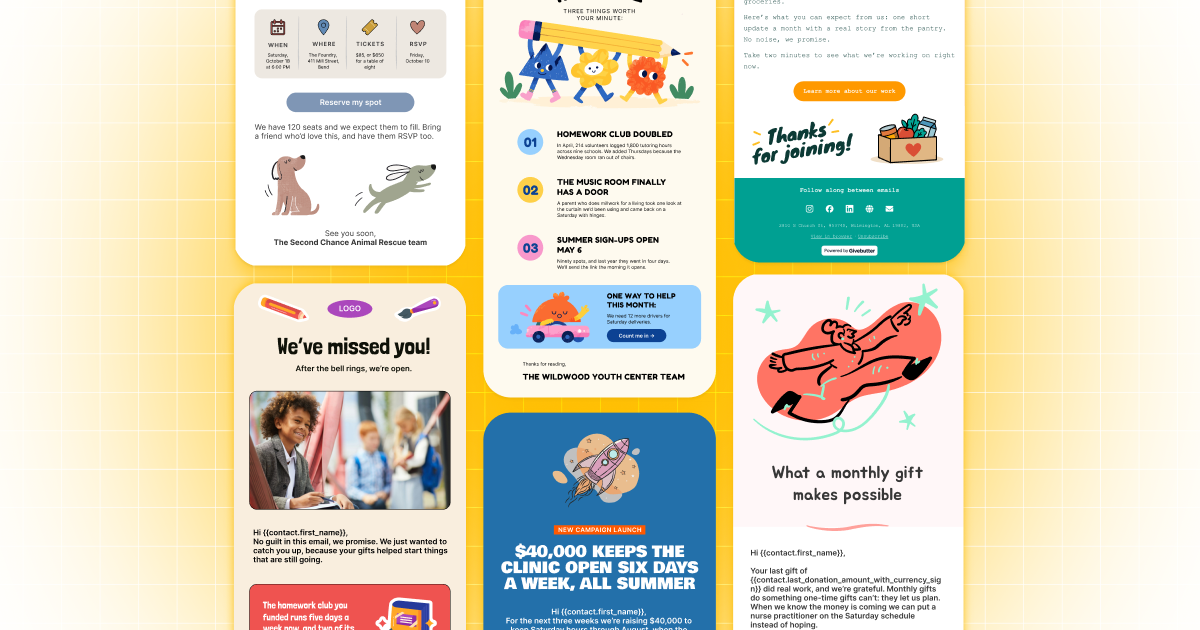
You also have more flexibility to make every email your own with new column layouts, stat blocks, and personal signatures, plus seamless integrations with Unsplash, GIPHY, and Canva.
All the Givebutter email marketing features you already know and love are still here—now with a more flexible editor and a fresh new look for your emails.
Fundraising blocks that bring emails to life 🤩
Because your email, CRM, and fundraising all live in Givebutter, your outreach can now do things a standalone email tool simply can’t, like bringing your fundraising directly into an email itself.
With new fundraising blocks, Givebutter Plus subscribers can seamlessly add live goal bars, auction items, tickets, and peer-to-peer leaderboards into any email. Just choose the campaign you want to feature, and Givebutter pulls the details into the message for you.

Givebutter Plus subscribers also now have the option to hide Givebutter branding from email, so whether you’re writing a quick note or a polished newsletter, one email editor covers all your bases.
Video messages that make it personal 📹
We know how powerful personal messages can be in building donor relationships, so we wanted to make it easier to create those moments of connection right from Givebutter.
With new video messages, Givebutter Plus subscribers can record and send videos directly from any contact profile.
“My favorite thing about Givebutter video messages is that they combine gratitude, information, and human connection in one simple interaction. In just 30 seconds, a supporter can feel individually seen, valued, and informed about their impact.” - Dr. Sanjay Bindra, GOSUMEC Foundation USA
Thank a new donor, reconnect with a longtime supporter, or personally invite someone to an upcoming event—with a button to RSVP or grab a ticket right from your message.
Every video message stays connected to the donor’s profile, right alongside the rest of your relationship.
See it in action 💡 Check out this product demo from Syd, Givebutter’s Customer Education Specialist, for a closer look at ready-made reporting, the new email editor, fundraising blocks, and video messages.
Experience everything new in Givebutter Plus ➕
Since launching Givebutter Plus just two years ago, more than 4,000 organizations have made the switch. Nonprofits aren’t just saving time and money by consolidating tools—organizations using Givebutter Plus raise nearly 3x as much on Givebutter.
While most of the features we unveiled at The Spread are available for free, Givebutter Plus gives you access to advanced tools, including new ready-made reports, fundraising blocks in emails, and video messages.
Ahead of the end-of-year giving season, we want every organization to have a chance to try Givebutter Plus. So we’re opening up a fresh 30-day trial to everyone.
If you’ve already used your trial, we’re extending the offer to you again through the end of the year. Just launch a new trial in your dashboard and get started.
Bringing more of your work under one roof
Last year at The Spread, we shared our vision for Givebutter to be the home for nonprofits—one place to fundraise, run events, build relationships, manage money, and more. This year, we’re bringing even more of that work under one roof.
More ways to manage your spending 💳
In 2025, we introduced Givebutter Wallet, a free, secure place in your dashboard to manage your funds and earn 2.5% APY rewards on every dollar raised.
Today, more than 7,000 organizations are already using Wallet to make their hard-raised funds go even further, with nearly $100M added to Wallet since we launched.
“The Mighty Millie Foundation uses Givebutter Wallet every single day! We’re grateful to have fundraising and spending connected. We’ve earned enough rewards to give 2,000 popsicles to kids fighting cancer in the hospital. This is amazing, and something we wouldn’t have done otherwise.” - Nick Mracek
And Wallet just keeps getting better! In July, we introduced Spend Cards, giving organizations a faster and easier way to put their Wallet funds to work.
With Spend Cards, you can make payments directly from your Wallet balance with a virtual or physical card, add it to Apple Pay or Google Pay, get cash out at any ATM, and skip the wait for a bank transfer.
You can now take Spend Cards even further with new expense management tools built right in Givebutter. Set spending limits on every card, automatically track every purchase, and upload receipts that Givebutter Magic verifies against the matching transaction—giving you more control over team spending and a clearer picture of where your organization’s money is going.
An easier way to process checks 🤳
We’re also excited to announce our game-changing new mobile check acceptance feature, which lets you process checks right from the Givebutter mobile app. Just snap a photo, and the donation is recorded in Givebutter while the funds settle directly into your Wallet, ready to earn APY rewards or for your team to spend.
And because everything is connected in Givebutter, your donor records, receipts, QuickBooks syncing, and automations can keep working just like they do with any other transaction.
No trip to the bank. No managing checks and funds in two different places. Mobile check acceptance is rolling out to select customers now, and to everyone in the coming weeks.
A smoother experience at every event 🎟️
Fundraising events can be some of your biggest fundraising moments—and some of the most complicated to pull off.
That’s why we’ve rolled out updates across the entire event experience in Givebutter, starting with check-in. You can now see helpful details like table seating and custom fields right when you need them. And with brand-new wallet passes, supporters save tickets to their phones, so they’re always easy to find.
We’ve also recently added some of your most popular requests to our free auction software, including blind bidding, popcorn bidding, and paddle raise. Features like popcorn bidding and paddle raise are already helping organizations raise an average of 22% more when added to their auctions! Apple Wallet tickets are available now, and Google Wallet is coming soon.

And coming very soon, donors will be able to save their preferred payment method, so they can participate and give throughout your event without entering the same information over and over.
A new home base for every supporter 🏠
Your supporters might buy a ticket, make a one-time donation, become a monthly donor, or do all three. Our brand-new donor portal gives them one place to keep track of it all.
Supporters can view their giving history and receipts, update recurring gifts, and manage their event tickets—including updating guest details or reassigning a ticket themselves.

They also have more control over their peer-to-peer fundraising, with new ways to register multiple participants, join or create teams, manage participants, and transfer pages they’ve registered.
The entire experience is branded to your organization, so your cause stays front and center every time they log in. Supporters get more visibility and control, while your team spends less time tracking down receipts or resending tickets.
More fundraising power for your Wix website 🖥️
Your nonprofit’s website is often your best opportunity to make a good impression on new supporters and help existing supporters go deeper. That’s why we’ve partnered with Wix to make it easier to turn your nonprofit’s website into a fundraising powerhouse.
With more than 300 million registered users, Wix is one of the world’s leading website platforms—and with our new native Wix integration, Givebutter is built right into it.
Whether you’re creating a new Wix website with a custom domain or connecting one you already have, you can add Givebutter donation forms, buttons, email sign-ups, and more from the Wix editor, without touching a single line of code. The integration is optimized for any device, creating a smooth, branded, more connected supporter experience in just a few minutes.
Volunteer management made easy 🖐️
Your donors and volunteers aren’t always two separate groups. The same person might give their time, make a donation, attend an event, or all of the above. But when that activity lives in different systems, you don’t always see the full picture.
More than 300 Givebutter users requested better volunteer management, and now it’s here. Through our new integration with POINT, you can recruit, onboard, schedule, and manage volunteers—and keep that activity connected to the supporter relationships you have in Givebutter.
Volunteer sign-ups and service hours flow from POINT into Givebutter automatically, so you can see who’s giving their time, who’s giving financially, and who’s doing both, all in one place.
Co-creating in community at The Spread hackathon
In the spirit of Co-Create, we expanded The Spread beyond the livestream in 2026 with our first-ever community hackathon.
Changemakers had seven self-guided playbooks and everything we unveiled live in their Givebutter dashboards to tackle a real challenge facing their organization.
The playbooks 📚
Each playbook walks changemakers through a common nonprofit challenge step by step, helping them build something practical they can keep using long after the hackathon ends.
- Launch a fundraising campaign in an afternoon
- Get your Giving Tuesday campaign launch-ready
- Set up a strong recurring giving program
- Create a 90-day fundraising plan from your donor data
- Design a smoother event journey
- Transform your Wix site into a fundraising hub
- Wildcard: Bring your nonprofit’s idea to life
As an added bonus, eligible organizations that completed a project and submitted a short video about what they built earned a $100 reward in their Givebutter Wallet.
The meetups 🤝
We Are For Good, which we welcomed into the Givebutter family last year, hosted hackathon meetups in five cities on October 2: New York, Los Angeles, Seattle, Indianapolis, and Denver.

Changemakers everywhere came together in person to connect, build, and put the latest Givebutter features to work for their organizations. Take a peek inside our New York City meetup for a glimpse of the energy, ideas, and community behind the hackathon!
The projects 🤩
So many incredible organizations submitted hackathon projects, and watching their videos roll in was a reminder of what’s possible when changemakers have the space to create. Here are a few of our favorites.
A plan to reconnect with the donors who helped launch it all 🤝
Coming up on a year since founding the Food Equity Collaborative in North Carolina, Executive Director Tori Wierzchowski has wanted to re-engage the community of supporters who helped get the organization off the ground. But as a team of one, finding the time to plan it all out has been daunting.
Tori joined The Spread hackathon virtually and chose to work from the 90-day fundraising plan playbook. She went step by step through the donor communication plan template, creating a workflow and then drafting the first email she plans to send before a round of more personal outreach. She also created task reminders to keep herself on track!
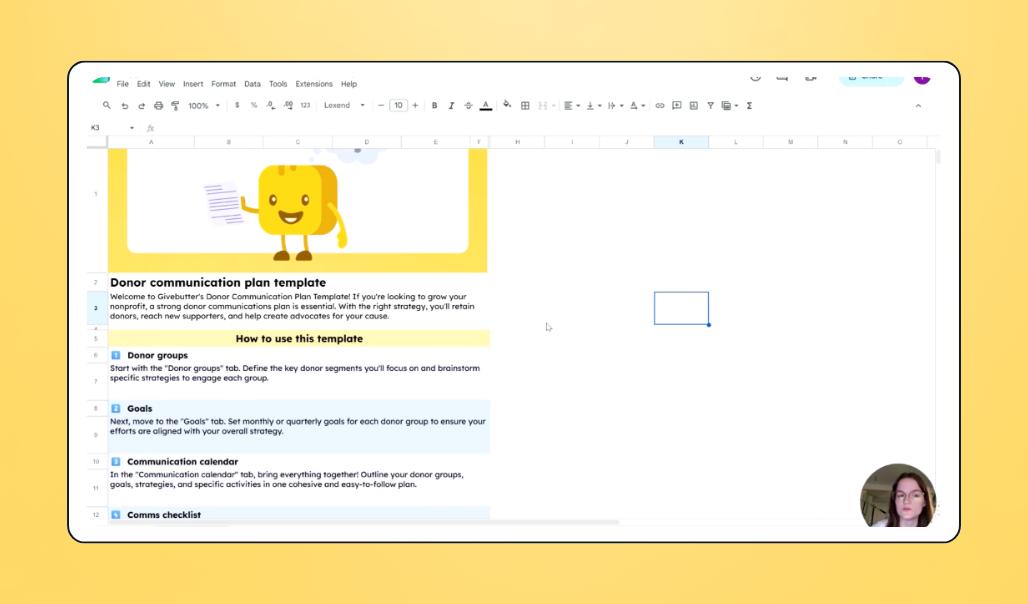
“As a one-person team, I typically don’t have time to sit down and think this far ahead,” Tori explains:
“Since this is planned ahead of time, it feels so much more intentional. It's especially helpful for me to have discrete, smaller tasks set up instead of having this giant, looming task of fundraising on my to-do list. Having this framework set up now will dramatically reduce the time and, especially, the mental energy that I have to dedicate to this later.”
With her re-engagement plan in place, Tori will be able to call back to donors’ previous support, reiterate the impact they’ve had over the past year, and announce the continuation of a pilot program, drawing supporters into this new phase of programming and growth for their mission.
Getting ahead of Giving Tuesday 🎁
For seven years, Dorm Fairies has helped students with limited incomes have a more successful transition into college. Founder and CEO Latia Allen joined the hackathon, selecting the Giving Tuesday playbook to help her get ready for one of her organization’s biggest giving days of the year.
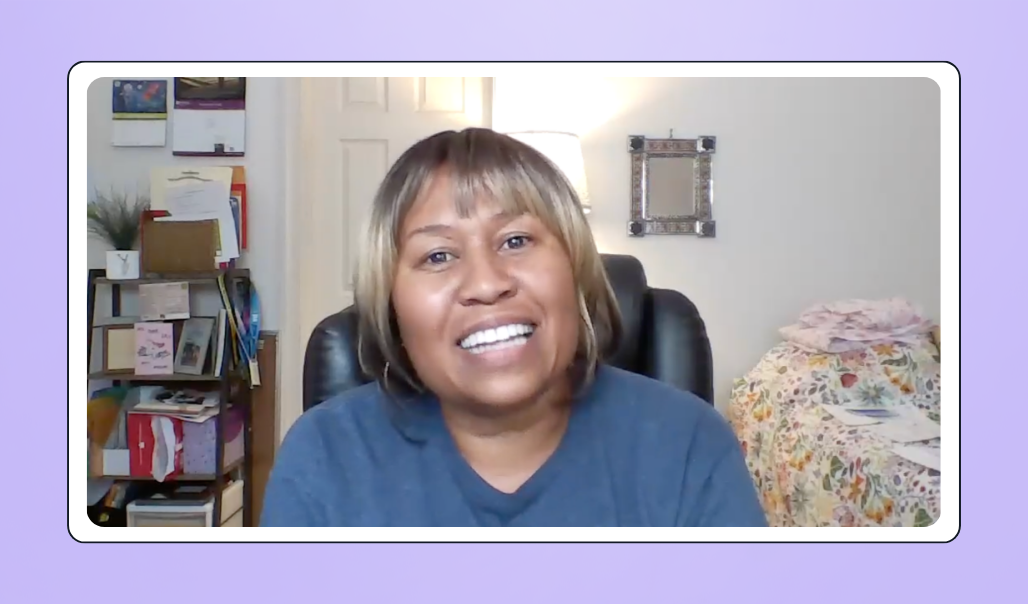
Latia used the Givebutter Magic campaign creator to build her Giving Tuesday fundraising page in minutes. Then, with the help of Giving Tuesday email templates in the new email editor, she drafted an entire email series, with messages leading up to, during, and after the big day.
“The template really helped me outline how to market Giving Tuesday better this year. With this new campaign, not only do I have things developed earlier, but I’m going to be on a schedule.”
Latia is more prepared than ever and hopes to raise $3K on Giving Tuesday to give more students dorm room essentials in 2027.
Creating a smoother website donation experience 🌐
The small but mighty team at Athens Area Diaper Bank distributes 70,000 diapers a month to families in need across their Georgia community. When the organization suddenly needed to find a new CRM and website last year, they made the switch to Givebutter and Wix, and Development Director Kelsey Ripley joined the hackathon with the goal of better integrating the two tools.
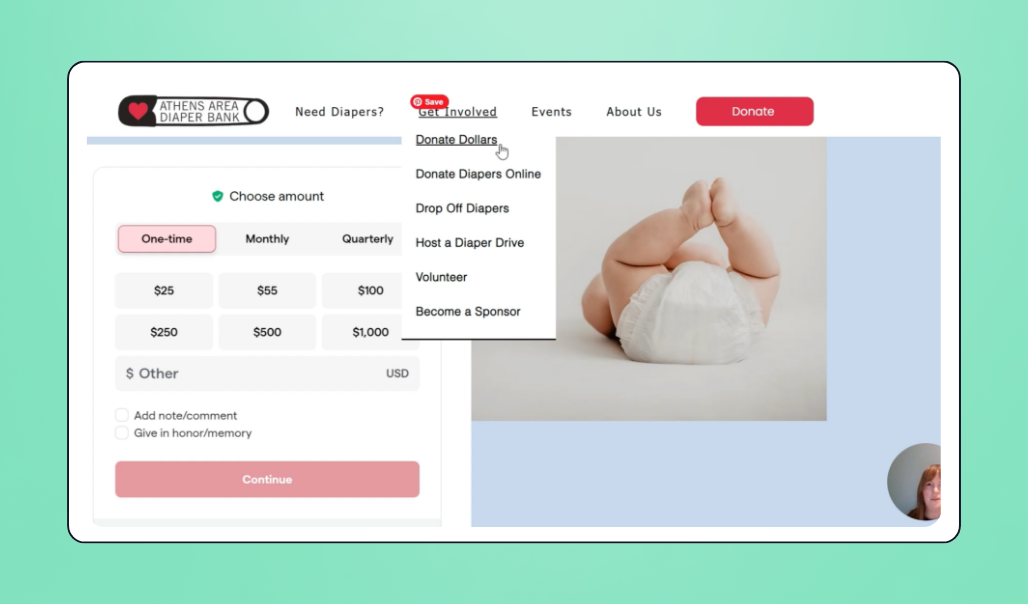
While Kelsey had previously embedded Givebutter widgets on the website, the Wix playbook walked her through adding these elements directly in the Wix editor for a much cleaner look and feel. She was delighted to see not only how her general donation form looked, but also their newsletter sign-up form and diaper donation portal—on desktop and mobile.
“Y'all, it is so much better. It could not have been easier to get these in here. We want to use our time for families and diapers. We don't want to use our time learning really specific pieces of code or having to adjust formatting on mobile versions of the website. That's not why we're here. This is going to make it that much easier for us to just stay focused on the mission.”
What we’re building together next
Believe it or not, everything we unveiled at The Spread is only a fraction of what we’ve been building this year. We’ve launched more than 1,000 product improvements in 2026 alone, and thanks to our growing team, we’re proud to be delivering on our public roadmap faster than ever before.

That’s what Co-Create looks like in practice: You tell us what’s working, what’s getting in your way, and what you need next—and we keep building from there. We can’t wait to keep building alongside you.
And if you’re new to Givebutter, there’s never been a better time to join us and help shape what’s next for nonprofits. Create your free Givebutter account today, and let’s see what we can build together.

Create the world you believe in with Givebutter
Frequently asked questions
The Spread live chat was full of great questions! Here are answers to the ones that came up most.
Share this article



.png)


.svg)
.svg)


